12 EN
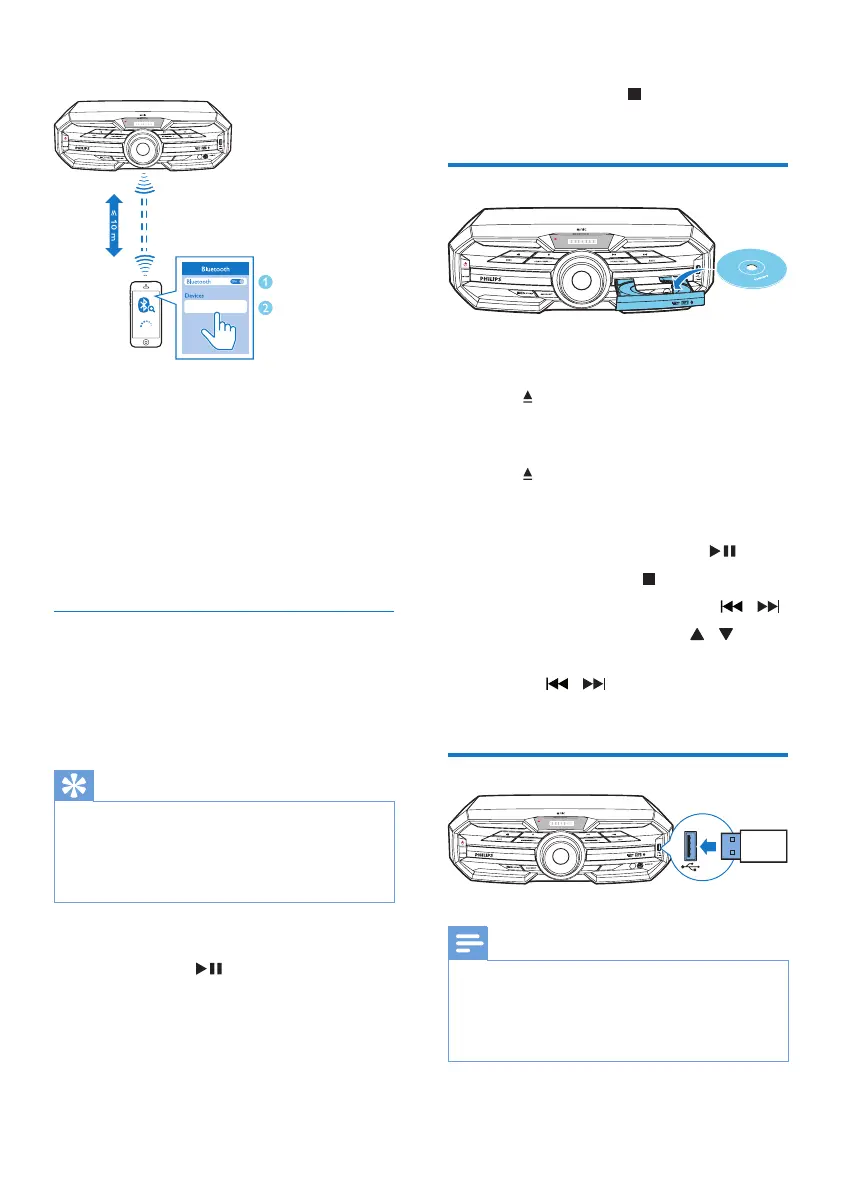
Option 2: Pair and connect manually
1 On the Bluetooth enabled device, search
for Bluetooth devices that can be paired
(see the user manual of the device).
2 Select 'Philips FX15' on your Bluetooth
enabled device and if necessary input
'0000' as the pairing password.
» After successful pairing and connection,
'BT CONNECTED' (BT connected)
scrolls on the screen once.
Stream music through Bluetooth
• Play audio on the Bluetooth device
connected to the unit.
» Audio streams from your Bluetooth
enabled device to the unit.
Tip
•
If the Bluetooth enabled device also supports AVRCP
(Audio Video Remote Control Prole), you can use
some basic operation buttons of the unit (such as the
play/pause, stop and previous/next buttons) to control
music play.
To disconnect the Bluetooth-enabled device:
• Press and hold
on the remote control
for three seconds.
• Deactivate Bluetooth on your device; or
• Move the device beyond the
communication range.
Philips FX15
15
EQUALIZER
PROGRAM
To clear Bluetooth pairing history:
• Press and hold both
on the remote
control for three seconds.
Play a disc
1 Press SOURCE repeatedly to select the
disc source.
2 Press to open the disc compartment.
3 Load a disc onto the disc tray, with the
printed side facing up.
4 Press again to close the disc
compartment.
» Play starts automatically.
• To pause/resume play, press
.
• To stop play, press
.
• To select another track, press
/ .
• To select an album, press
/ .
• To search within a track, press and
hold
/ , then release to resume
normal play.
Play from USB
Note
•
Make sure that the USB device contains playable audio
contents in supported formats. The NTFS le format is
not supported.
• A USB hub is not supported.
• Some card readers may not be supported.
15
EQUALIZER
PROGRAM
15
EQUALIZER
PROGRAM


 To Next Page