SetupMyFavoritemenu
You can set any three menus as "My
Favorite". Before you make any changes to
the setting, the default menus are "Jasmin
rice/Sticky", "Cooking congee" and "Making
soup".
• Tap once or more times to
select the menu you need, and then tap
to quickly start with the
cooking process.
If you need to change the menu in "My
Favorite", for instance to change "Making
soup" to "Cooking noodle", follow the
steps below.
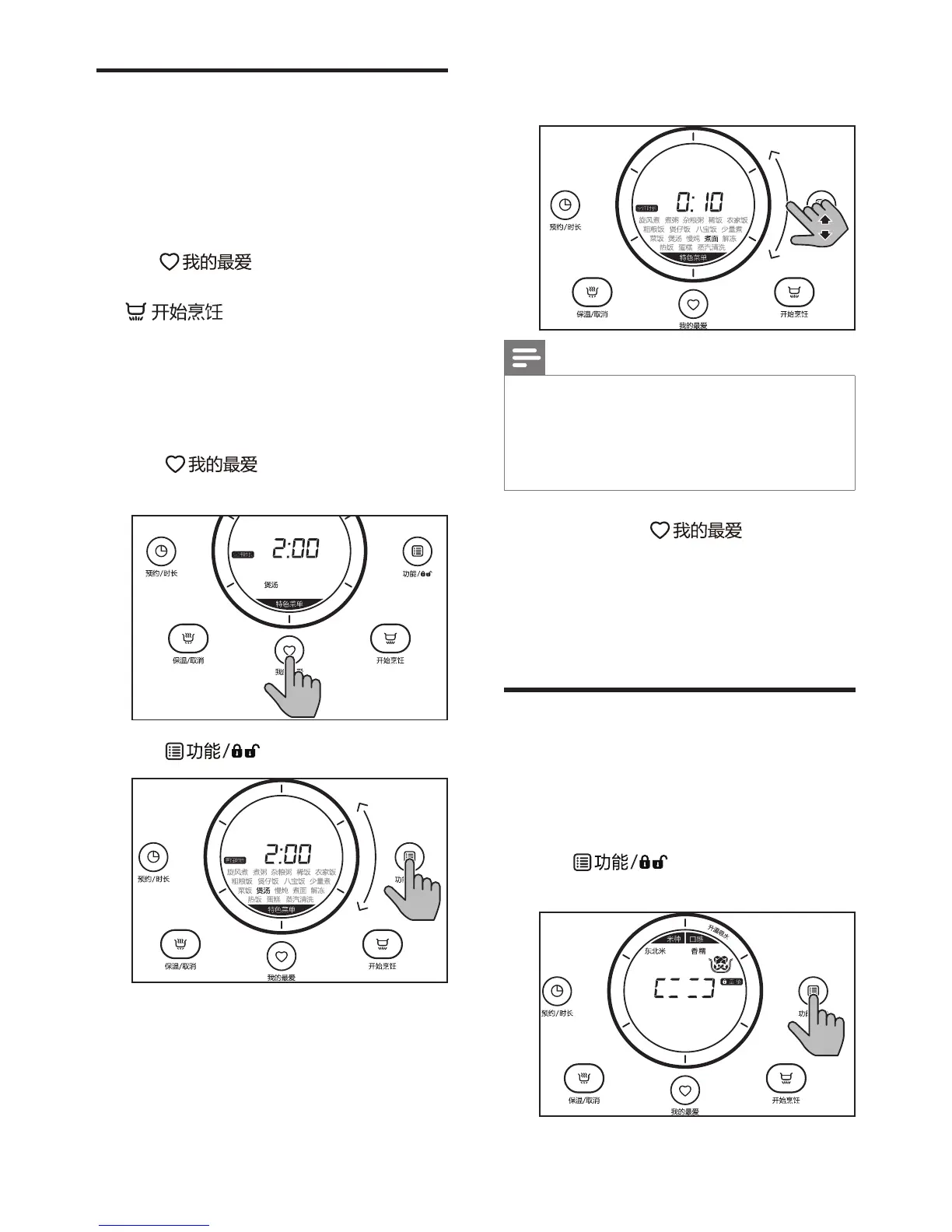
1
Tap until "Making soup" is
selected.
2
Tap .
3
Slide on the bar until "Cooking
noodle" is selected.
Note
•
Refer to chapter "Set the cooking
time" if you need a different cooking
time. The revised cooking time will also
be saved in the "My Favorite" menu.
4
Tap and hold for 3
seconds, "Making soup" will be
changed to "Cooking noodle" in the
"My Favorite" menu.
Follow the same logic to change the other
menus in "My Favorite".
Setupchildlock
To protect your child from using the
appliance, or to avoid unexpected
operations during cooking, you can set up
the child lock function.
1
Ta p
for 3 seconds to
activate child lock.
3秒



 To Next Page