4
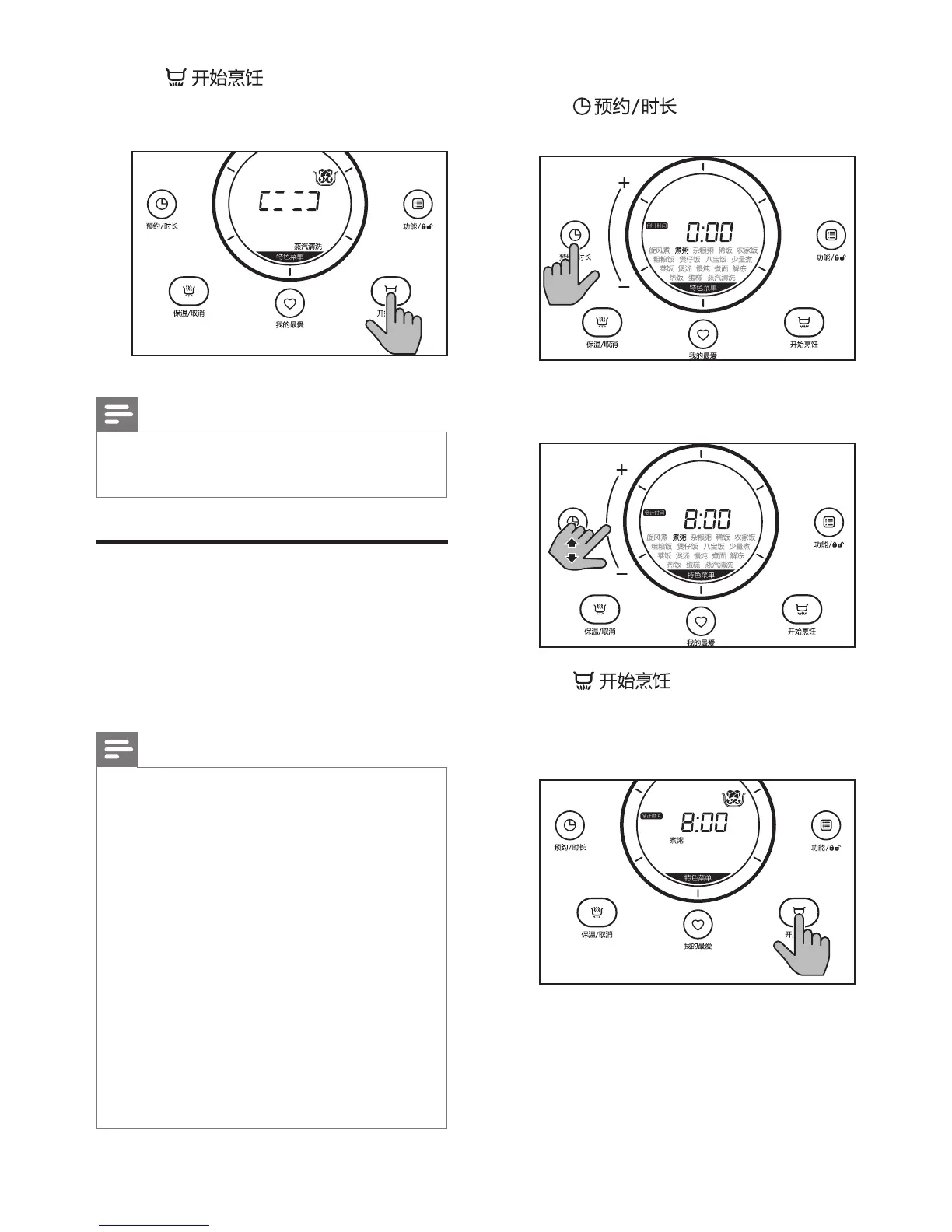
Tap to conrm the
cooking time and start the cooking
process.
Note
•
Tap and hold "+" or "-" to fast forward
in choosing the cooking time.
Presettimefordelayed
cooking
You can preset the delayed cooking time
for some menus. The preset timer is
available from 1 hour up to 24 hours.
Note
•
The cooking process will be nished
by the time the preset time has
elapsed. For instance, if the current
time is 12:00 (noon time), and you
would like the rice ready by 18:00 in
the afternoon, you need to set the
preset time of 6 hours.
•
If the preset time is shorter than the
cooking time, the cooking process will
start immediately.
•
The preset timer is not available in the
following menus: "Cooking noodle",
"Defrosting", "Reheating", "Baking cake"
and "Steam cleaning".
1
Choose the menu you need.
2
Tap until
倒计时间
is
displayed on the screen.
3
Slide on the bar to select the preset
time you need.
4
Tap to conrm the preset
time. The cooking process will be
nished by the time is preset time has
elapsed.



 To Next Page