Menu structure Submenu
SET AUTO-ON? AUTO-ON:
Disabled
0:00
SET AUTO-OFF? After 1 hour
After 2 hours
After 3 hours
SET CURRENT TIME? 0:00
START CLEANING? (cleaning procedure starts)
SET WATER HARDNESS? Hardness 1
Hardness 2
Hardness 3
Hardness 4
SET LANGUAGE? English
Deutsch
Nederlands
Francais
Espanol
Suomi
Svenska
RESET TO DEFAULT? (resetting procedure starts)
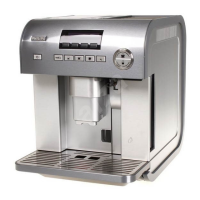
1 Press the MENU button.
The button lights up.
2 The message ‘START FLUSHING?’ appears on the display.
3 Place a cup under the coffee spout and press the OK button.
Over time, the continuous heating up of the water that is used to make
the coffee leads to scale build-up in the inner circuits of the appliance.
When the message ‘PLEASE DESCALE!’ appears on the display, you should
run the descaling program. Proceed as follows:
1 Press the MENU button.
,
EnglisH 19


 To Next Page
 Loading...