EasyManua.ls Logo

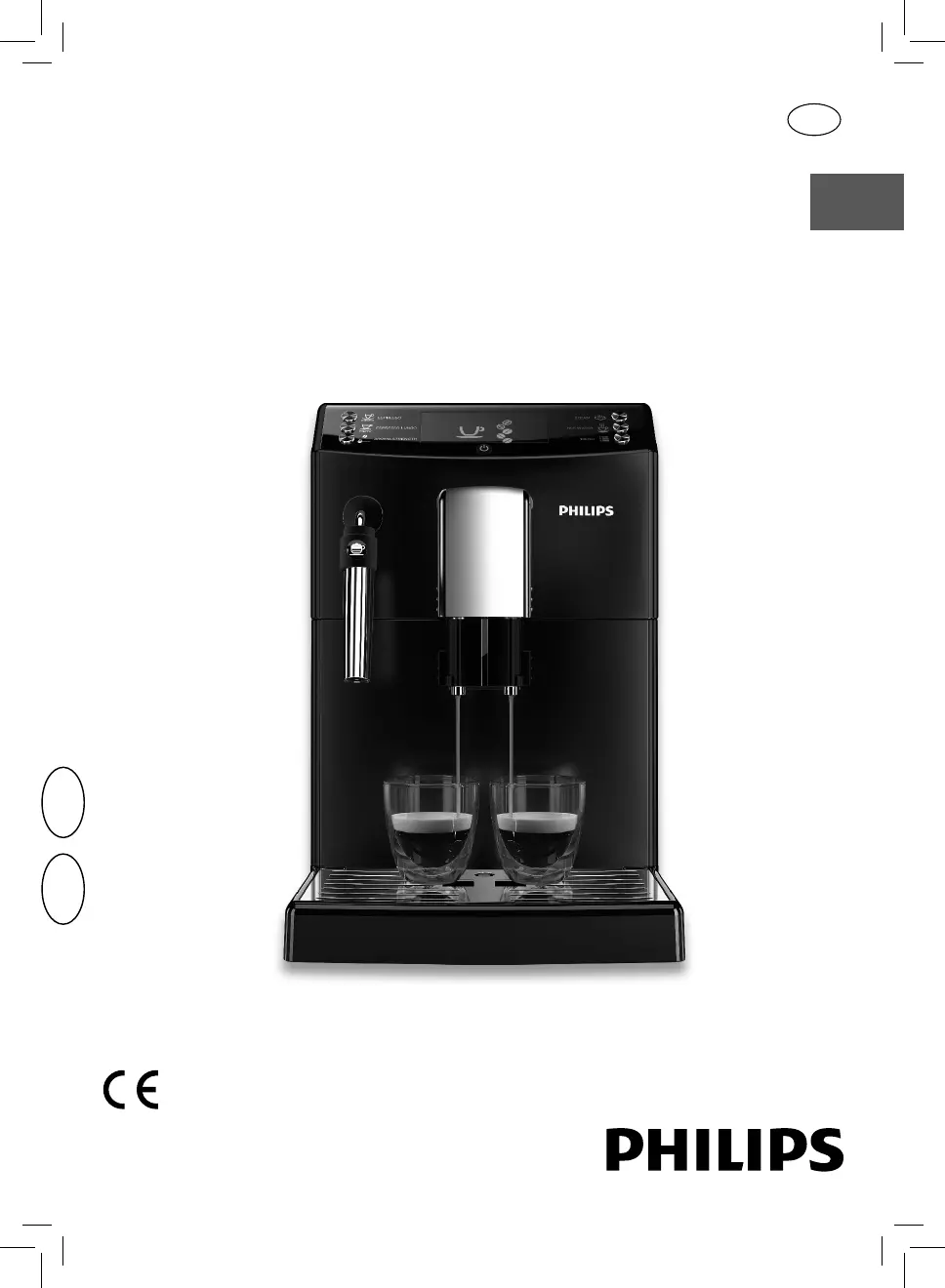
Philips HD8831 - User Manual

Philips HD8831
63 pages
Print Icon
To Next Page IconTo Next Page
Loading...
English
USER MANUAL
Read carefully before using the machine.
Register your product and get support at
www.philips.com/welcome
Super automatic espresso co ee machine
3100 series
EN
02
02
HD8826
HD8831

Table of Contents

Other manuals for Philips HD8831

Questions and Answers

  • A
    Ashley MartinSep 8, 2025
    What to do if the brew group cannot be inserted in my Philips HD8831?
    • J
      Joseph CruzSep 8, 2025
      If the brew group cannot be inserted, make sure that the brew group is in the off position. If that doesn't work, insert the drip tray and the coffee grounds drawer, close the service door, and turn on the machine without inserting the brew group. This will move the gearmotor back to the correct position. Then, turn off the machine and reinsert the brew group.
  • J
    jackfrenchSep 12, 2025
    What to do if my Philips HD8831 shows Error Code 3 or 4?
    • D
      Dalton CookSep 12, 2025
      If your Philips Coffee Maker shows Error Code 3 or 4, the brew group is blocked and cannot be pulled out because it is out of place. Close the service door, turn the machine off and then back on. The brew group will automatically return to the initial position.
  • S
    Stacey FloresSep 12, 2025
    How to turn off demo mode on Philips Coffee Maker?
    • R
      Randy CarterSep 13, 2025
      If your Philips Coffee Maker is in demo mode, turn the machine off and back on using the power button.
  • J
    Jessica StoutSep 15, 2025
    Why doesn't my Philips Coffee Maker coffee have enough crema?
    • S
      Sean HoffmanSep 15, 2025
      If your coffee does not have enough crema, the blend may be unsuitable, the coffee may not be freshly roasted, or the grind may be too coarse. Change coffee blend or adjust the grind setting.
  • V
    Vanessa SalinasSep 17, 2025
    What to do if my Philips Coffee Maker shows Error Code 1?
    • K
      Kristie HoltSep 17, 2025
      If your Philips Coffee Maker displays Error Code 1, it means the coffee grinder is blocked. This is caused by a clogged coffee outlet duct. Thoroughly clean the coffee outlet duct.

Summary

CAUTION

IMPORTANT

Safety Instructions

Essential safety guidelines for operating the espresso machine to prevent injury.

Warnings

Critical alerts about potential hazards like electric shock, burns, and damage.

Cautions

Precautions to avoid minor injuries or damage to the appliance during operation.

INSTALLATION

PREPARING FOR USE

Machine Installation

Steps and recommendations for properly setting up the espresso machine in its location.

USING THE MACHINE FOR THE FIRST TIME

Circuit Priming

Initial process to fill the machine’s internal circuits with water before first use.

MEASURING AND PROGRAMMING WATER HARDNESS

INTENZA+ WATER FILTER

ADJUSTMENTS

BREWING ESPRESSO AND LONG ESPRESSO

Brewing Espresso or Long Espresso Using Coffee Beans

Steps for brewing espresso and long espresso using whole coffee beans.

DISPENSING STEAM; BREWING CAPPUCCINO

CLEANING AND MAINTENANCE

Daily Cleaning of the Machine

Daily tasks to clean the coffee grounds drawer and drip tray for hygiene.

Weekly Cleaning of the Brew Group

Weekly procedure for cleaning the brew group to ensure optimal coffee quality.

Monthly Cleaning of the Brew Group with “Coffee Oil Remover”

Monthly cleaning cycle using special tablets to remove coffee oils.

DESCALING

Preparation Phase

Steps to prepare the machine before starting the descaling cycle.

Descaling Phase

The main phase of the descaling cycle, involving dispensing the solution.

PROGRAMMING

MEANING OF THE DISPLAY ICONS

TROUBLESHOOTING

Philips HD8831 Specifications

General IconGeneral
TypeEspresso Machine
ModelHD8831
BrandPhilips
ColorBlack
Voltage230 V
Water Tank Capacity1.8 L
Bean Container Capacity250 g
Pump Pressure15 bar
Weight7.2 kg
Milk FrotherYes
MaterialPlastic
Special FeaturesAquaClean filter, Adjustable coffee strength

Related product manuals