10 EN
Connect audio from TV and
other devices
Play audio from TV or other devices through
your home theater speakers.
Use the best quality connection available on
your TV, home theater, and other devices.
Note
• When your home theater and TV are connected
through HDMI ARC, an audio connection is not
required (see 'Option 1: Connect to TV through HDMI
(ARC)' on page 9).
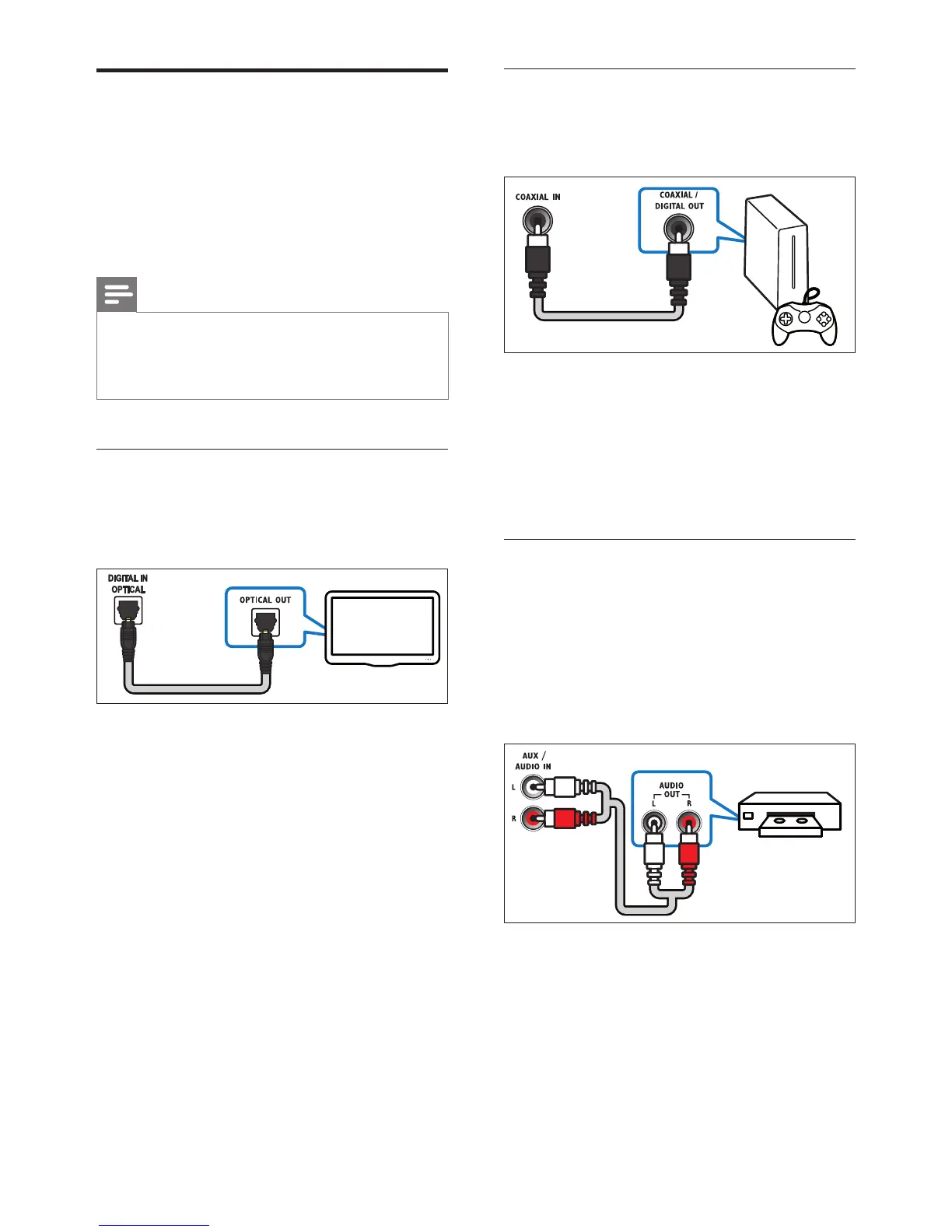
Option 1: Connect audio through a
digital optical cable
Best quality audio
1 Using an optical cable, connect the
DIGITAL IN-OPTICAL connector on
your home theater to the OPTICAL OUT
connector on the TV or other device.
• The digital optical connector might be
labeled SPDIF or SPDIF OUT.
TV
Option 2: Connect audio through a
digital coaxial cable
Good quality audio
1 Using a coaxial cable, connect the
COAXIAL IN connector on your home
theater to the COAXIAL/DIGITAL OUT
connector on the TV or other device.
• The digital coaxial connector might be
labeled DIGITAL AUDIO OUT.
Option 3: Connect audio through
analog audio cables
Basic quality audio
1 Using an analog cable, connect the AUDIO
IN-AUX connectors on your home
theater to the AUDIO OUT connectors
on the TV or other device.
VCR



 To Next Page