EasyManua.ls Logo

Philips HTB5540D/98 - User Manual

Philips HTB5540D/98
46 pages
Print Icon
To Next Page IconTo Next Page
Loading...
HTB5510D
HTB5540D
HTB5570D
www.philips.com/support
User manual
Always there to help you
Register your product and get support at
Question?
Contact
Philips

Other manuals for Philips HTB5540D/98

Question and Answer IconNeed help?

Do you have a question about the Philips HTB5540D/98 and is the answer not in the manual?

Summary

Important Safety and Care Instructions

Safety Precautions

Safety instructions and precautions for using the product.

3 D Health Warning

Warnings related to 3D viewing and potential health effects.

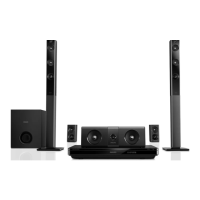
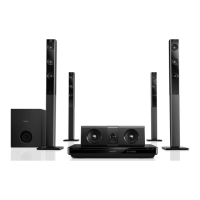
Your Home Theater System

System Connectors

Description of the various input and output connectors on the unit.

Connecting and Setting Up Your System

Connecting Speakers

Instructions on how to connect the speakers to the home theater.

Wireless Rear Speaker Setup

Instructions for making rear speakers wireless using an accessory module.

Connecting to Your TV

Guide on connecting the home theater system to a television.

HDMI Digital Device Connection

How to connect digital devices using HDMI.

Connecting TV and Device Audio

Steps to connect audio from external sources.

Speaker Placement and Setup

Manual setup process for optimizing speaker performance.

EasyLink (HDMI-CEC) Setup

Configuration for HDMI-CEC control for seamless device interaction.

Home Network Setup

Instructions for connecting to a home network.

Using Your Home Theater

Accessing the Home Menu

How to access the main menu for system navigation and settings.

Playing Blu-ray 3 D Discs

Instructions for playing 3D Blu-ray discs, including requirements.

Bluetooth Audio Playback

Connecting and playing audio from Bluetooth-enabled devices.

Audio, Video, and Picture Options

MP3 Player Usage

iPod or iPhone Playback

Smartphone Control

Choosing the Ideal Sound

Auto Volume Adjustment

Changing Settings

Picture and Video Settings

Adjusting settings related to picture quality and video output.

Speaker Settings Configuration

Restoring Default Settings

Updating Software

Checking Software Version

Verifying the current software version installed on the home theater.

Updating Software via USB

Instructions for updating the software using a USB flash drive.

Updating Software via Internet

Updating the home theater software via an internet connection.

Product Specifications

Troubleshooting Common Issues

Main Unit Issues

Troubleshooting problems with the home theater's main unit and buttons.

Picture and Video Issues

Resolving common problems with picture display and video playback.

Sound and Audio Issues

Troubleshooting sound output, distortion, and synchronization problems.

Bluetooth Connectivity Troubleshooting

Network Connectivity Troubleshooting

Summary

Important Safety and Care Instructions

Safety Precautions

Safety instructions and precautions for using the product.

3 D Health Warning

Warnings related to 3D viewing and potential health effects.

Your Home Theater System

System Connectors

Description of the various input and output connectors on the unit.

Connecting and Setting Up Your System

Connecting Speakers

Instructions on how to connect the speakers to the home theater.

Wireless Rear Speaker Setup

Instructions for making rear speakers wireless using an accessory module.

Connecting to Your TV

Guide on connecting the home theater system to a television.

HDMI Digital Device Connection

How to connect digital devices using HDMI.

Connecting TV and Device Audio

Steps to connect audio from external sources.

Speaker Placement and Setup

Manual setup process for optimizing speaker performance.

EasyLink (HDMI-CEC) Setup

Configuration for HDMI-CEC control for seamless device interaction.

Home Network Setup

Instructions for connecting to a home network.

Using Your Home Theater

Accessing the Home Menu

How to access the main menu for system navigation and settings.

Playing Blu-ray 3 D Discs

Instructions for playing 3D Blu-ray discs, including requirements.

Bluetooth Audio Playback

Connecting and playing audio from Bluetooth-enabled devices.

Audio, Video, and Picture Options

MP3 Player Usage

iPod or iPhone Playback

Smartphone Control

Choosing the Ideal Sound

Auto Volume Adjustment

Changing Settings

Picture and Video Settings

Adjusting settings related to picture quality and video output.

Speaker Settings Configuration

Restoring Default Settings

Updating Software

Checking Software Version

Verifying the current software version installed on the home theater.

Updating Software via USB

Instructions for updating the software using a USB flash drive.

Updating Software via Internet

Updating the home theater software via an internet connection.

Product Specifications

Troubleshooting Common Issues

Main Unit Issues

Troubleshooting problems with the home theater's main unit and buttons.

Picture and Video Issues

Resolving common problems with picture display and video playback.

Sound and Audio Issues

Troubleshooting sound output, distortion, and synchronization problems.

Bluetooth Connectivity Troubleshooting

Network Connectivity Troubleshooting

Philips HTB5540D/98 Specifications

General IconGeneral
TypeBlu-ray Player
Video Output Resolution1080p
HDMI Outputs1
USB PortYes
USB ports quantity1
Wi-FiYes
Ethernet PortYes
Subwoofer typePassive
RMS rated power1000 W
Image formats supportedJPEG
3DYes
Blu-Ray disc playbackYes
Supported Disc FormatsDVD, CD
Video FormatMPEG-2
Audio Formats SupportedDolby Digital, DTS
Wireless ConnectivityWi-Fi
Audio Output5.1 channel

Related product manuals