8 EN
5 SUBWOOFER (subwoofer):
Place the subwoofer at least one meter
to the left or right of the TV. Leave about
10-centimeter clearance from the wall.
6 Wireless box (receiver):
Place the wireless box in between the rear
speakers for cable connection.
Pair up the rear speakers
For the rst time connection, pair up the
rear speakers with the home theater via the
supplied wireless box (receiver).
What you need
• Connect the rear speakers (left and right)
to the supplied wireless box (receiver) and
make sure to match the color between the
speaker cables and the connectors.
• Connect the wireless box to AC power to
power it on.
1 Press and hold CONNECT (connect) on
the wireless box for ve seconds.
» The indicator on the front of the
wireless box blinks at a fast rate for
thirty seconds. Complete the following
steps within thirty seconds.
2 At the home menu status (press ), press
and hold
(blue button) on the remote
control until PAIRING (PAIRING) blinks on
the display panel of the home theater.
» If the pairing succeeds, PAIRED
(PAIRED) is displayed and the indicator
on the wireless box lights up.
» If the pairing fails, FAILED (FAILED)
is displayed and the indicator on the
wireless box blinks at a slower rate.
Repeat the steps above to re-connect
the rear speakers.
Connect to TV
Connect your home theater to a TV to watch
videos. You can listen to the TV audio through
your home theater speakers.
Use the best quality connection available on
your home theater and TV.
Option 1: Connect to TV through
HDMI (ARC)
Best quality video
Your home theater supports HDMI version
with Audio Return Channel (ARC). If your TV
is HDMI ARC compliant, you can hear the TV
audio through your home theater by using a
single HDMI cable.
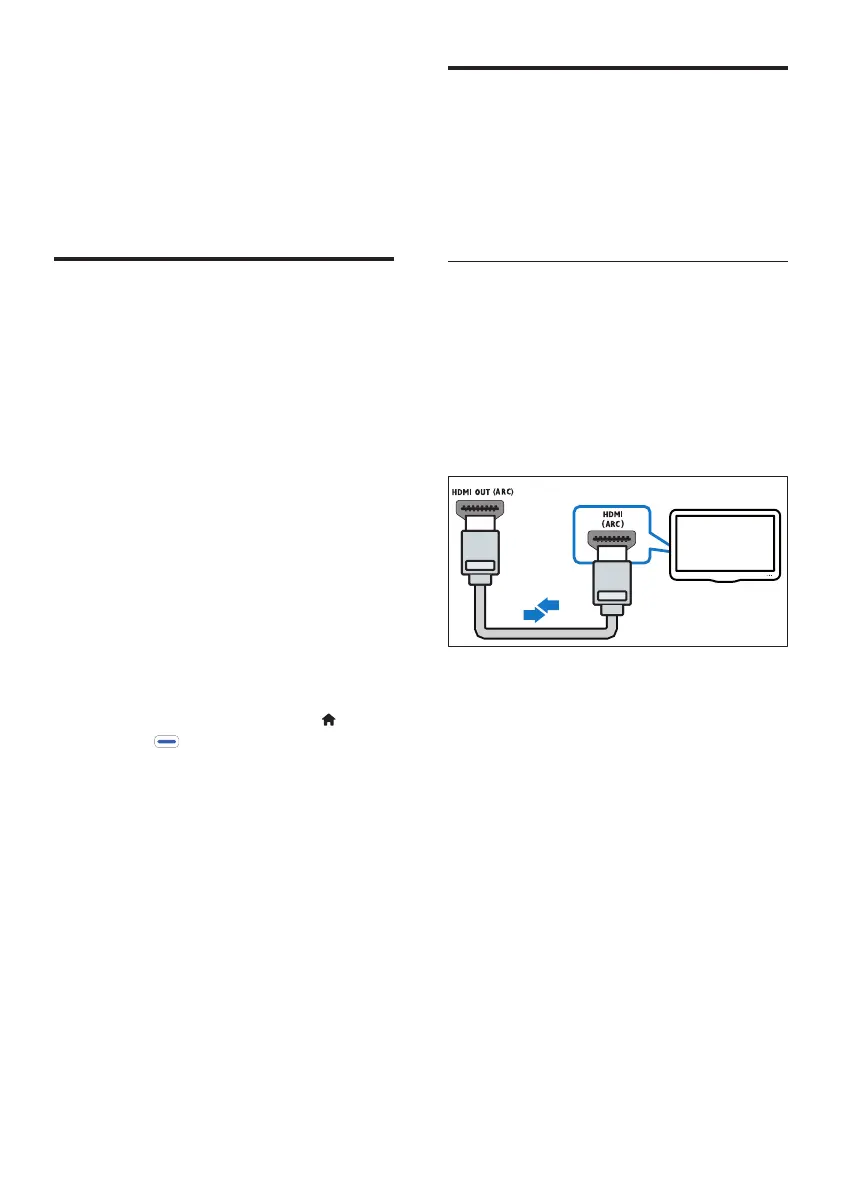
1 Using a High Speed HDMI cable, connect
the HDMI OUT (ARC) connector on
your home theater to the HDMI ARC
connector on the TV.
• The HDMI ARC connector on the TV
might be labeled differently. For details,
see the TV user manual.
2 On your TV, turn on HDMI-CEC
operations. For details, see the TV user
manual.
• HDMI-CEC is a feature that enables
CEC compliant devices that are
connected through HDMI to be
controlled by a single remote control,
such as volume control for both the
TV and the home theater. (see 'Set
up EasyLink (HDMI-CEC control)' on
page 10)
TV




 To Next Page