6 EN
c AUDIO IN
Audio input from an external device, such
as MP3 player (3.5mm jack).
d
(USB)
Audio, video or picture input from a USB
storage device.
Note
•
When you connect an MP3 player to the home theater
with a 3.5mm audio cable, make sure that you connect
the MP3 player to the AUDIO IN connector, not to the
MIC 1 or MIC 2 connector, to ensure normal function
of the home theater.
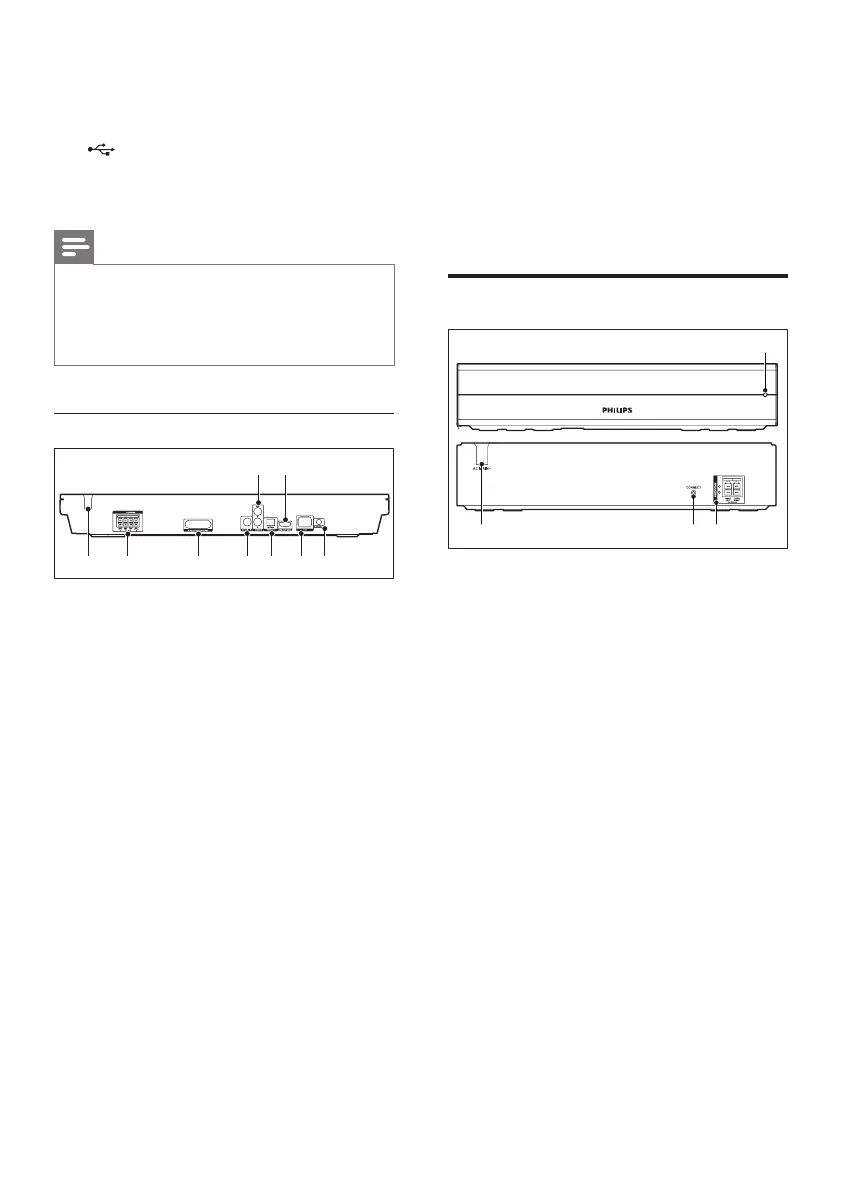
Rear connectors
33 3
i h
a AC MAINS
Fixed AC power cable.
b SPEAKERS
Connect to the supplied speakers and
subwoofer.
c Wireless transmitter
Transmit wireless audio signal to the rear
speakers via the supplied wireless box
(receiver).
d COAXIAL IN
Connect to a coaxial audio output on the
TV or a digital device.
e DIGITAL IN-OPTICAL
Connect to an optical audio output on the
TV or a digital device.
f LAN
Connect to the LAN input on a
broadband modem or router.
g FM ANTENNA
Connect to the supplied FM antenna.
h HDMI OUT (ARC)
Connect to the HDMI input on the TV.
i AUDIO IN-AUX
Connect to an analog audio output on the
TV or an analog device.
Wireless box (receiver)
cba
d
a AC MAINS
Fixed AC power cable.
b CONNECT (connect)
Press and hold to to enter the pairing
mode for the rear speakers and the main
unit.
c Rear speaker connectors
Connect to the rear speakers.
d Wireless indicator
• During wireless pairing between the
rear speakers and the home theater,
the indicator blinks at a fast rate.
• When the pairing succeeds, the
indicator lights up.
• When the pairing fails, the indicator
blinks at a slower rate.




 To Next Page