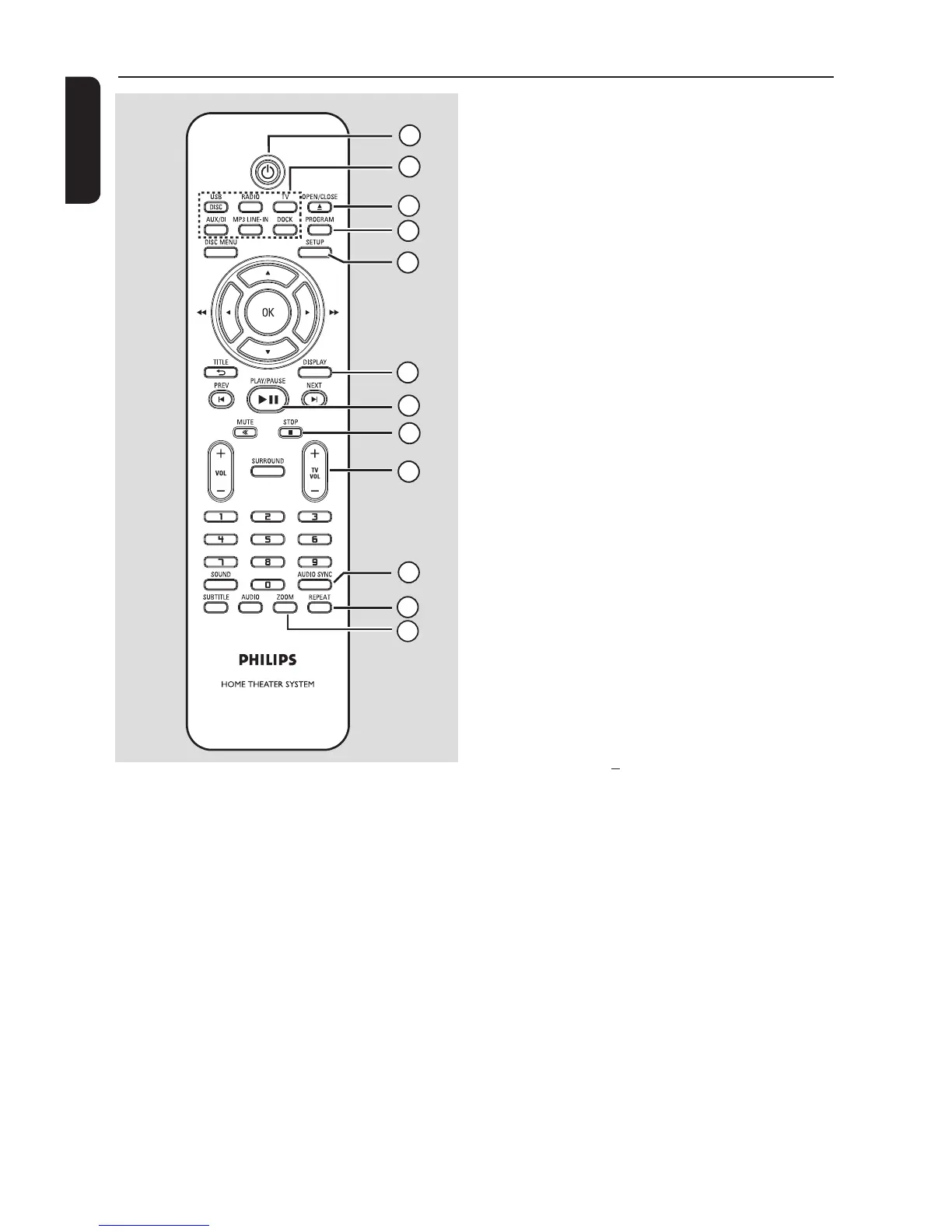
a 2
– Turns on this unit or turns off to normal
standby mode.
b Source buttons
– DISC/USB: toggles between DISC or
USB mode.
R A DIO: switches to FM band.
TV: switches to TV mode. The sound
from the TV output through the
connected speaker system.
AUX/DI: switches to external device
that is connected to the AUDIO/AUX-in
jack.
M P 3 LINE-IN: switches to audio device
that is connected to the MP3 LINE-IN
jack.
DOCK: switches to the GoGear/iPod
that is connected to the docking station.
c OPEN/CLOSEç
– Opens/closes the disc tray.
d PROGRAM
– DISC: starts programming.
– RADIO: press and hold this button to
start automatic/ manual preset
programming.
e SETUP
– Enters or exits the system setup menu.
f DISPLAY
– Displays the current status or disc
information.
– Selects a different viewing angle of a DVD
movie (if available.)
g PLAY/PAUSE u
– DISC: starts/pauses playback.
– RADIO: starts auto radio installation for
r st time setup.
h STOP Ç
– Exits an operation.
– DISC: stops playback.
– RADIO: press and hold this button to
erase the current preset radio station.
i TV VOL +/
– Adjusts the volume of the TV (for Philips
TVs or compatible brands only.)
j AUDIO SYNC
– Sets the audio output delay times if the
video playback is slower than the audio
output.
k REPEAT
– Selects various repeat or shuf e modes;
turns off repeat or shuf e mode.
l ZOOM
– Zoom in or out the picture on the TV.



 To Next Page