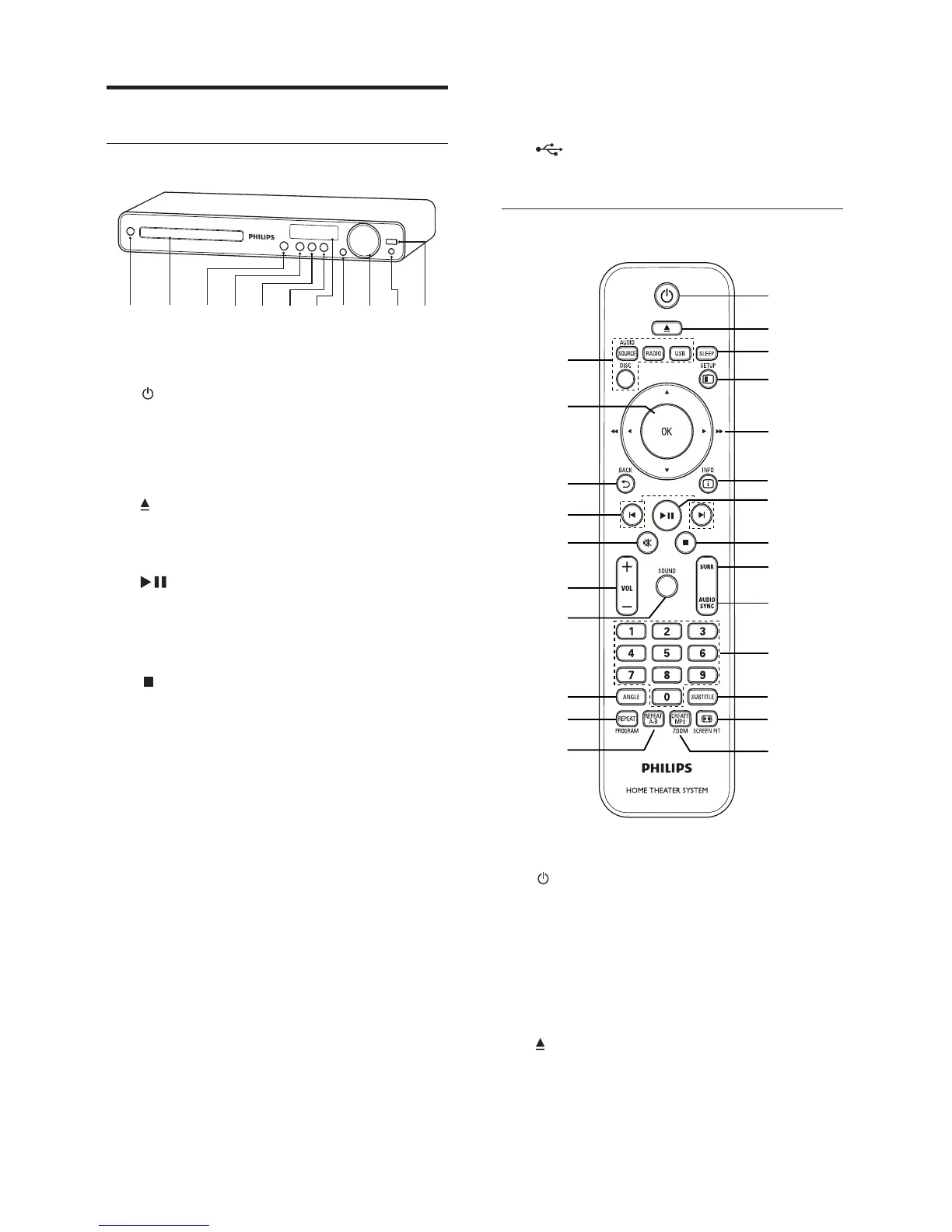
8
j MP3 LINK
Connects a portable audio player•
k
( USB )
Connects a USB supported device.•
Remote control
a ( Standby-On )
Turns on the Home Theatre System •
or switches to standby mode.
When EasyLink is enabled, press •
and hold for at least three seconds
to turn all connected HDMI CEC-
compliant devices to standby.
b
( Open/Close )
Opens or closes the disc •
compartment.
n
q
r
s
t
u
v
w
x
m
a
b
c
d
e
f
g
h
i
j
k
l
p
o
Product overview
Main unit
a ( Standby-On )
Turns on the Home Theatre System •
or switches to standby mode.
b Disc compartment
c
( Open/Close )
Opens or closes the disc •
compartment.
d
( Play/Pause )
Starts, pauses or resumes play.•
In radio mode, automatically tune •
radio stations during fi rst-time setup.
e
( Stop )
Stops play.•
In radio mode, erases the current •
preset radio station.
f SOURCE
Selects a media to play or listen to •
audio from the connected device.
g Display panel
Displays the current status or the •
disc information.
h IR sensor
Detects signals from the remote •
control. Point the remote control at
the IR sensor.
i VOL
Increases or decreases volume.•
a b cdefghij
k
EN



 To Next Page