33
English
Playing a Karaoke disc
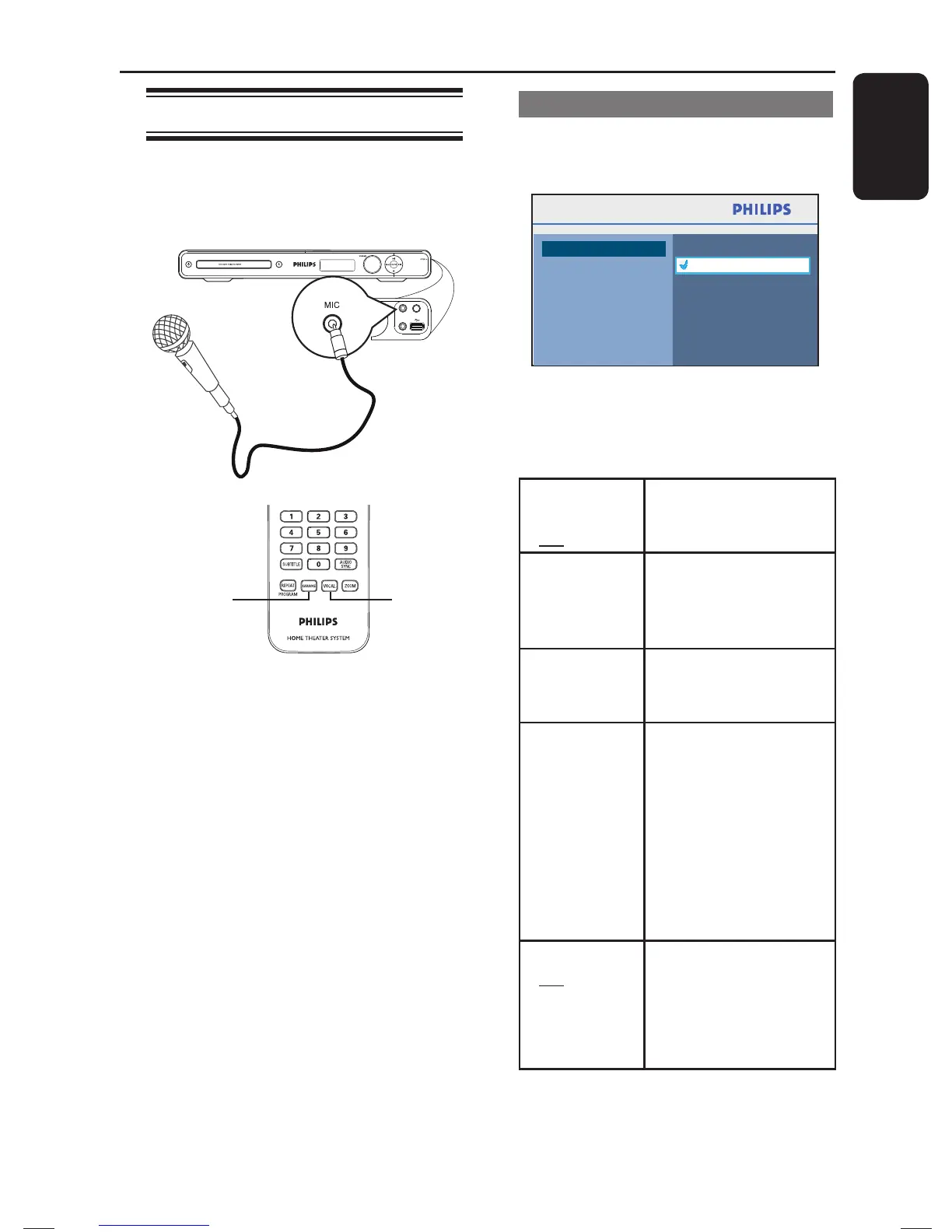
A Connect a microphone (not supplied) to
the MIC socket at the right side of the
front panel.
MIC LEVEL
MP3 LINK
MIC
VOCALKARAOKE
B Insert a karaoke disc.
If the disc menu appears, use keys
to make your selection and press OK to
start playback.
C To turn off the vocal or change the sound
channel of a karaoke disc, press VOCAL
on the remote control repeatedly to
toggle between various audio modes.
D Start enjoying the karaoke.
Helpful Hints:
– While singing, you can press MIC LEVEL
on the main unit followed by adjusting the
volume control to set the microphone volume
level.
Microphone setting
A Press KARAOKE to access ‘Microphone
Setup’ page.
Microphone Setup
On
Off
Mic
Mic Volume
Echo Level
Key
Score
B In ‘Microphone Setup’ page, use
keys to select the option for microphone
settings and press OK to con rm.
{ Mic }
- On
- Off
To turn on or off the
karaoke microphone.
{ Mic
Volume }
Set the microphone
volume level (0 ~
+20). Default setting is
10.
{ Echo
Level }
Set the Echo Level
(0 ~ +20). Default
setting is 10.
{ Key } Set the pitch level
(-10~ +10) that
matching your voice.
Note: Select ‘-10’ for
lowest possible tone
and ‘+10’ for highest
tone. To return to
original tone, select
‘00’.
{ Score }
- Off
- Basic
- Intermediate
- Advance
Select the level of
scoring option.
Note: Select { Off }
to turn off the karaoke
scoring option.
Playback - Karaoke
1_hts3565_78_eng1.indd 331_hts3565_78_eng1.indd 33 10/14/2008 4:56:53 PM10/14/2008 4:56:53 PM


 To Next Page