8 EN
Product overview
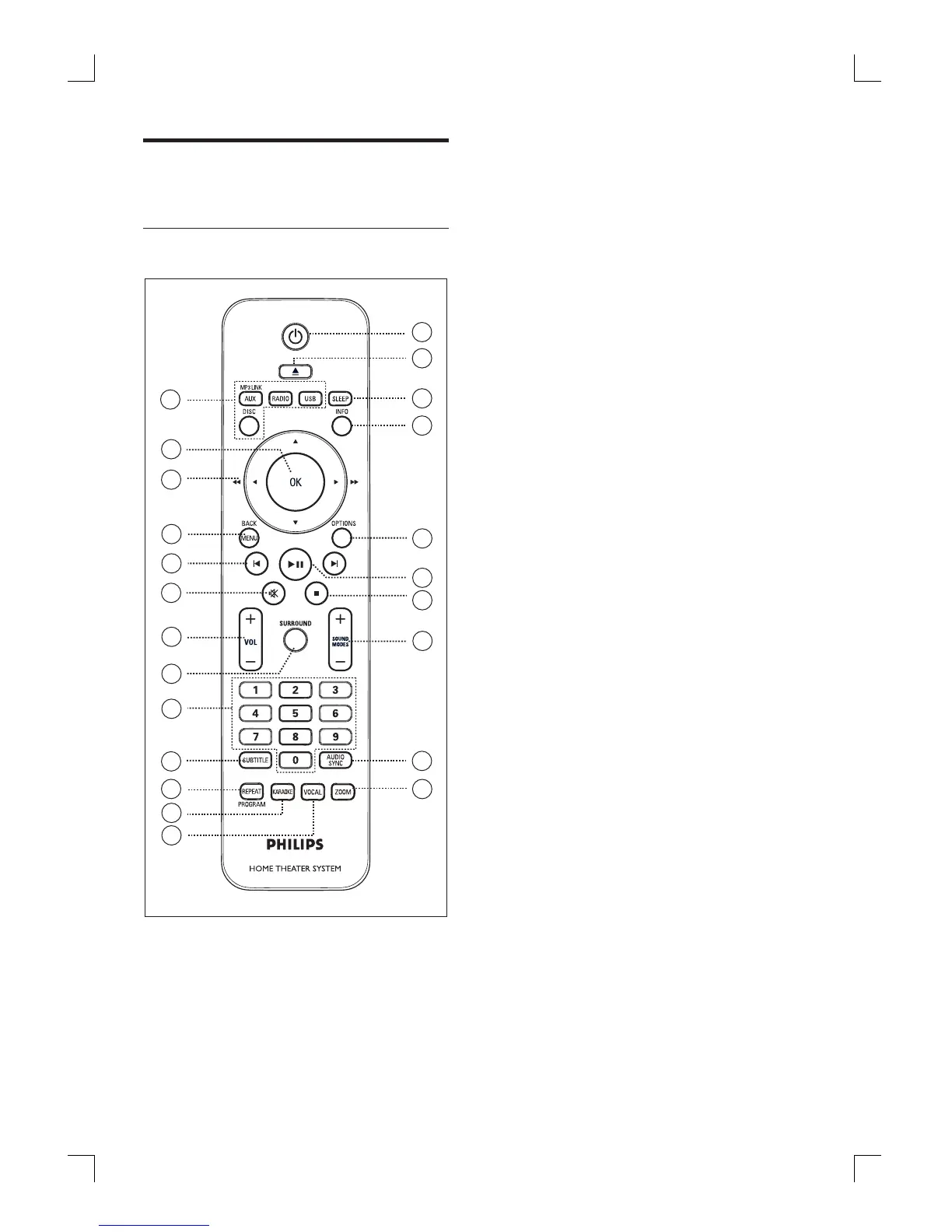
Remote control
20
21
22
23
19
18
17
13
14
15
16
12
11
8
1
2
3
4
5
6
7
9
10
a 2
Turn on this unit or turn off to standby
mode.
b Z (Open/Close)
Open or close the disc compartment.
c SLEEP
Select a preset timer to turn off this
unit to standby mode.
d INFO
Display the current status or disc
information.
Display photo fi les in 12 thumbnails
view.
e OPTIONS
Access or exit Options menu (this
menu provides various setting options).
f u (Play/Pause)
Start or pause disc play.
RADIO: start auto radio installation
(only available for fi rst time setup).
g x (Stop)
Stop disc play.
RADIO: erase the current preset radio
station.
h SOUND MODES +-
Select a predefi ned sound effect.
i AUDIO SYNC
Select an audio language/channel.
Press and hold to access audio sync
setting. Then press VOL +- to set
the audio delay time.
j ZOOM
Zoom in or out the picture on the TV.
•
•
•
•
•
•
•
•
•
•
•
•
•
•
1_hts3565-69_98_eng5_Final808.in8 81_hts3565-69_98_eng5_Final808.in8 8 2008-02-20 5:00:05 PM2008-02-20 5:00:05 PM



 To Next Page