English
EN 39
Adjust settings
Video setup
1
Press OPTIONS.
[ General Setup ] menu is displayed.
2 Press V to select [ Video Setup ], then
press B.
3 Select an option, then press OK.
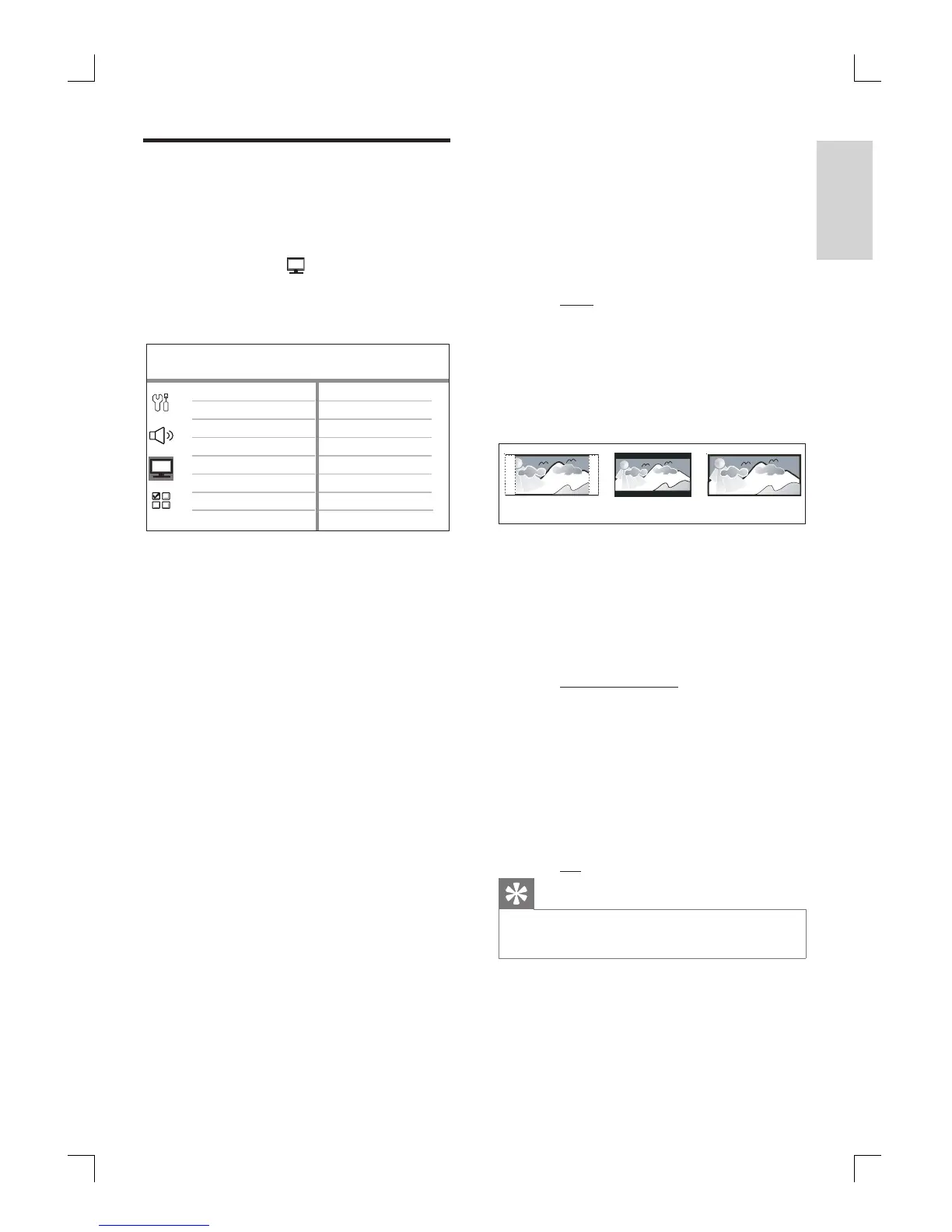
Video Setup
HDMI Setup
Closed Caption
TV Display
TV Type
Picture Settings
Progressive
See the explanations of the above
options in the following pages.
4 Select a setting, then press OK.
To return to the previous menu, press
BACK.
To exit the menu, press OPTIONS.
•
•
•
[ TV Type ]
Change this setting only if the video does
not appear correctly. By default, this
setting matches the most common setting
for TVs in your country.
[ PAL ] – for PAL-system TV.
[ NTSC ] – for NTSC-system TV.
[ Multi ] – for TV that is compatible
with both PAL and NTSC.
[ TV Display ]
Select the screen format according to how
you want the picture to appear on your
TV.
4:3 LetterBox (LB)
4:3 PanScan (PS)
16:9 (Widescreen)
[ 4:3 Pan Scan ] – for standard TV, a
full-height screen display with the sides
trimmed.
[ 4:3 Letter Box ] – for standard TV, a
‘wide-screen’ display with black bars on
the top and bottom.
[ 16:9 Wide Screen ] – for wide-screen
TV (frame ratio 16:9).
[ Progressive ]
If your TV can support progressive signals,
you can activate the progressive scan
mode of this unit.
[ On ] – turn on progressive scan
mode.
[ Off ] – disable progressive scan mode.
Tips
See chapter ‘Get Started - Turn on Progressive Scan’
for detailed information.
•
•
•
•
•
•
•
•
•
1_hts3565-69_98_eng5_Final808.in39 391_hts3565-69_98_eng5_Final808.in39 39 2008-02-19 3:42:12 PM2008-02-19 3:42:12 PM



 To Next Page