8
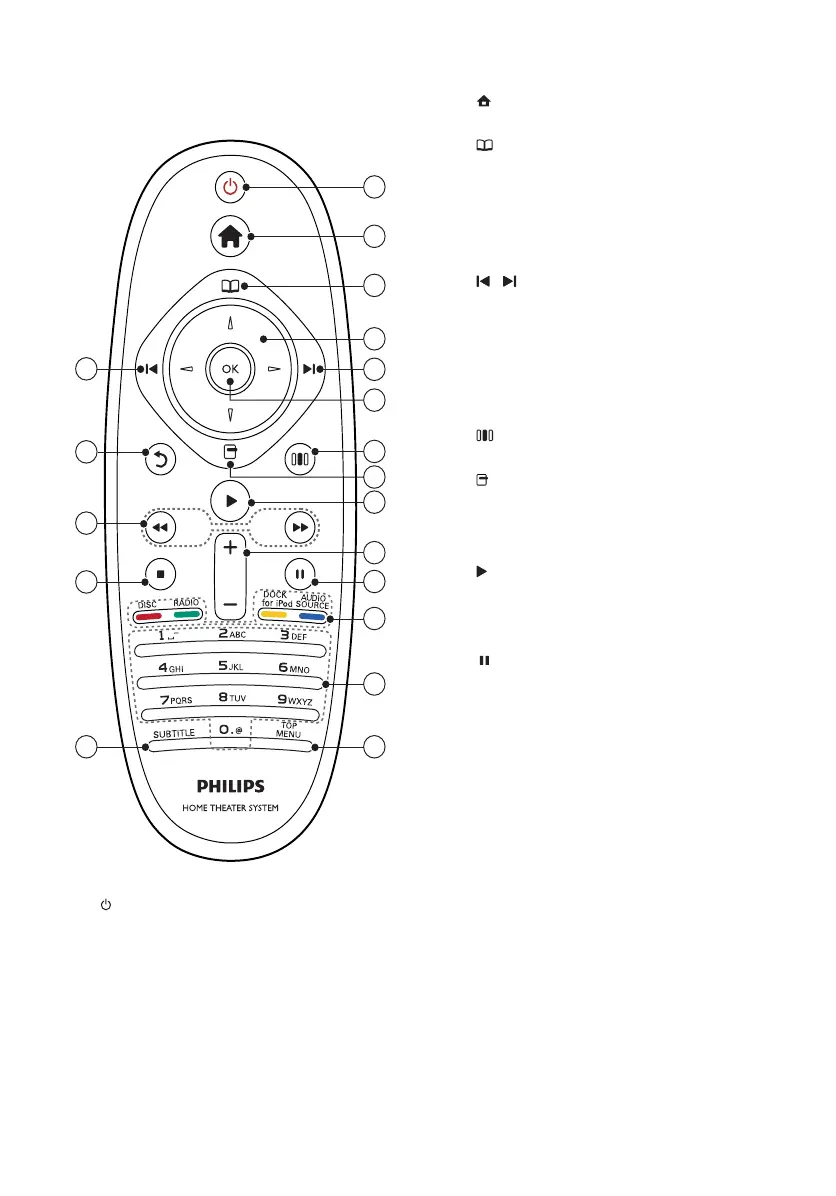
b ( Home )
Accesses the home menu.
c ( Disc menu )
Accesses or exits the disc menu.
d Navigation buttons
• Navigates menus.
• In radio mode, press left or right to
start auto search.
e / ( Previous/Next )
• Skips to the previous or next track,
chapter or fi le.
• In radio mode, selects a preset radio
station.
f OK
Confi rms an entry or selection.
g ( Sound options )
Accesses or exits various sound options.
h ( Options )
• Accesses more play options during
playback.
• In radio mode, programs radio stations.
i ( Play )
Starts or resumes play.
j +/- ( Volume )
Increases or decreases volume.
k ( Pause )
Pauses play.
l Source buttons / Color buttons
• Blu-ray discs: Selects tasks or options.
• AUDIO SOURCE: Selects an audio
input source.
• DOCK for iPod: Switches to Philips
Dock for iPod/iPhone.
• RADIO: Switches to FM radio.
• DISC: Switches to disc source.
m Alphanumeric buttons
Enters values or letters (using SMS style
entry).
n TOP MENU
Accesses the main menu of a video disc.
o SUBTITLE
Selects subtitle language for video.
Remote control - B
a ( Standby-On )
• Switches the home theater on or to
standby.
• When EasyLink is enabled, press
and hold for at least three seconds
to switch all connected HDMI CEC
compliant devices to standby.
3
4
6
7
8
9
11
12
13
14
1
2
5
15
5
16
10
18
17
EN



 To Next Page