11
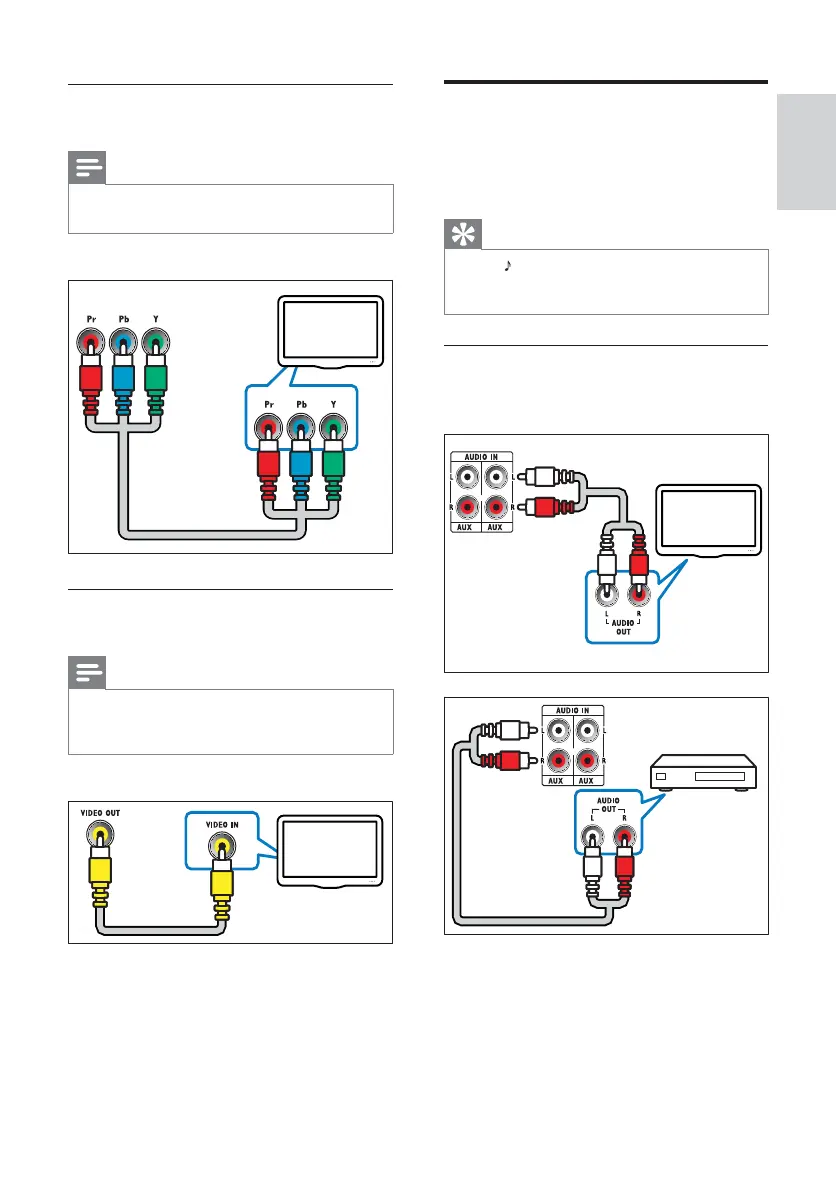
Connect audio from TV or
other devices
Use your home theater to play audio from the
TV or other devices such as a cable box.
Tip
• Press SOURCE / AUDIO SOURCE
repeatedly to select the audio output of your
connection.
Option 1: Connect audio through analog
audio cables
(Cable not supplied)
2
1
TV
2
1
Option 2: Connect to the TV through
YPbPr (component video)
Note
• The component video cable or connector
might be labeled Y Cb Cr or YUV.
(Cable not supplied)
Option 3: Connect to the TV through
composite video (CVBS)
Note
• The composite video cable or connector might
be labeled AV IN, VIDEO IN, COMPOSITE or
BASEBAND.
(Cable not supplied)
Component Video Out
Component Video In
TV
TV
English
EN



 To Next Page