17
Connect portable media player
1 Connect a 3.5mm stereo audio cable (not
supplied) to the MP3 LINK jack on this
Home Theater System and the phone
jack on the portable media player (such as
MP3 player).
Note
To listen to the audio output from this •
connection, press AUDIO SOURCE
repeatedly until ‘MP3 LINK’ is displayed on the
display panel.
Connect USB device
1 Connect the USB device to USB jack
on this Home Theater System.
Note
This Home Theater System can only play/view •
MP3, WMA, DivX (Ultra) or JPEG les that are
stored on such devices.
Press
• USB to access the content and play the
les.
MP3
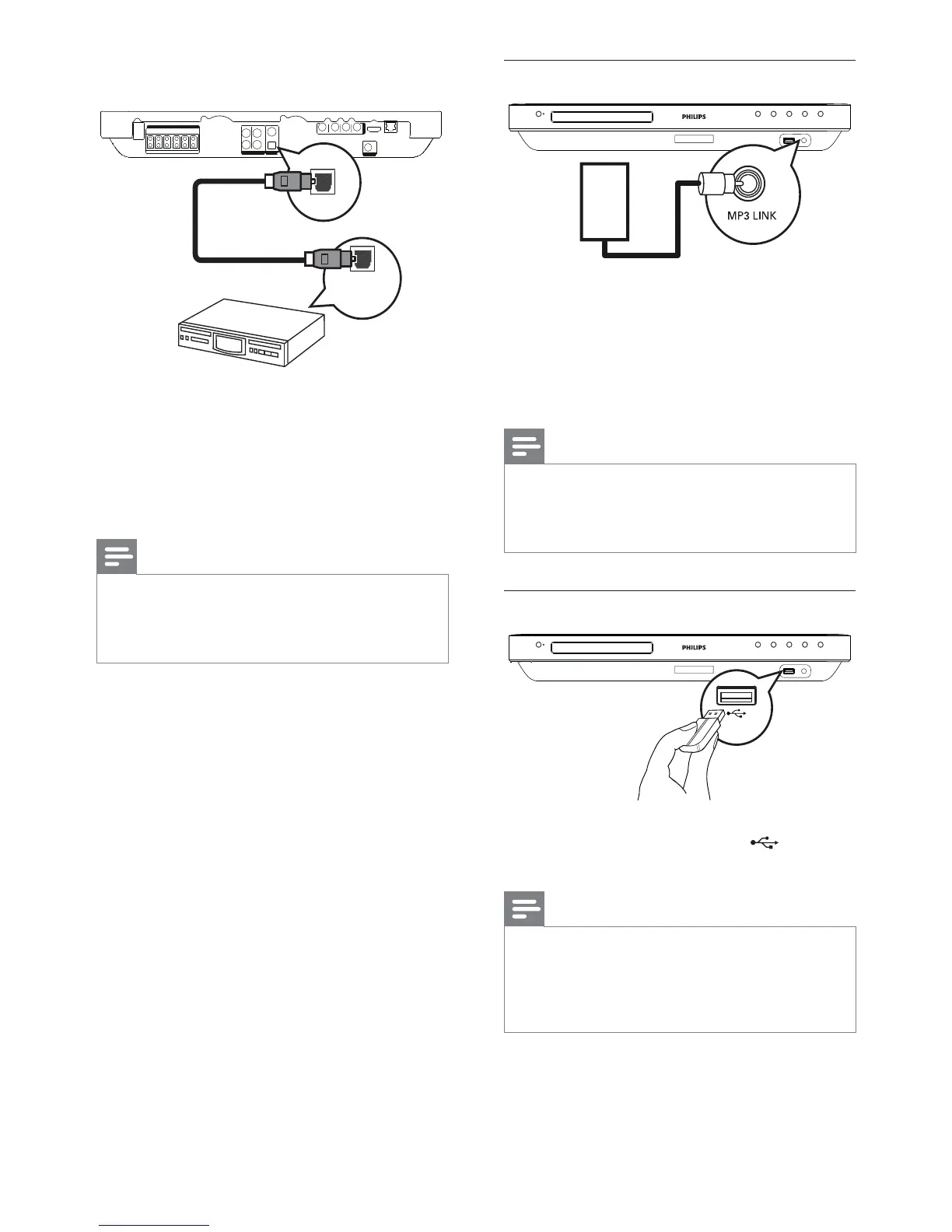
Connect to optical jack
1 Connect an optical cable (not supplied)
to the DIGITAL-IN - OPTICAL jack
on this Home Theater System and the
OPTICAL/SPDIF output jack on the
device.
Note
To listen to the audio output from this •
connection, press AUDIO SOURCE
repeatedly until ‘OPTI IN’ is displayed on the
display panel.
OPTICAL
DIGITAL IN
DIGITAL OUT
OPTICAL
OPTICAL
EN


 To Next Page