10
Connect to the TV
Connect your home theater directly to a TV
through one of the following connectors (from
highest to basic quality video):
a HDMI
b Component video
c Composite video
Option 1: Connect to the TV through
HDMI
Note
• The HDMI connector on the TV might be
labeled HDMI IN or HDMI ARC.
• If the TV supports HDMI Audio Return
Channel (ARC), you can use it to output digital
audio to the home theater.
• If the HDTV has a DVI connector, connect
using an HDMI/DVI adapter.
• If the TV supports EasyLink HDMI CEC,
control the home theater and TV with one
remote control (see ‘Use Philips EasyLink’ on
page 21).
Option 2: Connect to the TV through
YPbPr (component video)
Note
• The component video cable or connector
might be labeled Y Cb Cr or YUV.
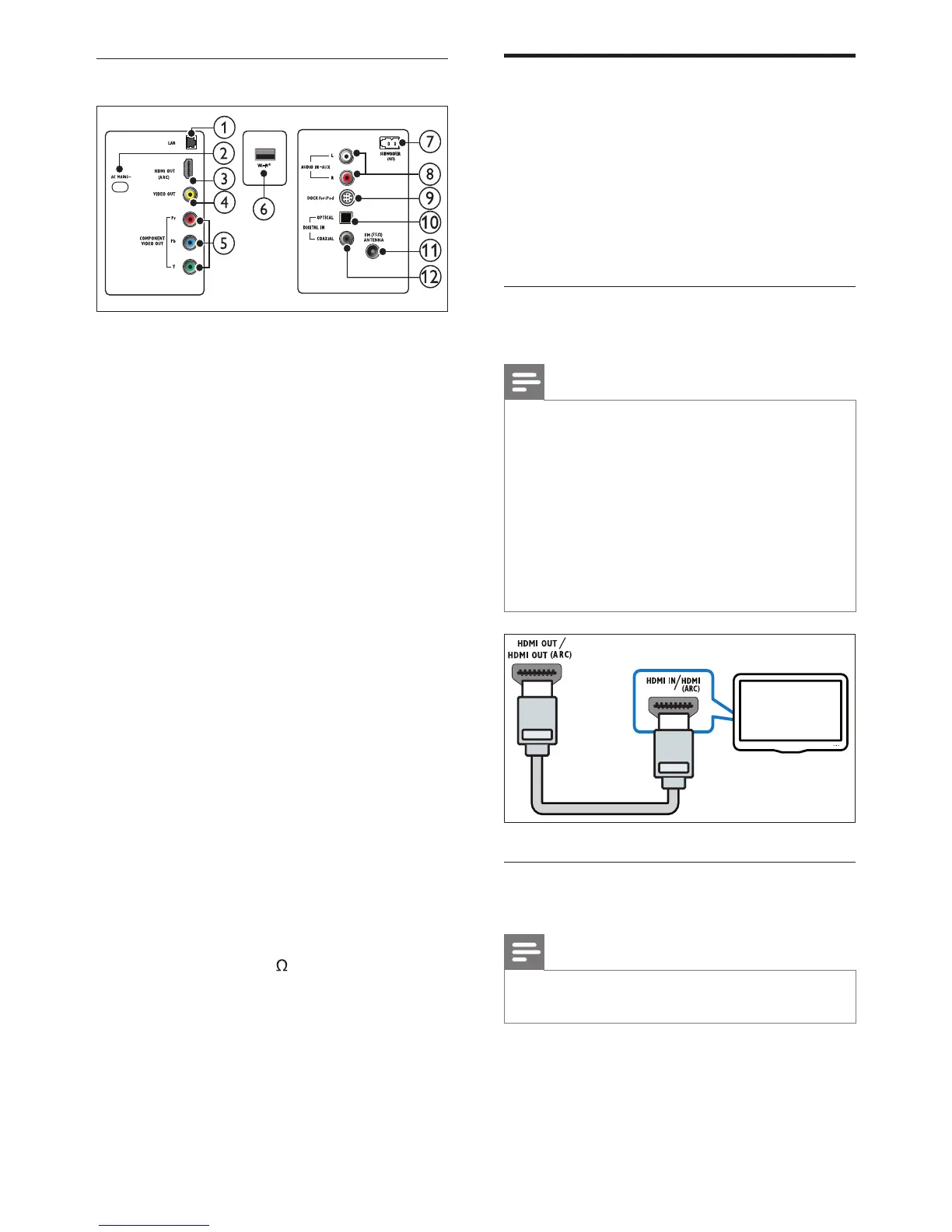
Back connectors
a LAN
Connects to the LAN input on a broadband
modem or router.
b AC MAINS~
Connects to the power supply.
c HDMI OUT (ARC)
Connects to the HDMI input on the TV.
d VIDEO OUT
Connects to the composite video input on
the TV.
e COMPONENT VIDEO OUT
Connects to the component video input on
the TV.
f Wi-Fi
®
Connects to a Wi-Fi USB adapter.(Model:
Philips WUB1110, sold separately.)
g SUBWOOFER
Connects to the supplied subwoofer.
h AUDIO IN-AUX
Connects to the analog audio output on the
TV or an analog device.
i DOCK for iPod
Connects to a Philips Dock for iPod/iPhone.
(Model: Philips DCK3060)
j DIGITAL IN-OPTICAL
Connects to the optical audio output on
the TV or a digital device.
k ANTENNA FM (75 )
Signal input from an antenna, cable or
satellite.
l DIGITAL IN-COAXIAL
Connects to the coaxial audio output on
the TV or a digital device.
EN













 To Next Page