42
ENGLISH
Red
9
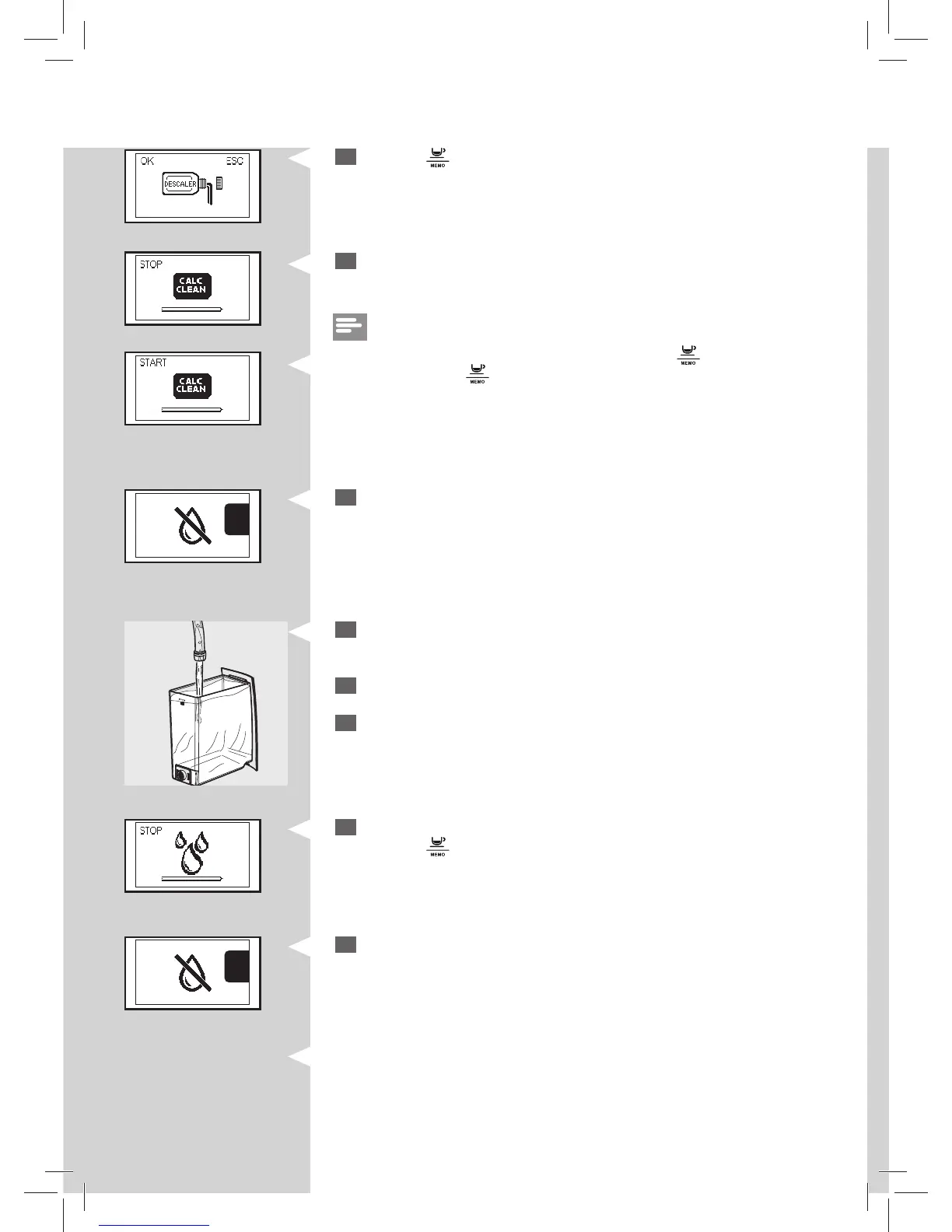
Press the “ ” button to start the descaling cycle.
Red
10
The machine will start dispensing the descaling solution at intervals.
The bar on the display shows the cycle progress.
Note:
The descaling cycle may be paused by pressing the “
” button .To resume
the cycle, press the “
” button again. This allows you to empty the contai-
ner or to stay away from the machine for a brief period of time.
RedRedRedRed
11
When this icon is displayed, the water tank is empty.
CALC
CLEAN
. . . .
15
When inserting the water tank into the machine, this icon is displayed.
Press the “
” button to start the rinsing cycle.
CALC
CLEAN
. . . .
16
When this icon is displayed, the water tank is empty. Repeat steps 12 –
15. Then continue to step 17.
12
Remove the water tank, rinse it and ll it up to the MAX level with fresh
water. Place it back into the machine.
13
Empty the drip tray and place it back.
14
Empty the container and place it back under the steam/hot water
wand and dispensing spout.







 To Next Page