6
English
3 Overview of television
keys and connectors
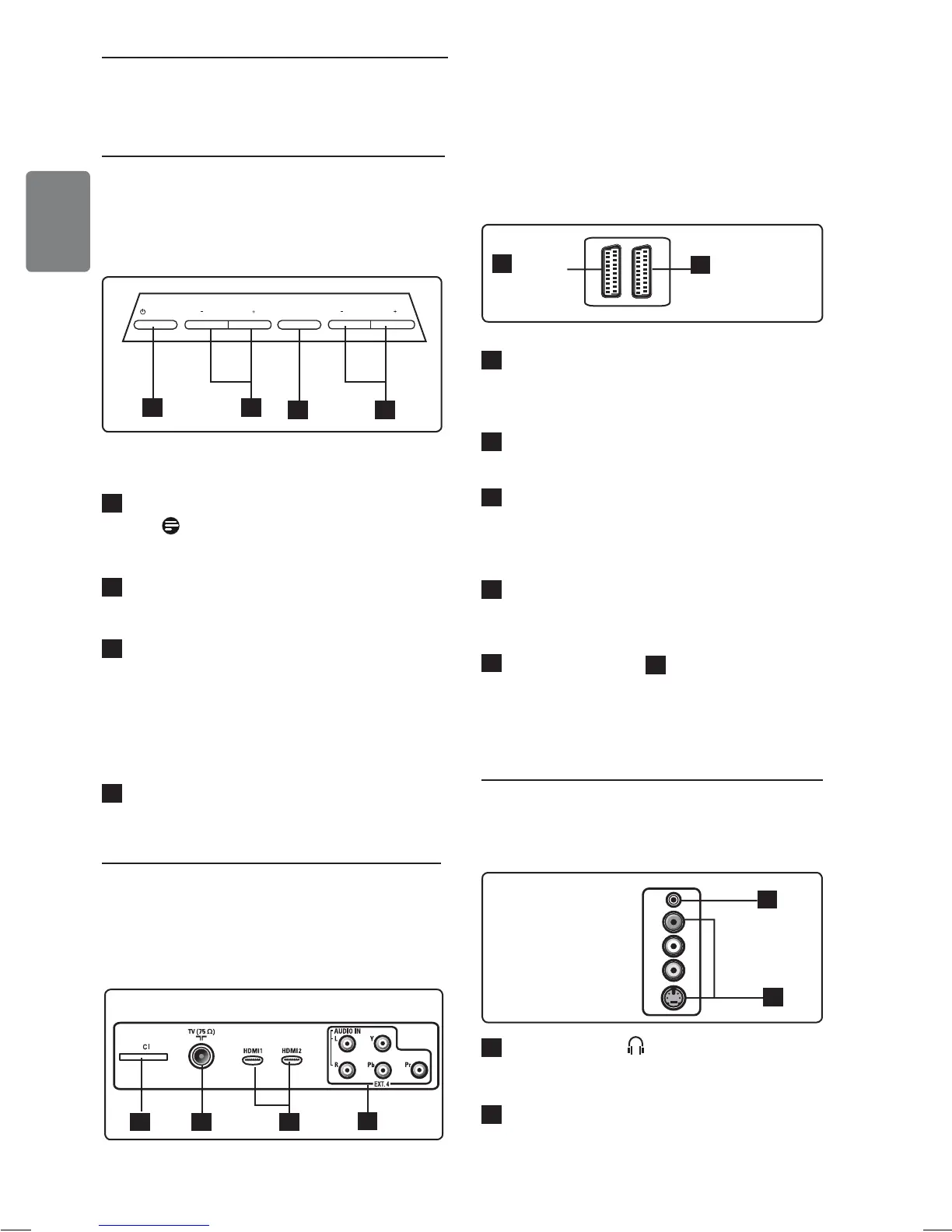
The following connectors are located on the
rear of the TV.
1
CI (Common Interface) slot: to
connect a CAM (Conditional Access
Module) and a smart card.
2
TV Aerial socket :
Insert the aerial
plug into the 75 Ω : socket.
3
HDMI 1 / HDMI 2: to connect to
set-top box, DVD player/recorder, High
Definition equipment or Personal
Computer.
4
EXT4
: to connect to equipment like
DVD, Decoder which have the same
sockets.
5
EXT 1 (RGB) and
6
EXT 2 (CVBS/
S-VIDEO): connect to equipment
like DVD
player/recorder, VCR, Decoder which
have similar connections (so called ‘scart
connections’).
3.3 Side connectors
These connectors are located on the side of the
TV.
1
Headphone : Connect the phono-
jack to the headphone connector of the
TV.
2
Audio Video
: to connect to the camera
or camcorder.
3.1 Side or top controls
Use the side or top keys to control power, menu,
volume and programme number.
1
POWER
.
: to switch the TV on and
off.
Note:
For zero power, remove
the mains cord from the mains socket.
2
PROGRAM + / – : to select
programmes.
3
MENU: to display or close menus.
The PROGRAM + / – keys can be used
to select a menu item and the VOLUME
+ / – keys can be used to enter into
the selected menu item and make
adjustments.
4
VOLUME + / –: make the volume
louder or quieter.
3.2 Rear connectors
The rear connectors are located on the rear of
the TV and face downward.
6
EXT 2
(CVBS /S-VIDEO)
5
EXT 1
(RGB)
43
21
POWER
PROGRAM
MENU
VOLUME
4
1 32
2
1
EXT 3










 To Next Page