EasyManua.ls Logo

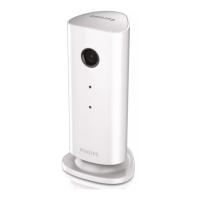
Philips M100D - User Manual

Philips M100D
16 pages
Print Icon
To Next Page IconTo Next Page
Loading...
www.philips.com/welcome
User manual
Always there to help you
Register your product and get support at
M100D
M100G
Wireless Home Monitor
Question?
Contact
Philips
Question and Answer IconNeed help?

Do you have a question about the Philips M100D and is the answer not in the manual?

Summary

Important Information

Safety Instructions

Provides critical safety warnings and precautions for operating the Philips wireless home monitor.

Environmental Considerations

Details on responsible product disposal and packaging, aligning with environmental regulations.

Notices and Disclaimers

Covers device modification policies, Wi-Fi network influences, and usage disclaimers.

Regulatory Compliance

Outlines product adherence to European directives and radio frequency interference standards.

Your Wireless Home Monitor

Package Contents

Itemizes all the components provided within the Philips wireless home monitor box.

Product Components Overview

Identifies and explains the various physical parts and features of the monitor.

Monitor Placement

Set-up and Usage

Connect Monitor to Wi-Fi Network

Step-by-step guide to connect the monitor to your home Wi-Fi network for operation.

Using the Monitor and Remote Access

Covers app features, photo/video capture, alerts, sharing, and web browser access.

Advanced Settings and Options

Details on accessing and configuring advanced settings and customization features.

Specifications

Troubleshooting

Summary

Important Information

Safety Instructions

Provides critical safety warnings and precautions for operating the Philips wireless home monitor.

Environmental Considerations

Details on responsible product disposal and packaging, aligning with environmental regulations.

Notices and Disclaimers

Covers device modification policies, Wi-Fi network influences, and usage disclaimers.

Regulatory Compliance

Outlines product adherence to European directives and radio frequency interference standards.

Your Wireless Home Monitor

Package Contents

Itemizes all the components provided within the Philips wireless home monitor box.

Product Components Overview

Identifies and explains the various physical parts and features of the monitor.

Monitor Placement

Set-up and Usage

Connect Monitor to Wi-Fi Network

Step-by-step guide to connect the monitor to your home Wi-Fi network for operation.

Using the Monitor and Remote Access

Covers app features, photo/video capture, alerts, sharing, and web browser access.

Advanced Settings and Options

Details on accessing and configuring advanced settings and customization features.

Specifications

Troubleshooting

Philips M100D Specifications

General IconGeneral
Frame Rate30 fps
InterfaceUSB 2.0
Cable Length1.5 m
Max. video resolution720p
Resolution720p
Focus TypeFixed
CompatibilitymacOS 10.10 or later

Related product manuals