7EN
3 Get started
Caution
• Make sure that you have read the safety instructions in
the 'Important safety instructions' section before you
connect and install your handset.
Connect the base station
Warning
• Risk of product damage! Ensure that the power supply
voltage corresponds to the voltage printed on the back
or the underside of the phone.
• Use only the supplied power adapter to charge the
batteries.
Note
• If you subscribe to the digital subscriber line (DSL) high
speed internet service through your telephone line,
ensure you install a DSL lter between the telephone
line cord and the power socket. The lter prevents
noise and caller ID problems caused by the DSL
interference. For more information on the DSL lters,
contact your DSL service provider.
• The type plate is located on the bottom of the base
station.
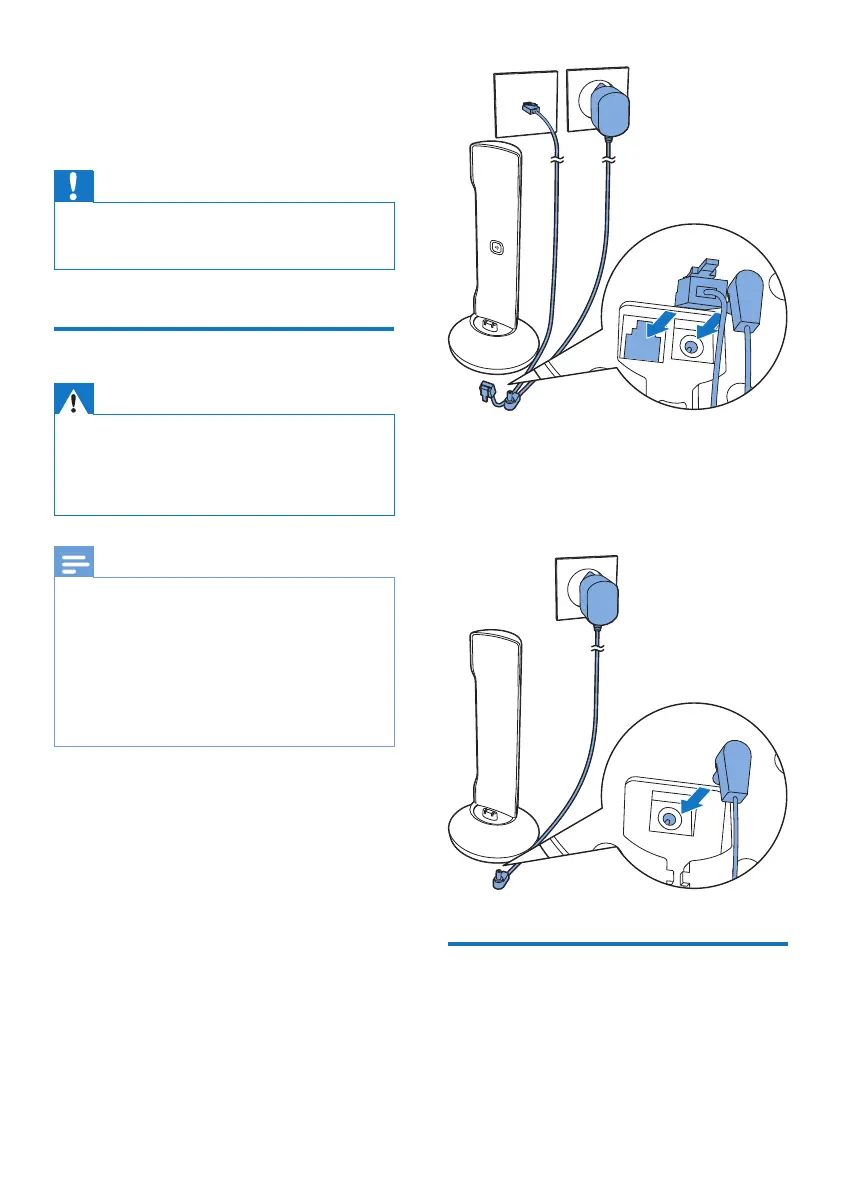
1 Connect each end of the power adapter
to:
• the DC input jack at the bottom of the
base station;
• the power socket on the wall.
2 Connect each end of the line cord to:
• the telephone socket at the bottom of
the base station;
• the telephone socket on the wall.
3 Connect each end of the power adapter
to (for multi handset version only):
• the DC input jack at the bottom of the
extra handset charger.
• the power socket on the wall.
Install the handset
The batteries are pre-installed in the handset.
Pull the battery tape off from the battery door
before charging.


 To Next Page