15
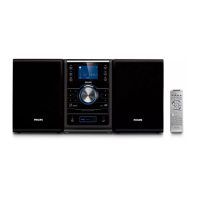
Option 4: Connect through S-Video
1 Connect an S-video cable (not supplied)
to:
the • S-Video socket on this unit.
the S-Video input socket on the TV.•
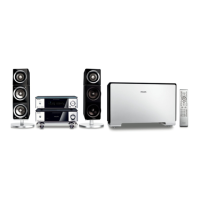
Option 5: Connect through
composite video
1 Connect the supplied composite video
cable to:
the • VIDEO OUT socket on this unit.
the video input socket on the TV.•
TV
S-VIDEO IN
TV
VIDEO IN
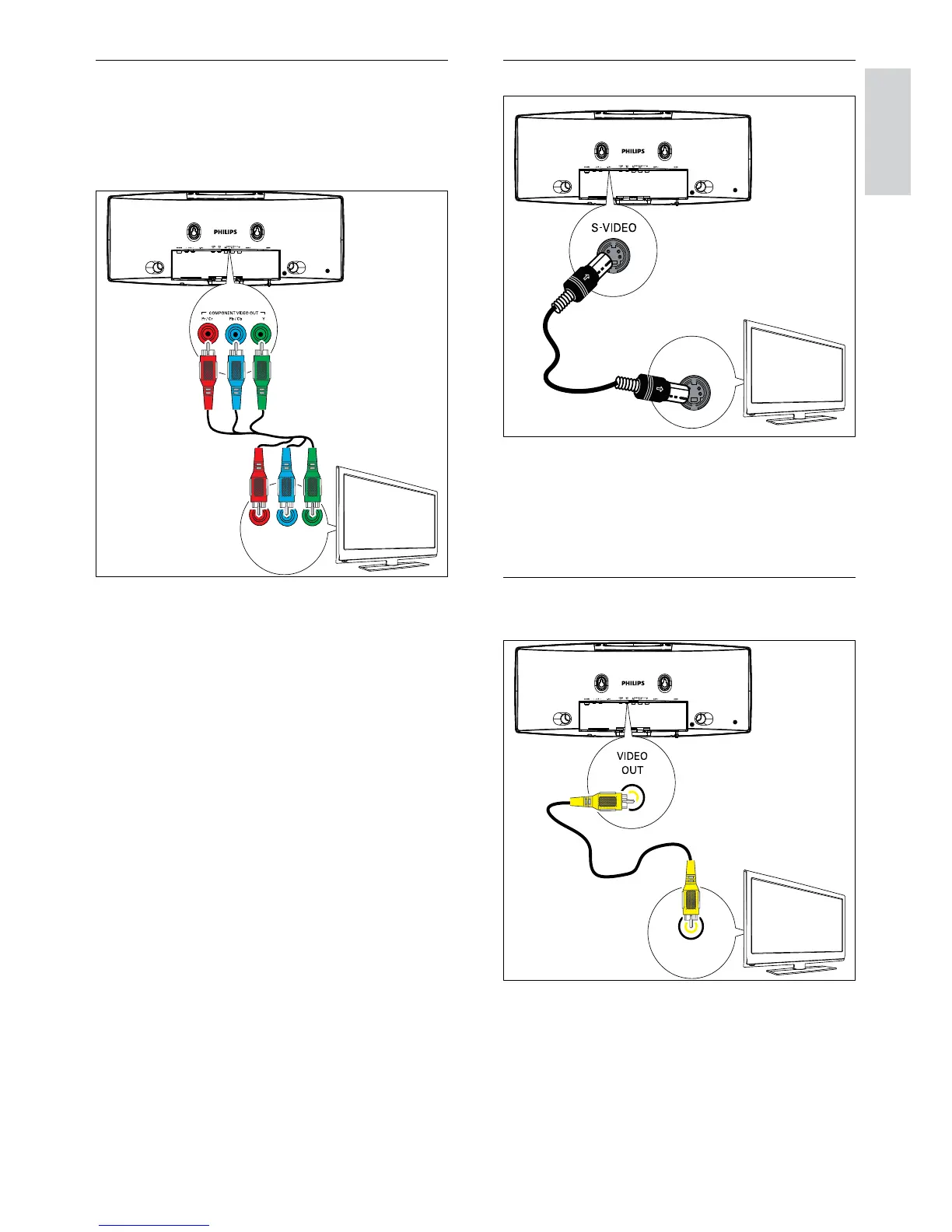
Option 3: Connect through
component video
Connect a progressive scan TV through
component video for higher quality video.
1 Connect component video cables (red/
blue/green - not supplied) to:
the • COMPONENT VIDEO OUT
(Pr/Cr Pb/Cb Y) sockets on this unit.
the component input sockets on the •
TV.
TV
Pr/Cr Pb/Cb Y
COMPONENT VIDEO IN PUT
English
EN



 To Next Page