Need help?
Do you have a question about the Philips MCM138D and is the answer not in the manual?
Information on the 13 Amp plug, fuse replacement, and safe disposal.
Wiring instructions for connecting a plug based on wire colors.
Advice on setting and maintaining safe listening volumes to prevent hearing loss.
Guidance on listening duration, breaks, and avoiding hazardous situations.
Welcome, registration benefits, compliance, and list of supplied accessories.
Details on packaging materials and guidance for old product disposal.
Essential safety advice on placement, ventilation, liquids, heat, and battery handling.
Diagram and instructions for rear panel connections.
How to connect and position the AM/MW and FM antennas for optimal reception.
How to connect the front speakers to the main unit.
Initial setup and battery replacement for the remote control.
Explanation of buttons on the main unit for various functions.
Detailed description of all buttons and notes for using the remote control.
How to control volume and apply sound effects like DBB and DSC.
How to switch between active standby, standby, and eco-power standby modes.
Explanation of the power-saving automatic standby feature.
How to insert discs and perform basic playback controls like play, pause, skip.
Techniques for fast-forwarding, rewinding, pausing, and resuming playback.
Specific instructions for playing MP3 and WMA formatted discs.
How to use Shuffle and Repeat functions for playback.
Steps to create and store a custom playback order for tracks.
How to view and delete programmed track sequences.
Instructions for selecting and tuning radio stations using the system.
Guidelines for cleaning the unit's cabinet, discs, and lens.
Step-by-step guide to set the current time on the device.
How to set a timer for alarm or specific playback source.
How to activate/deactivate timer and sleep functions.
How to connect an iPod to the dock and play music.
Guide on fitting and removing adaptors for compatible iPods.
Using system controls to play music from a docked iPod.
Information on how the dock charges the connected iPod.
Solutions for disc errors, poor radio reception, and reversed audio outputs.
Troubleshooting steps for unresponsive buttons and audio issues.
Tips for when the remote control is not working properly.
Solutions for timer not working or clock/timer settings being erased.
How to navigate menus and limitations of system controls for docked players.
Technical specifications for the amplifier, speakers, and CD player.
Technical specs for the tuner, general dimensions, weight, and power consumption.
 General
| Type | Home audio micro system |
|---|---|
| Cassette deck | No |
| Product color | White |
| Disc loading type | Top |
| Optical disc player | Yes |
| Number of optical discs | 1 discs |
| Speaker type | 1-way |
| RMS rated power | 4 W |
| Woofer diameter | 88.9 mm |
| Number of speakers | 2 |
| Supported radio bands | FM, MW |
| Display type | LCD |
| Headphone outputs | 1 |
| Headphone connectivity | 3.5 mm |
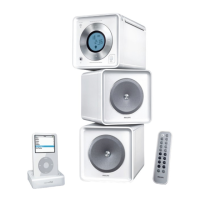
| Apple docking compatibility | iPod |
| Playback modes | Repeat, Repeat all, Repeat one, Shuffle |
| Disc types supported | CD, CD-R, CD-RW |
| Playback disc formats | CD audio |
| Audio formats supported | MP3, WMA |
| Power source | AC |
| Input voltage | 110-240 V |
| Input frequency | 50 - 60 Hz |
| Accessories included | Cradle and adaptors for GoGear and iPod |
 Weight and Dimensions
| Depth | 244 mm |
|---|---|
| Width | 150 mm |
| Height | 153 mm |
| Package depth | 202 mm |
| Package width | 302 mm |
| Package height | 531 mm |
| Package weight | 5270 g |

 To Next Page