10
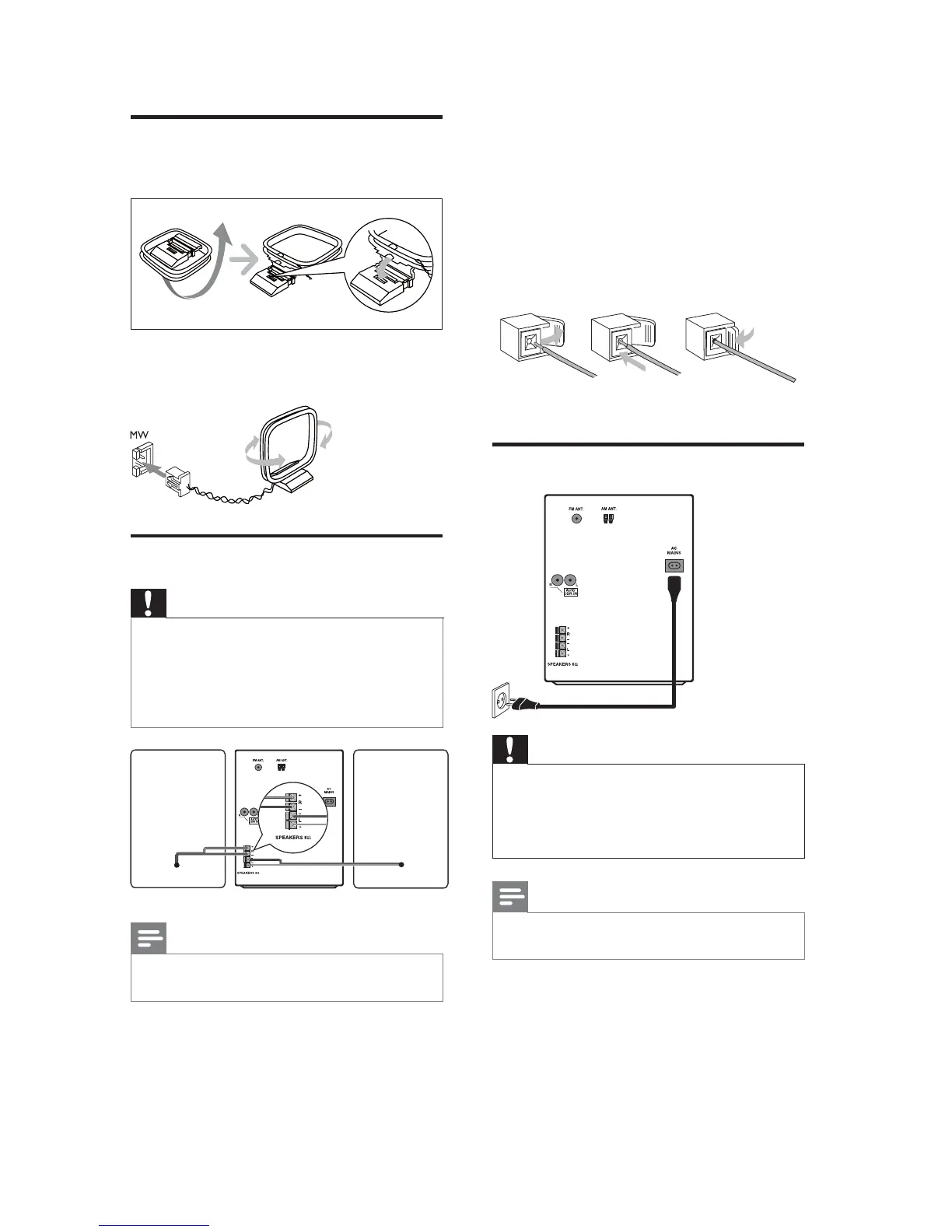
2 Insert the stripped part of the wire
completely.
Insert the right speaker wires to “ R”,
left speaker wires to “L”.
Insert the red wires “ +”, black wires
to “-”.
3 3XOOWKHVRFNHWÁDSWRFORVHWKHVRFNHW
Connect power
Caution
Risk of product damage! Ensure that the
power supply voltage corresponds to the
voltage printed on the back of the unit.
Before connecting the AC power cord, ensure
you have completed all other connections.
Note
The type plate is located on the back of the
main unit.
1 Connect the AC power cable to:
the main unit.
the wall socket.
abc
Connect MW antenna
1
Assemble the MW loop antenna.
2 Connect the MW loop antenna to the
MW jack on the back of the main unit.
Connect speakers
Caution
For optimal sound, use the supplied speakers
only.
Connect only speakers with impedance that is
the same or higher than the supplied speakers.
5HIHUWRWKH6SHFLÀFDWLRQVVHFWLRQRIWKLV
manual.
Note
Ensure that the colors of the speaker wires and
terminals are matched.
1 If the socket is closed, push the socket
ÁDSWRRSHQ
EN


 To Next Page