English
12
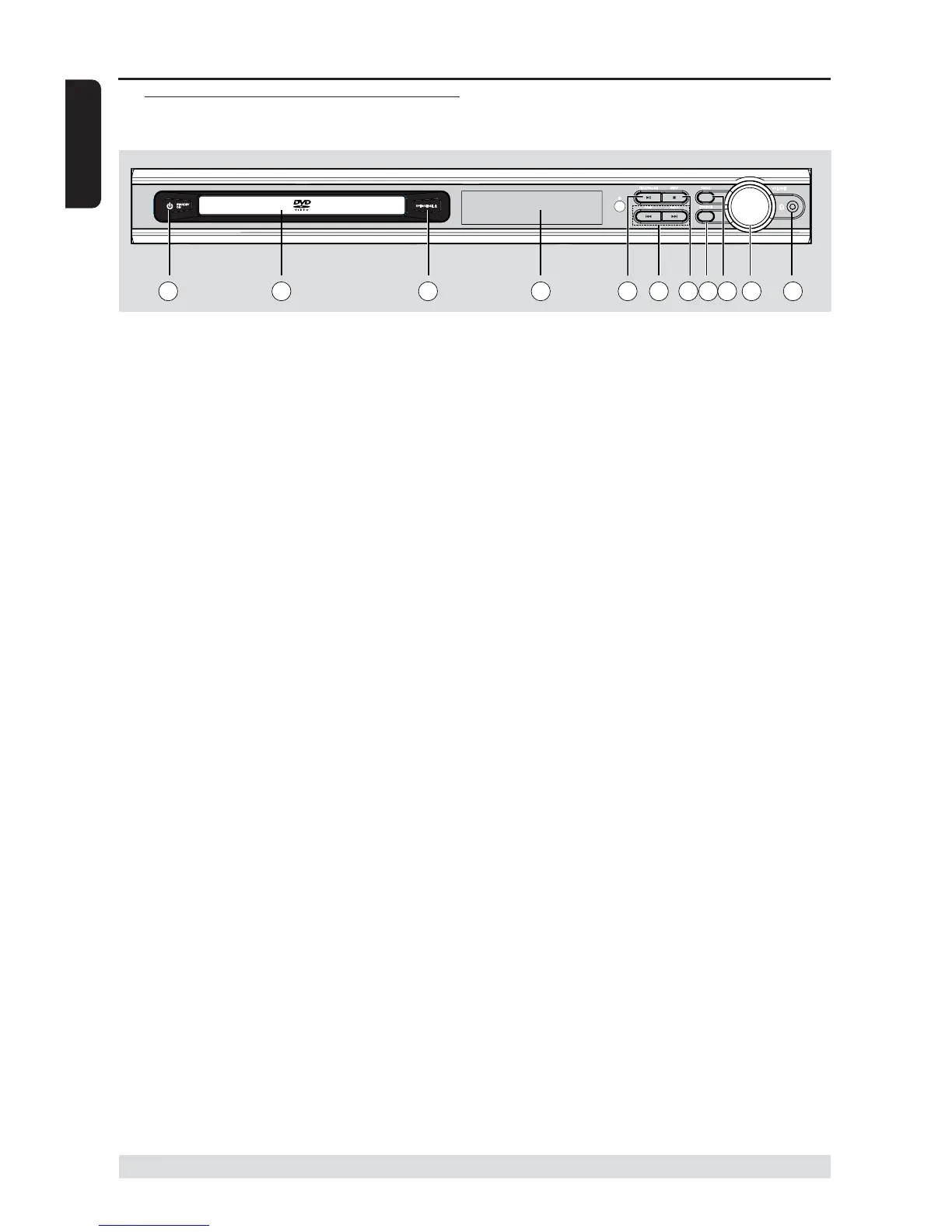
Functional Overview
* = Press and hold the button for more than two seconds.
Main unit and remote control
1 STANDBY ON
– Switches to standby mode or turns on
the system.
2 Disc tray
3 OPEN/CLOSE 0 (DISC mode only)
– Opens/Closes the disc tray.
4 System display panel
5 ÉÅ PLAY/PAUSE
– DISC: starts/pauses playback.
6 S PREV / T NEXT
– DISC: *searches backward/forward or
selects a track.
– TUNER: tunes the radio frequency
up/down.
– TV: selects previous/next channel on
Philips TV (on remote only).
7 Ç STOP
– Exits an operation.
– DISC: stops playback or clears a program.
– TUNER: *erases a preset radio station.
8 SOURCE
– Selects the relevant active mode : TV,
DISC, TUNER (FM/AM) or AUX.
9 PROG
– DISC: starts programming.
– TUNER: starts manual preset
programming.
0 VOLUME (VOL +-)
– Adjusts the volume level.
! PHONES
– For plugging in the headphones jack.
The speakers output will be cancelled.
1 2 3 4 567 98 1110


 To Next Page