English
13
* = Press and hold the button for more than two seconds.
Control buttons available on the
remote only
8
12
13
14
6
5
7
15
16
14
6
23
22
21
20
17
18
10
26
27
19
25
24
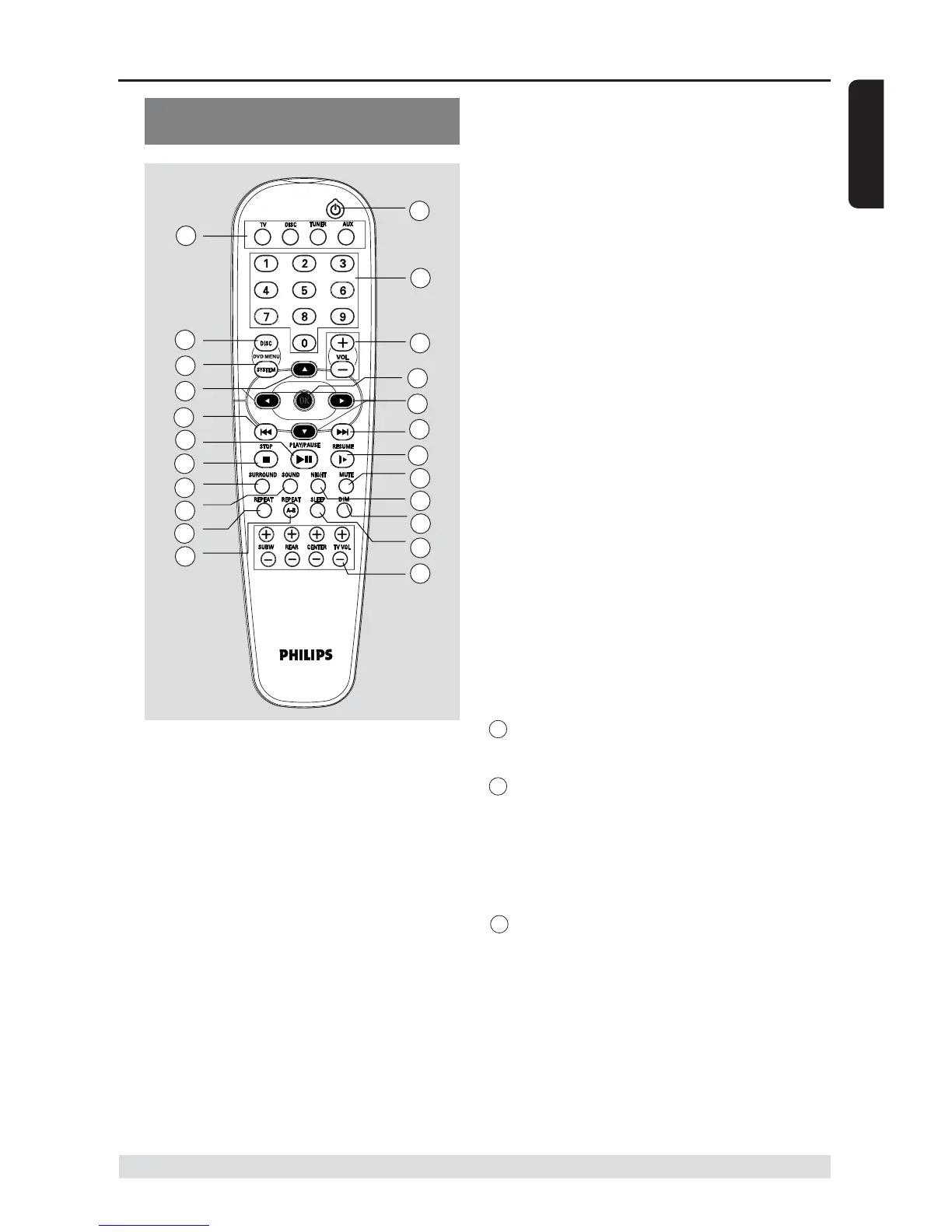
@ DISC MENU
– Enters disc contents menu.
# SYSTEM MENU (DISC mode only)
– Enters or exits system setup menu.
$ 1234
– Selects movement direction in the menu.
– Use 2 3 to select a preset radio
station.
% SURROUND
– Selects multichannel surround (Dolby
Digital, Dolby Pro Logic or Dolby Pro
Logic II) or stereo mode.
^ SOUND
– Selects a sound effect.
Functional Overview
& REPEAT
– Selects various repeat modes.
* REPEAT A-B
– Repeats a specific section on a disc.
( SUBW +-
– Adjusts subwoofer’s sound level.
REAR +-
– Adjusts rear speakers’ sound level.
CENTER +-
– Adjusts center speaker’s sound level.
TV VOL +-
– Adjusts TV volume (Philips TV only).
) SLEEP
– Sets the sleep timer function.
¡ DIM
– Selects different levels of brightness for
display panel.
™ NIGHT (DVD mode only)
– Toggles between night mode on and off.
Selects night mode on to level out the
volume output.
£ MUTE
– Mutes or restores the volume.
24 RESUME
– Continues playback after an interruption.
25 OK
– Confirms a selection.
§ Numeric Keypad (0-9)
– Enters a track/title number of the disc.
– Enters a number of a preset radio station.
27 B
– Switches to standby mode.
– In TV mode, switches Philips TV on/off.


 To Next Page