36
English
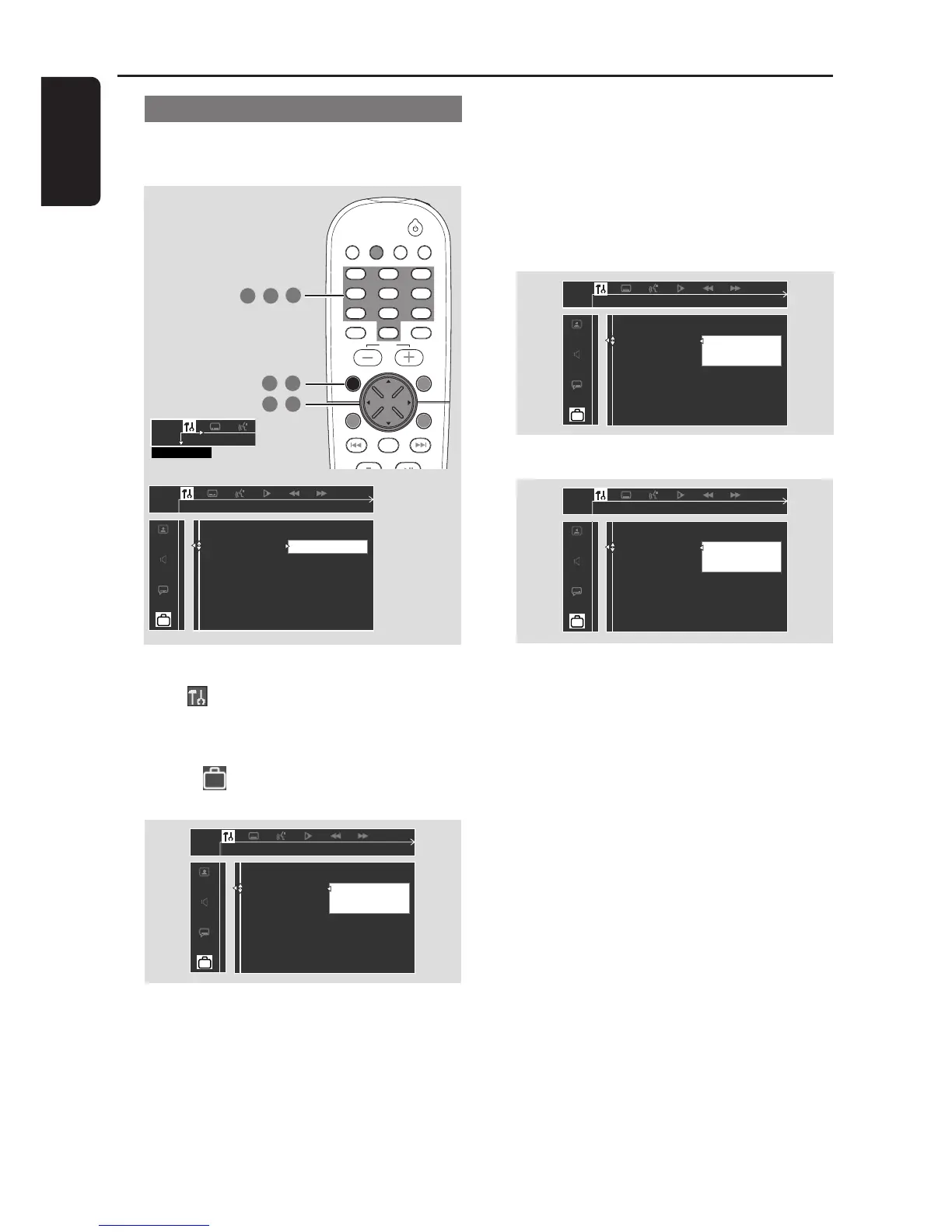
Changing the password
You can change the four-digit password used for
Parental Control. The default password is ‘1234.’
1 In disc mode, press SYSTEM MENU.
2 Select icon and press 4.
3 Use the joystick (1 2 3 4) on the remote to
navigate in the menu.
Move to and press 2.
Move to ‘Password’ and press 2.
__ __ __ __
Enter code
Please enter old password
Parental Control
Password
Menu Language
Defaults
TV/AV
DISC/
MEDIA
TUNER
AUX/DI
DISC MENUSYSTEM MENU
SEATING ZOOM
PREV NEXT
STOP PLAY/PAUSE
VOL
OK
456
123
789
0
SURR.
SOUND
1 7
,
2 3
,
6
4 5
,
,
SETUP MENU
➠
Change
Change password
Parental Control
Password
Menu Language
Defaults
DVD Menu Options
4 Use the numeric keypad (0-9) to enter your
original four-digit password at “Enter code.”
➜ If you are asked to enter the code for the
first time, key in ‘1234.’
➜ If you forget your password, press Ç four
times to restore to the default password
(1234.)
5 Enter your new four-digit password.



 To Next Page