EasyManua.ls Logo

Philips PET800 - Remote Control

Philips PET800
28 pages
Print Icon
To Next Page IconTo Next Page
To Previous Page IconTo Previous Page
Loading...
English
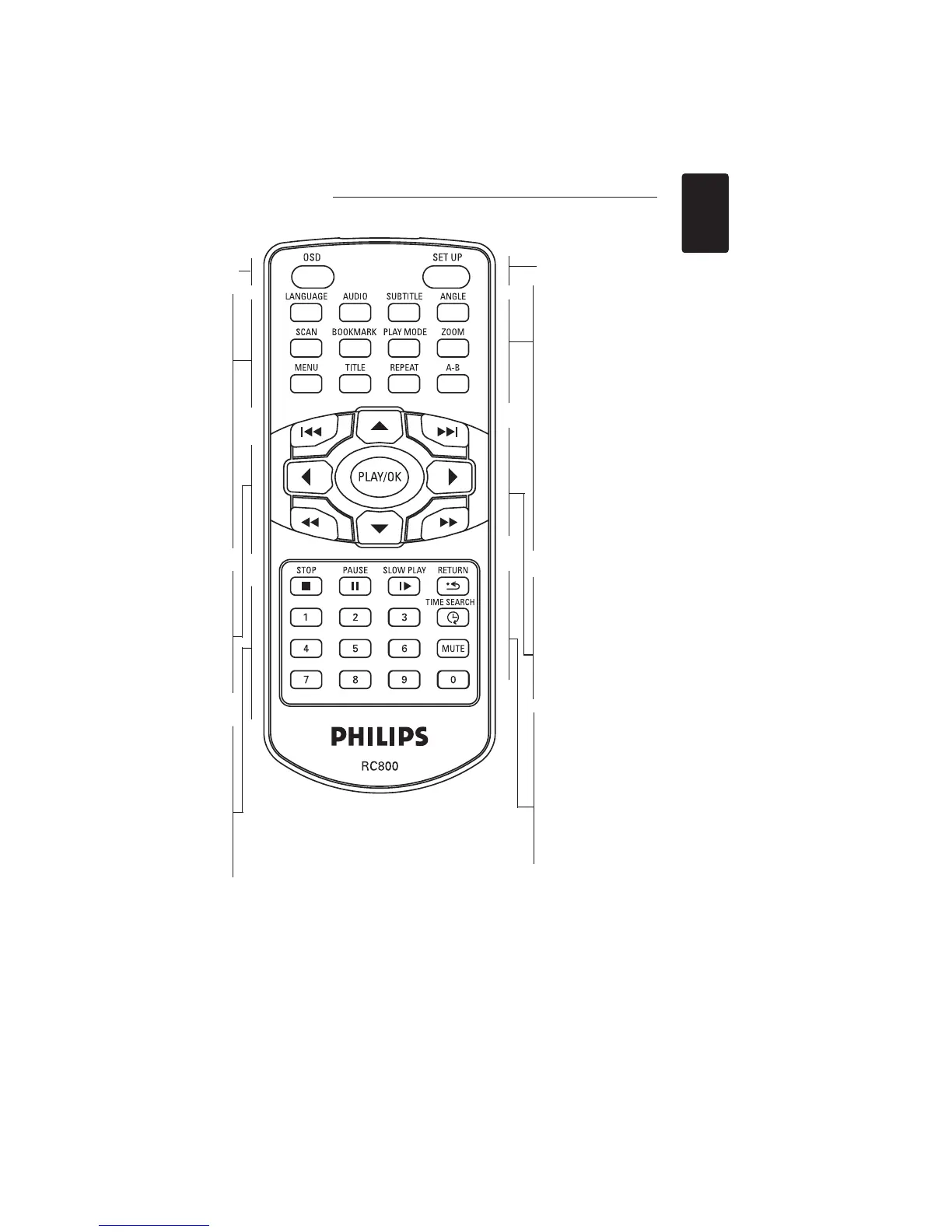
Remote control
OSD
On Screen Display on / off
LANGUAGE
Language selector
AUDIO
Audio language
selector
SCAN
Playback of the first 10
seconds of each chapter
/ index on the disc
BOOKMARK
Selects bookmark
options
MENU
Displays MENU page
TITLE
Displays TITLE page
Previous chapter,
track or title
Search backward
PLAY / OK
Confirms selection
and starts playback
STOP
Press twice to
stop playback
PAUSE
Pause playback
0-9
Numerical keypad
MUTE
Muting player volume
SETUP
Enters SETUP menu
SUBTITLE
Subtitle language
selector
ANGLE
Selects DVD
camera angle
PLAY MODE
Selects play order
options
ZOOM
Enlarges / chapter /
video image
REPEAT
Repeats chapter /
title / disc
A - B
To repeat or loop a
sequence in a title
Search forward
, , ,
Up / down / left /
right cursor
SLOW PLAY
Slow motion / Frame
by frame playback
RETURN
For VCD menu page
TIME SEARCH
Searches by time
Next chapter, track
or title
9
:
7
8
5634

Other manuals for Philips PET800

Related product manuals