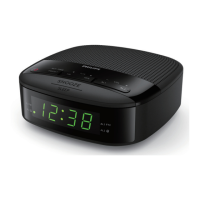
This document describes the Philips Clock Radio 3000 Series, model R3306, a compact and versatile device designed for personal audio and timekeeping. It combines the functionality of an FM radio with an alarm clock, offering a range of features for daily use.
Function Description:
The Philips Clock Radio R3306 primarily functions as a clock radio, allowing users to listen to FM radio stations and set multiple alarms. It features a clear digital display for time and radio frequency, and intuitive controls for easy operation. The device can be powered by an AC adaptor, with batteries serving as a backup for clock and alarm settings, ensuring timekeeping continuity during power interruptions.
Important Technical Specifications:
- Amplifier:
- Rated Output Power: 400mW RMS
- Tuner (FM):
- Tuning Range: 87.5-108 MHz
- Tuning Grid: 50 KHz
- Sensitivity (Mono, 26 dB S/N Ratio): <22 dBf
- Total Harmonic Distortion: <3%
- Signal to Noise Ratio: >50 dBA
- General Information:
- AC Power (power adaptor):
- Brand: Philips
- Model: AS030-050-EE060
- Input: 100-240V~ 50/60 Hz; 0.15A
- Output: 5V = 0.6A
- Operation Power Consumption: <3 W
- Standby Power Consumption: <1 W
- Dimensions (W x H x D): 186 x 96 x 65 mm
- Weight (Main unit): 296 g
- Batteries: Requires 2 AAA batteries (not provided) for backup.
Usage Features:
The clock radio offers a variety of user-friendly features:
- Time Setting:
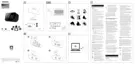
- The time can be set in standby mode by pressing and holding "SET TIME" for 2 seconds, then using "HR" and "MIN" to adjust the hour and minute, and "SET TIME" to confirm.
- FM Radio Listening:
- Turning On/Off: Press the power button to turn on the clock radio or switch to standby.
- Tuning to Stations:
- Automatic Tuning: Press and hold "TUN" for 2 seconds to automatically tune to a station with strong reception. Repeat to find more stations.
- Manual Tuning: Press "TUN" repeatedly to select a specific frequency. The tuning grid is 50KHz, meaning the frequency increases by 0.1MHz with two presses of "TUN".
- Storing FM Radio Stations:
- Automatic Storage: In FM tuner mode, press and hold "SCAN" for more than 2 seconds. The unit will automatically store all available FM radio stations (up to 20) and broadcast the first one.
- Manual Storage: Tune to an FM radio station, then press and hold "PRESET" for 2 seconds. The preset number will blink. Use "TUN" to select a preset number, then press "PRESET" again to confirm.
- Selecting a Preset Radio Station:
- Option A: Press "PRESET" repeatedly to cycle through preset numbers.
- Option B: Press "PRESET" once, then use "TUN" to select a preset radio station.
- Adjusting Volume: While listening to the radio, press "VOL+" or "VOL-" to adjust the volume.
- Alarm Features:
- Setting Alarm Time: In standby mode, press and hold "AL1" or "AL2" for 2 seconds. Use "HR" and "MIN" to set the hour and minute, then press "AL1" or "AL2" to confirm.
- Selecting Alarm Source: In standby mode, press "AL1" or "AL2" to choose between FM radio or buzzer as the alarm source. The corresponding alarm icon will light up.
- Activating/Deactivating Alarm: Press "AL1" or "AL2" repeatedly to activate or deactivate the alarm timer. The alarm indicator turns on when activated and off when deactivated.
- Snooze Function: When the alarm sounds, press "SNOOZE". The alarm will snooze for 9 minutes and then ring again.
- Stopping Alarm: To stop the alarm, press the corresponding "AL1" or "AL2" button. The alarm will repeat the next day.
- Sleep Timer:
- Press "SLEEP" repeatedly to select a preset period (15, 30, 60, 90, 120 minutes). The clock radio will automatically switch to standby mode after the selected period.
- To deactivate the sleep timer, press "SLEEP" repeatedly until "[OFF]" appears.
- Display Brightness: Press "BRIGHTNESS" repeatedly to select different brightness levels: High, Medium, or Low.
- Display Panel: Shows current status, including time, radio frequency, and alarm indicators.
- What's in the box: Main unit, Power adaptor, Quick start guide, Safety sheet, Warranty.
Maintenance Features and Important Notes:
- Safety:
- Read and heed all warnings and instructions.
- Do not block ventilation openings.
- Keep away from heat sources.
- Protect the power cord from damage.
- Use only manufacturer-specified attachments/accessories.
- Unplug during lightning storms or long periods of disuse.
- Refer servicing to qualified personnel if damaged.
- Battery Safety: Install batteries correctly (+ and -). Remove batteries if not used for a long time. Do not expose batteries to excessive heat.
- Avoid dripping or splashing liquids on the clock radio.
- Do not place liquid-filled objects or lighted candles on the device.
- The Direct Plug-in Adapter's plug serves as the disconnect device and must remain readily operable.
- Product Information: Specifications are subject to change without prior notice.
- Troubleshooting:
- No power: Ensure AC power plug is connected and there is power at the AC outlet.
- No sound: Adjust the volume.
- No response from unit: Disconnect and reconnect the power plug, then turn on the unit again.
- Poor radio reception: Keep the clock radio away from other electronic devices. Fully extend and adjust the FM antenna.
- Alarm does not work: Set the clock/alarm correctly.
- Clock/alarm setting erased: Reset the clock/alarm. Replace backup batteries if power was interrupted or the power plug was disconnected.
- Environmental Information:
- The product is designed with high-quality materials for recycling.
- The crossed-out wheeled bin symbol indicates that the product and its batteries should not be discarded with household waste but should be delivered to appropriate collection facilities for recycling. This helps prevent negative consequences for the environment and human health.
- Compliance:
- CE mark indicates compliance with European Community radio interference requirements and Directive 2014/53/EU.
- Any unauthorized modifications may void the user's authority to operate the product.
- The Declaration of Conformity can be found on www.philips.com/support.
- Warranty: Do not attempt to repair the device yourself to keep the warranty valid. For support, register your product at www.philips.com/support.
This Philips Clock Radio R3306 is a reliable and straightforward device, ideal for users seeking a combination of timekeeping, alarm functions, and FM radio listening in a compact form factor.

 Need help?
 General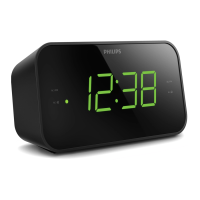

 To Next Page