Need help?
Do you have a question about the Philips R3205 and is the answer not in the manual?
Essential safety guidelines and warnings for operating the clock radio.
Instructions for inserting batteries to back up clock and alarm settings.
Steps for connecting the clock radio to the main power source.
Guide to setting the correct current time on the clock radio.
Instructions for configuring the alarm to ring at a specific time.
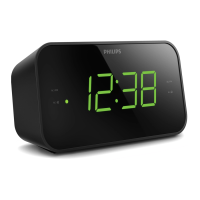
The Philips 3000 Series R3205 is a compact and versatile clock radio designed to provide users with essential timekeeping, alarm, and FM radio functionalities. Its user-friendly interface and thoughtful features make it a practical addition to any bedside table or personal space.
At its core, the R3205 serves as a reliable clock, displaying the current time clearly on its digital panel. Beyond simple time display, it integrates an FM radio tuner, allowing users to listen to their favorite stations. A key feature of this device is its dual alarm system, which enables the setting of two independent alarms to ring at different times. This is particularly useful for households with multiple users or for individuals who require different wake-up times on weekdays versus weekends. The alarm can be set to either an FM radio station, offering a gentle wake-up experience, or a traditional buzzer sound for those who prefer a more direct alert.
The clock radio is designed for straightforward operation. Setting the time is an intuitive process, performed in standby mode by pressing and holding the "SET TIME" button, then using the "HR" and "MIN" buttons to adjust the hour and minute respectively, and finally confirming with "SET TIME."
For radio listening, the device offers both automatic and manual tuning. To tune to an FM radio station, users simply press the power button to turn on the clock radio, then press and hold the "TUN" button for two seconds. The clock radio will automatically scan and tune to a station with strong reception. For more precise tuning, the "TUN" button can be pressed repeatedly to manually select a specific frequency. The display panel clearly shows the current frequency, increasing by 0.1MHz with each double press of the "TUN" button, reflecting the 50KHz tuning grid. Volume adjustment is also simple, controlled by the "- VOL +" buttons during playback.
The R3205 allows for the storage of up to 10 FM radio stations as presets. This feature simplifies access to frequently listened-to stations. To store a station, the user first tunes to the desired FM station, then presses and holds "PRESET" for two seconds to activate programming mode. A blinking preset number indicates readiness for selection, which can be done using the "TUN" buttons. Confirming with "PRESET" saves the station. Selecting a preset is as easy as repeatedly pressing "PRESET" in FM tuner mode until the desired number is displayed.
The dual alarm system is a significant convenience. Alarms are set in standby mode by pressing and holding either "AL1" or "AL2" for two seconds, then adjusting the hour and minute using "HR" and "MIN," and confirming with the respective alarm button. Users can choose between FM radio or a buzzer as the alarm source. The "gentle wake-up" function is specifically designed for the FM radio alarm, providing a more pleasant start to the day. Activating or deactivating an alarm is done by repeatedly pressing "AL1" or "AL2"; an illuminated alarm indicator confirms activation. When an alarm sounds, the "SNOOZE" button provides a temporary reprieve, silencing the alarm for nine minutes before it rings again. To completely stop an alarm, the corresponding "AL1" or "AL2" button is pressed.
Another useful feature is the sleep timer. This allows the clock radio to automatically switch to standby mode after a user-defined period. By repeatedly pressing the "SLEEP" button, users can cycle through preset durations (120, 90, 60, 30, 15 minutes) until the desired period is selected. To deactivate the sleep timer, "SLEEP" is pressed repeatedly until "OFF" appears on the display.
Maintaining the Philips R3205 is straightforward, primarily focusing on power management and proper handling to ensure longevity and optimal performance.
The device operates on AC power via an adaptor, but it also supports battery backup using two AAA batteries (not provided). These batteries are crucial for retaining clock and alarm settings during power outages or when the unit is disconnected from the main power supply. It is important to install batteries correctly, observing the polarity markings (+ and -) inside the battery compartment. For extended periods of non-use, it is recommended to remove the batteries to prevent leakage, which can cause damage to the clock radio. The manual explicitly warns against exposing batteries to excessive heat, such as direct sunshine or fire, and emphasizes proper disposal due to their chemical content.
When connecting power, users must ensure that the power voltage matches the specifications on the clock radio's type plate to prevent product damage. For safety, when unplugging the power adaptor, it is essential to pull the plug directly from the socket rather than tugging on the cord. Only the AC power adapter specified by the manufacturer should be used.
For optimal FM radio reception, the manual advises keeping the clock radio away from other electronic devices to avoid interference. Additionally, fully extending and adjusting the position of the FM antenna can significantly improve reception quality.
Troubleshooting common issues is also covered. If there's no power, users should check the AC power plug connection and ensure the AC outlet is functional. For no sound, adjusting the volume is the first step. If the unit is unresponsive, disconnecting and reconnecting the AC power plug, then turning the unit on again, often resolves the issue. In cases of poor radio reception, repositioning the clock radio away from other electronics and adjusting the antenna are recommended. If the alarm does not work, verifying that the clock and alarm times are set correctly is crucial. Should clock or alarm settings be erased, it typically indicates a power interruption or disconnection, requiring the user to reset them. The manual strongly advises against attempting to repair the device oneself to maintain warranty validity and prevent further damage. For persistent problems, users are directed to the Philips webpage for support.
 General
| Brand | Philips |
|---|---|
| Model | R3205 |
| Category | Clock Radio |
| Display Type | LED |
| Number of Alarms | 2 |
| Snooze Function | Yes |
| Sleep Timer | Yes |
| Radio Band | FM |
| Preset Stations | 20 |
| Alarm Type | Buzzer |
| Power Source | AC |

 To Next Page