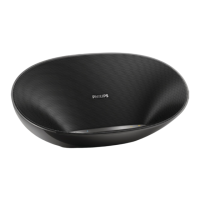
Need help?
Do you have a question about the Philips SB365B and is the answer not in the manual?
Important safety instructions and warnings for operating the speaker.
Overview of the speaker's capabilities and product registration.
Lists the items included in the product packaging.
Diagram and labels identifying all parts and ports of the speaker.
Information on using AC power or the built-in rechargeable battery.
Instructions for powering on the speaker and entering Bluetooth mode.
Steps to put the speaker into standby mode for power saving.
General notes and steps for connecting Bluetooth devices.
Guide to pairing devices using Near Field Communication technology.
Manual procedure for pairing Bluetooth devices via search and selection.
How to play audio streams from a connected Bluetooth device.
Methods to disconnect a paired Bluetooth device from the speaker.
Instructions for pairing a new device after one is already connected.
How the speaker automatically reconnects or manually reconnects to devices.
Using the speaker's CHARGING socket to charge mobile devices.
Connecting and playing audio from external devices via the AUDIO IN socket.
How to increase or decrease the speaker volume using the volume buttons.
Technical specifications including amplifier, Bluetooth, and physical dimensions.
Details on power supply, model, input/output voltages, and weight.
Solutions for common issues like no power, no sound, or speaker unresponsiveness.
Troubleshooting poor audio quality and connection problems with Bluetooth devices.
FCC and Industry Canada compliance statements for device operation.
Information regarding RF radiation exposure limits and antenna placement.
Guidelines for environmentally responsible disposal of the product and its battery.
Details on packaging materials and system components for recycling.
 General
| Impedance | - Ω |
|---|---|
| Frequency range | - Hz |
| RMS rated power | 8 W |
| Package depth | 115 mm |
| Package width | 327 mm |
| Package height | 120 mm |
| Package weight | 1420 g |
| Bluetooth range | 10 m |
| Bluetooth version | 4.0 |
| USB charging port | Yes |
| Bluetooth profiles | A2DP, AVRCP |
| USB 2.0 ports quantity | 1 |
| Connectivity technology | Wired & Wireless |
| Battery type | Built-in |
| Power source type | AC, Battery |
| AC adapter frequency | 50/60 Hz |
| AC adapter input voltage | 100 - 240 V |
| Product type | Stereo portable speaker |
| Product color | Black |
| Volume control | Digital |
| Speaker type | - |
| Number of drivers | 2 |
| Audio output channels | 2.0 channels |
| Subwoofer driver diameter | 63.5 mm |
| Recommended usage | Mobile phone / Smartphone |
| Compatible products | Apple iPad 4, iPad mini, new iPad, iPad 2, iPad 1, iPad Air, iPad Air 2, iPad mini 2, iPad mini 3, iPad with Retina display, iPhone 5S, iPhone 5C, iPhone 5, iPhone 4S, iPhone 4, iPhone 3GS, iPhone 3, iPhone 6, iPhone 6 Plus, iPod touch 3gen+ |
 Weight and Dimensions
| Depth | 83 mm |
|---|---|
| Width | 260 mm |
| Height | 95 mm |
| Weight | 1050 g |


 To Next Page