Connections to your TV
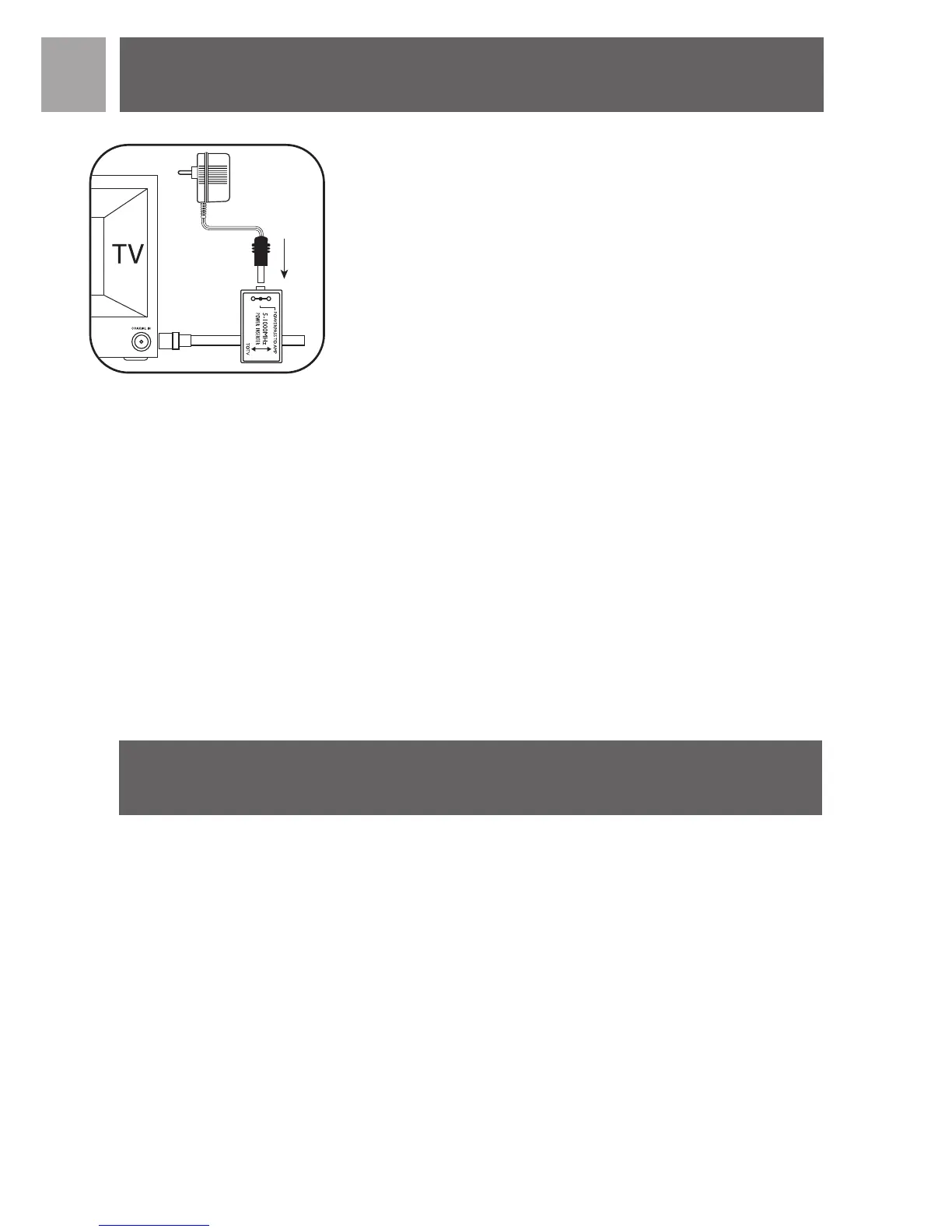
As previously noted the amplifier (Power Injector + Power supply) must be
placed in-line between the aerial and before any splitter or additional
devices.
1. Connect the coaxial cable from the aerial to the connector labeled AMP
on the Power Injector.
2. Connect Power Injector to the aerial input on your TV, Digital Set-Top
box, Splitter and / or any other device.
Note – some set-top boxes require an “F” type connector – use the
adapter supplied.
3. Connect the Power Supply DC plug to the Power Injector then plug the
power supply adapter into a 230 Volt AC receptacle.
Safety Note -The power injector and power supply is for indoor use only!
A note about coaxial cable - Your SDV2940/05 includes a 6m roll of RG-59
coaxial cable. If this is not adequate for your needs we recommend for best
possible signal integrity that you do not extend this cable.A better choice
is to replace the cable with either RG-6 or RG-6 Quad Shield cable. Both
of these cables are designed for minimal signal loss over longer cable runs.
This will ensure the best possible picture and overall performance.
Warranty information can be found at:
www.philips.com/guarantee
EN
Connection to TV
6
Warranty
fig.7


 To Next Page