
 Need help?
Do you have a question about the Philips SPA4270BT and is the answer not in the manual?
Essential safety guidelines, warnings, and handling instructions for the product.
Information regarding device modifications and the user's authority to operate it.
Instructions for responsible disposal of the product, batteries, and packaging.
Welcome to Philips and guidance on registering your new multimedia speaker.
Step-by-step instructions for physically setting up and connecting the speakers.
How to connect and stream audio wirelessly from a device using Bluetooth technology.
Instructions for connecting and playing audio from an external device via an audio cable.
Guide to adjusting volume, bass, and treble levels for optimal audio playback.
Technical details on AC power input, consumption, and compatible PC/Mac systems.
Common issues and solutions to help troubleshoot problems with the multimedia speaker.
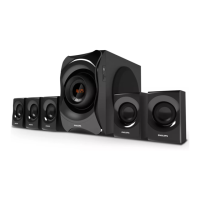
This document serves as a user manual for the Philips SPA4270BT multimedia speaker, providing essential information for its safe operation, setup, and use. The speaker system is designed to offer a versatile audio experience, allowing users to stream music wirelessly via Bluetooth or connect through a wired audio input.
The manual begins with an "Important" section, emphasizing safety instructions and notices. Users are advised to read and follow all safety guidelines to ensure proper and safe operation of the device. Key safety points include protecting the product from liquids, ensuring the mains plug is easily accessible for disconnection, keeping the product away from direct sunlight, naked flames, and heat sources, and unplugging it during lightning storms or extended periods of disuse. When disconnecting the power cord, users are reminded to pull the plug, not the cable. The manual also stresses the importance of using only manufacturer-specified attachments and accessories. A "Warning" box explicitly states not to remove the casing, lubricate any parts, or place the unit on other electrical equipment. It also reiterates keeping the unit away from water, moisture, liquids, direct sunlight, naked flames, or heat. The "Notice" section clarifies that any unauthorized changes or modifications to the device could void the user's authority to operate the equipment.
Environmental information is also provided, detailing the proper disposal of old products and batteries. The product is designed with high-quality, recyclable materials, and users are encouraged to follow local rules for the separate collection of electrical and electronic products and batteries. This helps prevent negative environmental and health consequences. Information on recycling centers is available at www.recycle.philips.com. The packaging is designed to be easily separated into cardboard, polystyrene foam, and polyethylene for recycling. The manual notes that the type plate, which contains important product information, is located on the back panel of the right speaker.
The "Your multimedia speaker" section offers a welcoming message and encourages users to register their product at www.philips.com/welcome to benefit from Philips support.
The "Get started" section provides installation instructions. A "Caution" note warns that using controls or adjustments or performing procedures other than those described may result in hazardous radiation exposure or unsafe operation. Users are instructed to follow the installation steps sequentially. The first step involves connecting the RCA cable from the left speaker to the "SPEAKER OUT" socket on the right speaker. The second step is to connect the AC plug to an AC power socket.
The "Play" section details how to use the speaker system, focusing on two primary methods: playing through Bluetooth and playing through the audio cable.
For playing through Bluetooth, the manual explains that the multimedia speaker uses Bluetooth wireless technology to stream music from a portable device. A "Note" section provides important considerations: the Bluetooth device should have software version 2.1 or above, users should familiarize themselves with their device's Bluetooth capabilities, the speaker should be kept away from other interfering electronic devices, and it must be properly installed. To activate Bluetooth, users rotate the VOL knob clockwise on the side panel of the right speaker, which causes the LED indicator to blink. To switch off the speaker, the VOL knob is rotated counter-clockwise until a click is heard. Users then activate Bluetooth on their device and search for "Philips SPA4270." For a first-time connection, "Philips SPA4270" is selected for pairing, and some devices may require a "0000" pairing password. A double beep confirms a successful connection, and the LED indicator lights up blue. Once connected, audio can be played through the device's media player, with sound coming from the multimedia speaker. The speaker automatically reconnects to the last paired device when switched on again. To connect to a different Bluetooth device, users must switch off Bluetooth on the currently paired device. A "Tip" section mentions that the effective operational range is approximately 10 meters (30 feet), and obstacles can reduce this range.
For playing through the audio cable, the manual explains how to connect an external audio device such as a computer, mobile phone, or MP3 player. A "Note" reminds users to ensure the multimedia speaker is properly installed. To use the audio cable, users connect the fixed 3.5mm audio-in cable (from the AUX-IN socket on the right speaker) to the headphone socket of the external device. Connecting the audio cable automatically exits Bluetooth pairing mode. To activate the speaker for wired playback, users rotate the VOL knob clockwise on the side panel of the right speaker, causing the LED indicator to turn on stably. Music can then be played from the external device. After use, the VOL knob is rotated counter-clockwise to switch off the speaker, and it should be unplugged.
The "Control Play" section describes how to adjust volume and tone. To increase or decrease volume, users rotate the VOL knob on the side panel of the right speaker. To adjust bass or treble levels, users rotate the BASS knob or the TREBLE knob, respectively, on the back panel of the right speaker.
The "Troubleshooting" section advises users not to attempt to repair the system themselves to maintain warranty validity. It suggests checking basic points if problems arise: ensuring speakers are correctly installed and that the LED lights up. If issues persist, users are directed to register their product and seek support at www.philips.com/support.
The manual concludes with information on where to download the full user manual, directing users to www.philips.com/support.
 General
| Bluetooth | Yes |
|---|---|
| Bluetooth Profiles | A2DP, AVRCP |
| Bluetooth Range | 10 m |
| Connectivity | Bluetooth, AUX, USB |
| USB/SD Card Playback | Yes |
| Inputs | USB |
| Speaker System | 2.1 Speaker System |







 To Next Page