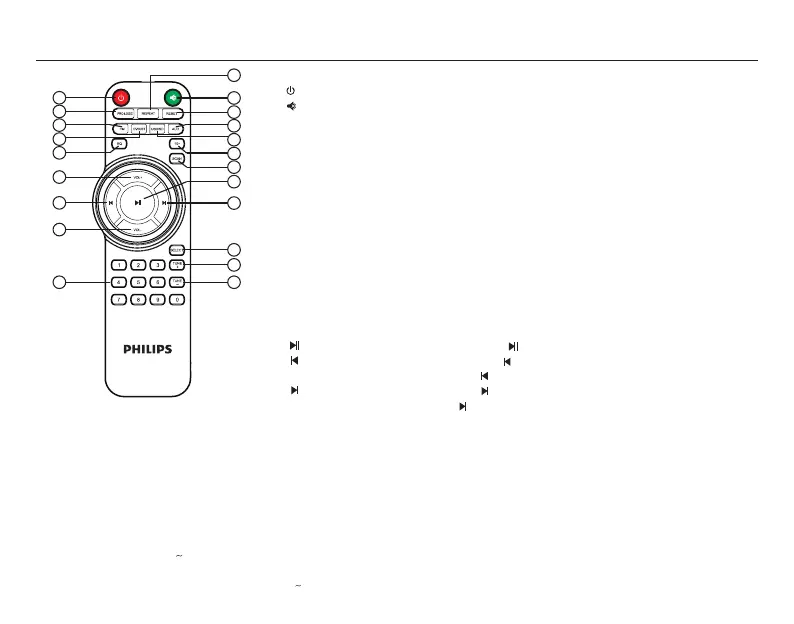
1.REPEAT
2.ST-BY
3.MUTE
4.PRO-LOGIC
5.RESET
6.FM
7.AUD
8.DVD/BT
9.USB/BT
10.EQ
11.10+
12.SCAN
13.VOL+
14.PLAY/PAUSE
15.PREVIOUS
16.NEXT
17.VOL-
18.SELECT
19.TUNE+
20.TUNE-
21.0 9
* AVAILABLE IF CONNECTED
Remote controls
5
1.REPEAT----To put system into REPEAT mode in USB/SD mode only.
2. ----Turn on/Stand-by the speaker.
3. ----Press “MUTE ” to activate or deactivate mute, display blinks, when at MUTE mode.
4.PRO-LOGIC----Enable or disable the function of
the PRO-LOGIC. In case of USB/SD/FM/BT, you can switch the output from 2.1 to 5.1 and in case
of DVD mode, it selects between prologic o (real 5.1) and prologic on(for surround sound).
5.RESET----Reset all user settings.
6.FM----Press “FM” to enter 106.4 for FM radio.
7.AUD----Press “AUD” to enter audio input.
8.DVD/BT----Press “DVD/BT” to enter DVD input, and then short-press to switch to “bt” for
Bluetooth.
9.USB/SD----Press “USB/SD” to enter USB input, and then short-press to switch to SD input.
10.EQ----Dierent equalizer mode “POP, ROCK, JAZZ, CLASSIC, COUNTRY” can be selected
in USB/SD mode only.
11.10+ ----To select and play the music track present after the 10 tracks.
12.SCAN----Long press "SCAN", it will enter into automatic search and automatic save channel
in FM mode.
13.VOL+----Volume up.
14. ----Play or pause the music by pressing “ ” at USB*/SD*/BT mode.
15. ----Play the previous song by pressing “ ” at USB*/SD*/BT mode.
Choose previous channel by pressing “ ” at FM mode.
16. ----Play the next song by pressing “ ” at USB*/SD*/BT mode.
Choose next channel by pressing “ ” at FM mode.
17.VOL- ----Volume down.
18.SELECT----Press”SELECT” key can switch to dierent channels [FL(front speakers) /
SL(surround speakers) / CE(Centre speaker) / SU(subwoofer)]. At the same time,
press”VOL+/-” to increase or decrease every channel’s volume. The number of
numeral tube will change accordingly.
19.TUNE+ ----Press“TUNE+”each time to search channel step by step(each
step 0.1 MHz). Long press "TUNE+", it will search next channel and play the channel
automatically.
20.TUNE- ----Press“TUNE-”each time to search channel step by step(each
step(-) 0.1 MHz). Long press "TUNE-", it will search previous channel and play the channel
automatically.
21.0 9----Numeric keys, with the help of these keys you select song or track in USB,
and in FM, you can key in station frequency, i.e. for 92.7 key in 92.7.
2
1
3
5
7
9
11
12
14
16
18
19
20
4
6
8
10
13
15
17
21


 To Next Page