EasyManua.ls Logo

Philips SPF3400/G7 - Using the main menu

Philips SPF3400/G7
66 pages
Print Icon
To Next Page IconTo Next Page
To Previous Page IconTo Previous Page
Loading...
Philips
Digital
PhotoFrame
Step
5:
Inserting
a
memory
card/
USB
flash
drive
You
can
turn
on
the
PhotoFrame
and
play
back
the
pre-installed
photos
in
the
internal
memory
with
no
memory
card/USB
flash
drive
inserted.
To
play
back
your
own
files,
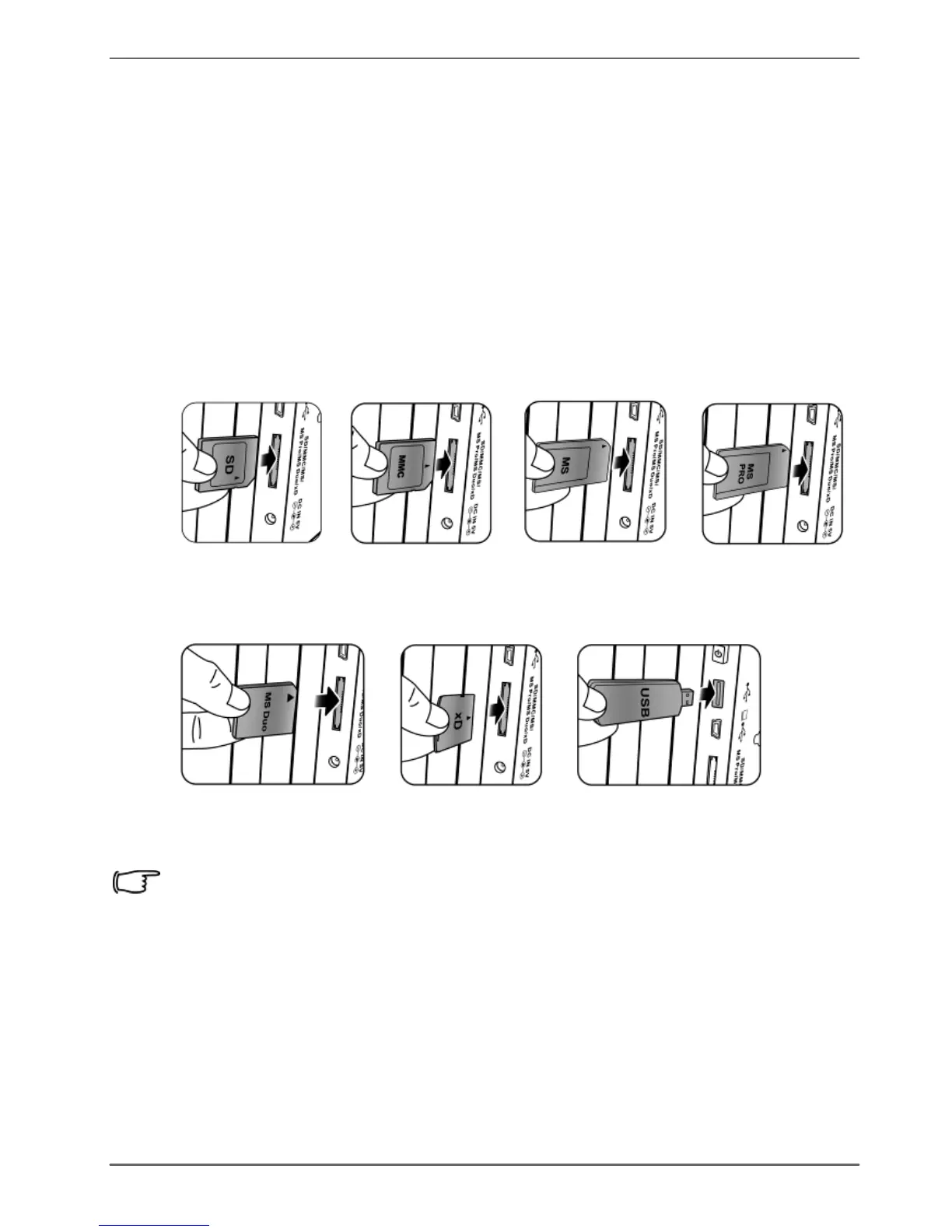
insert
a
compatible
memory
card
or
USB
flash
drive
that
contains
supported
files
into
the
corresponding
slot
on
the
PhotoFrame
as
illustrated
below.
SD/SDHC
MultiMediaCard
Memory
Stick
Memory
Stick
PRO
Memory
Stick
Duo
xD-Picture
Card
USB
flash
drive
For
more
information
about
the
supported
file
formats,
refer
to
"Specifications"
on
page
52.
Getting
started
EN
-
17

Table of Contents

Related product manuals