EasyManua.ls Logo

Philips SPF3400/G7 - Smart Energy Saver; CLOCK & CALENDAR; SCRAPBOOK

Philips SPF3400/G7
66 pages
Print Icon
To Next Page IconTo Next Page
To Previous Page IconTo Previous Page
Loading...
Philips
Digital
PhotoFrame
Using
the
main
menu
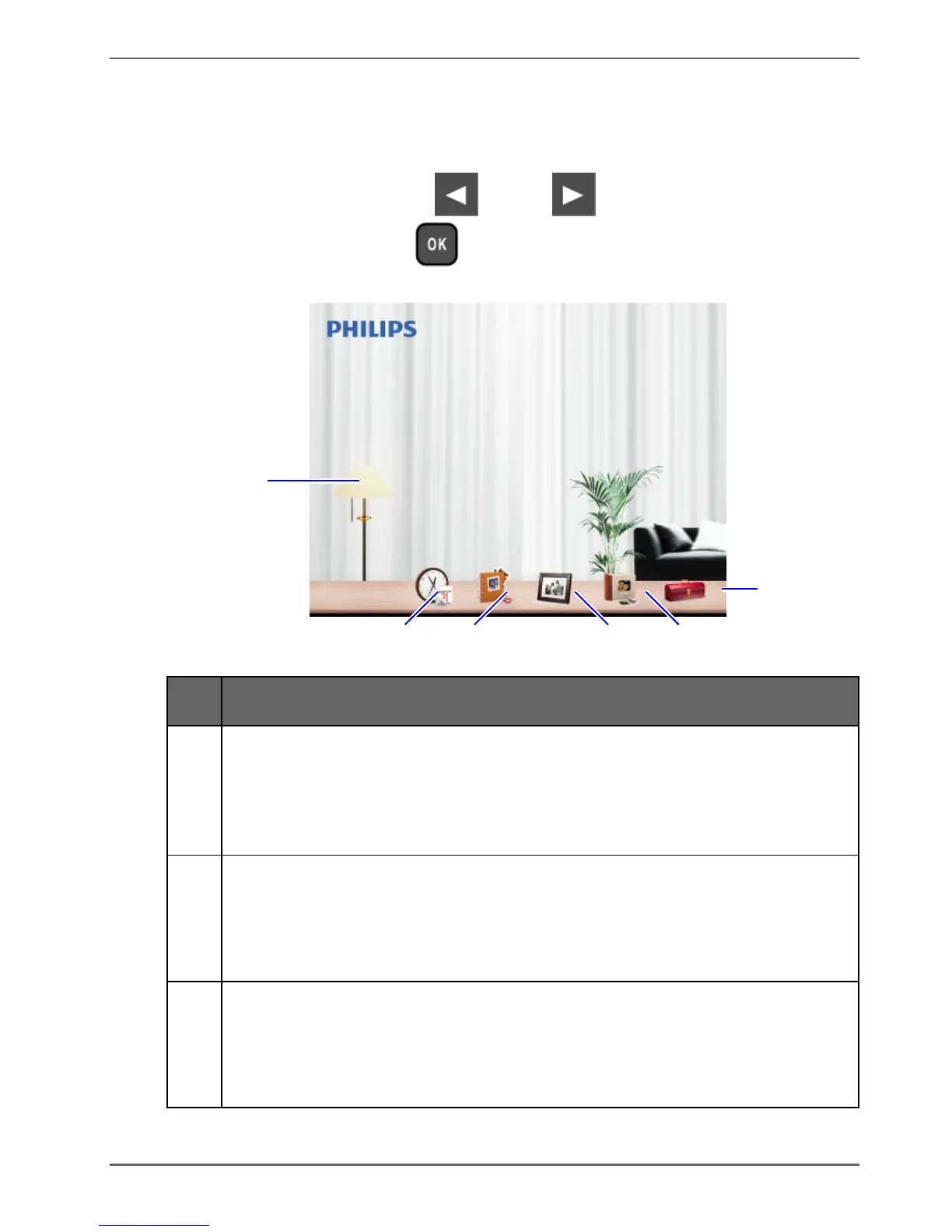
When
you
turn
on
the
PhotoFrame,
the
main
menu
below
appears.
You
can
press
or
to
select
the
desired
menu, and
then
press
to
enter
the
selected
menu.
1
6
2
3
4
5
No.
Description
1
Smart
Energy
Saver
™
Allows
you
to
select
a
power-saving
option
for
the
PhotoFrame.
See
"Using
Smart
Energy
Saver™"
on
page
40
for
details.
2
CLOCK
&
CALENDAR
Allows
you
to
set
your
favorite
clock
skins.
See
"Using
CLOCK
(EZ
Access
button)"
on
page
42
for
details.
3
SCRAPBOOK
Allows
you
to
display
photos
in
slideshow
with
various
preloaded
templates.
See
"Using
SCRAPBOOK"
on
page
44
for
details.
Using
the
main
menu
EN
-
23

Table of Contents