8
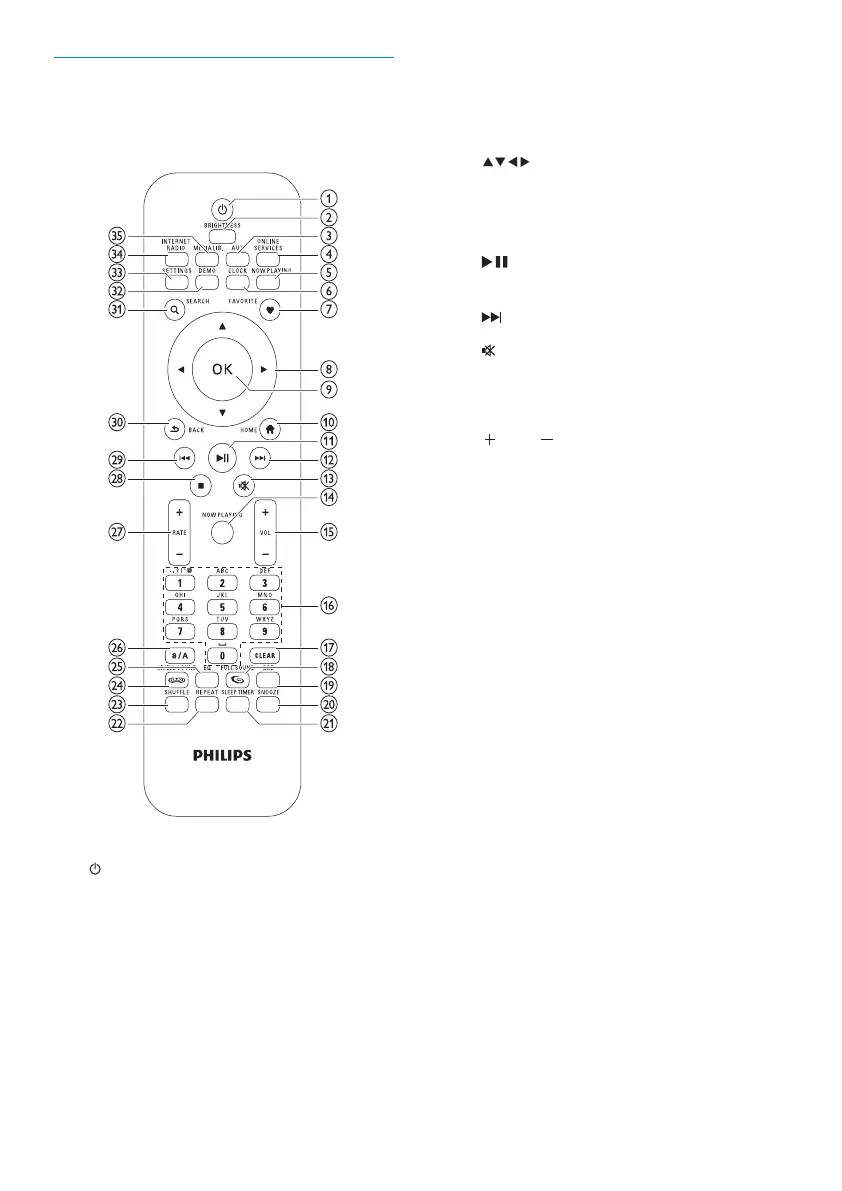
f CLOCK (activate time display)
g FAVORITE (mark current station as
favorite)
h
(navigate)
i OK (conrm)
j HOME (go to Home menu)
k
(play/pause current le / SuperPlay™
current list)
l
(skip to next le)
m
(mute/unmute sound)
n NOW PLAYING (go to current play
screen)
o
VOL (increase/decrease play
volume)
p Alphanumeric buttons
q CLEAR (press to delete last character
entry / press and hold to delete whole
line entry)
r FULLSOUND (activate/deactivate
FullSound™)
s DBB (activate/deactivate Dynamic Bass
Boost)
t SNOOZE (stop alarm sound for 15
minutes)
u SLEEP TIMER (toggle through sleep
timer options)
v REPEAT (toggle through repeat play
options)
w SHUFFLE (activate/deactivate random
order play)
x LIVINGSOUND (deactivate/activate
LivingSound™)
y EQ (toggle through preset equalizer
options)
z a/A (change shift for alphanumeric entry)
Remote control
You can control NP2900 with the remote
control.
a (On / Standby)
b BRIGHTNESS (adjust display
illumination)
c AUX (select external source)
d ONLINE SERVICES (go to optional
online services menu)
e NOW PLAYING (go to current play
screen)
EN











 To Next Page