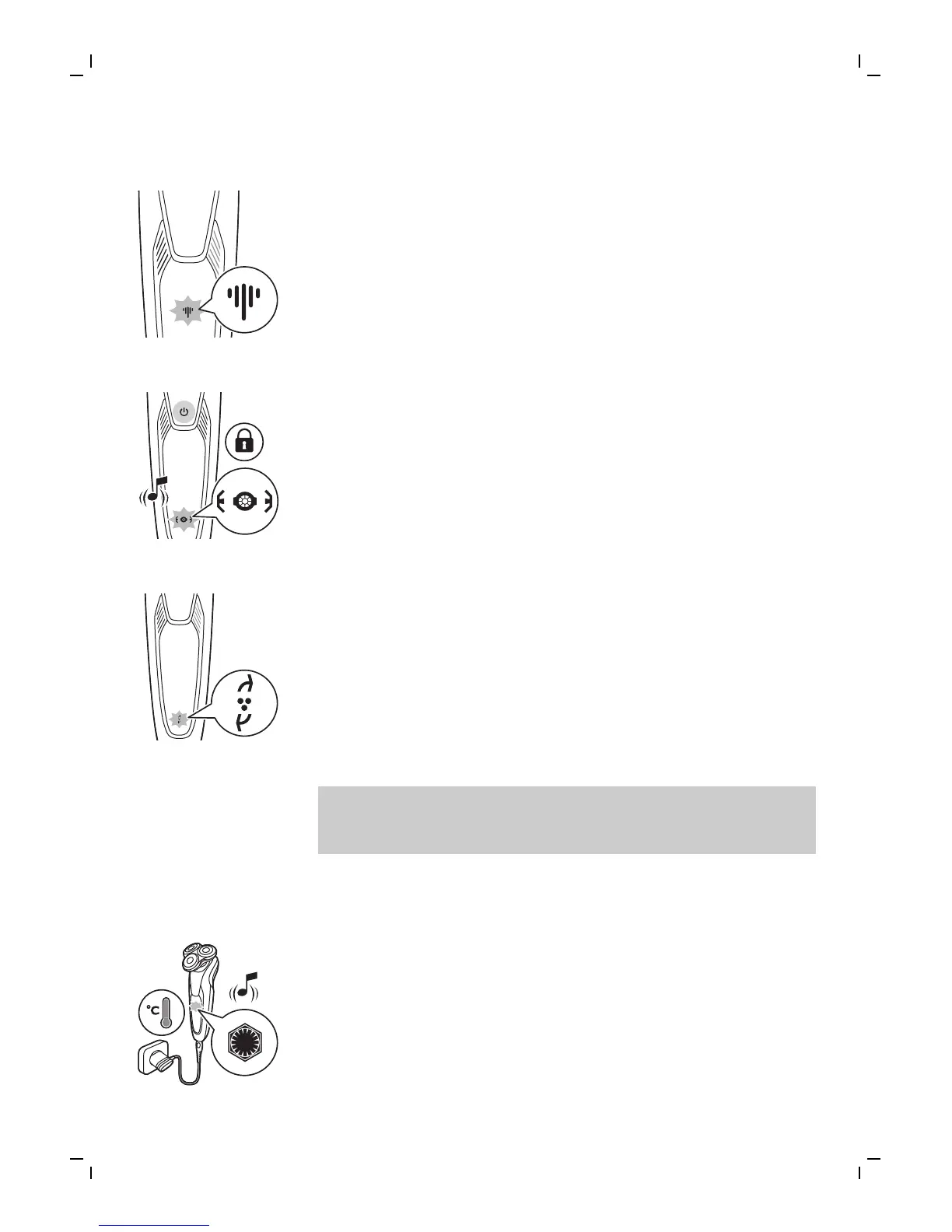
Cleaning reminder
Clean the shaver after every shave for optimal
performance (see 'Cleaning and maintenance').
When you switch off the shaver, the cleaning
reminder flashes to remind you to clean the
shaver.
Travel lock
You can lock the shaver when you are going to
travel. The travel lock prevents the shaver from
being switched on by accident (see 'Activating the
travel lock').
Replacement reminder
For maximum shaving performance, replace the
shaving heads every two years. The shaver is
equipped with a replacement reminder which
reminds you to replace the shaving heads. The
replacement reminder lights up and the arrows
flash to indicate that you have to replace the
shaving heads (see 'Replacing the shaving heads').
Note: After replacing the shaving heads, you need
to reset the replacement reminder by pressing the
on/off button for 7 seconds.
Notification symbol
Overheating
If the shaver overheats during charging, the
notification symbol flashes. When this happens,
the shaver switches off automatically. Charging
continues once the temperature of the shaver has
decreased to the normal level.
11
English



 To Next Page