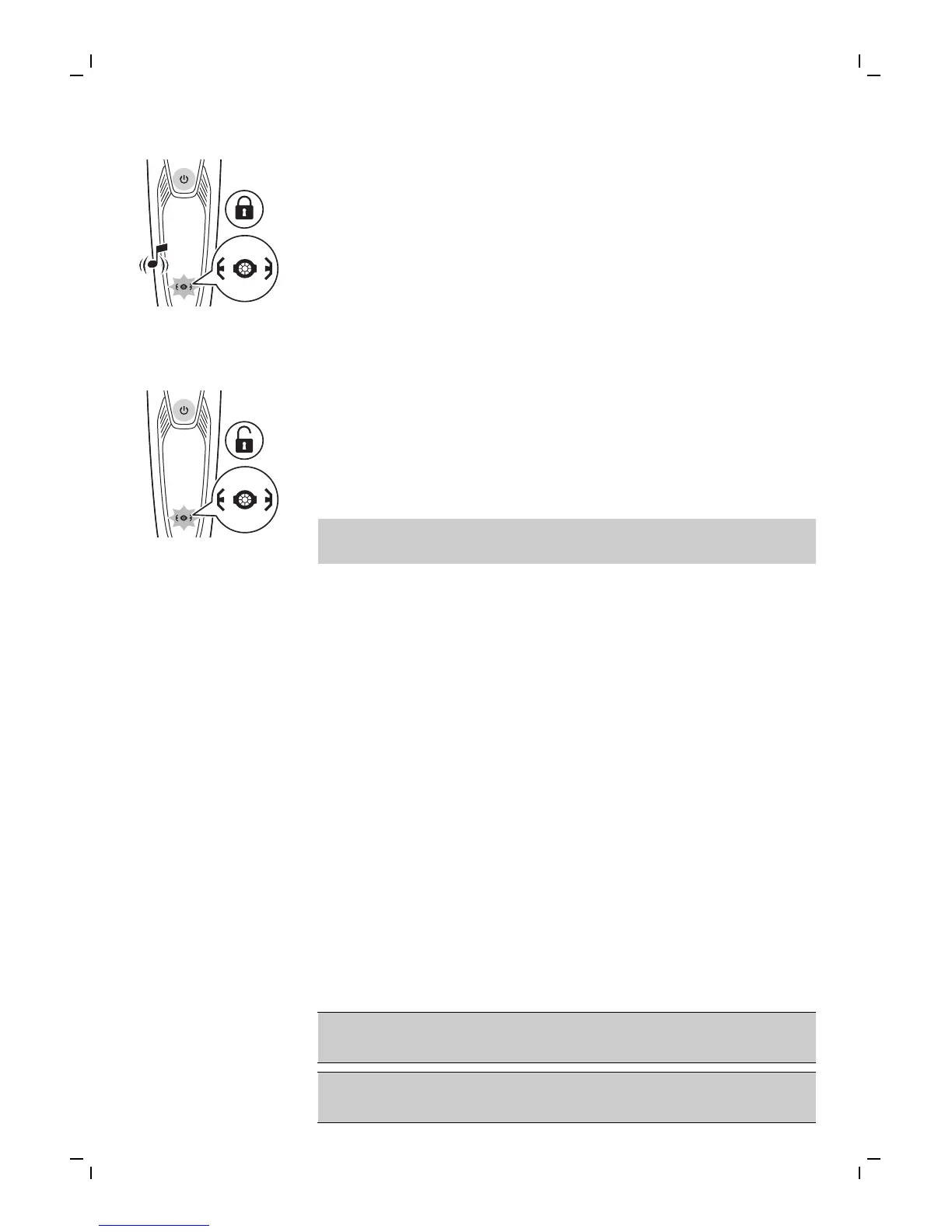
2 While you activate the travel lock, the
indications on the display light up briefly and
the shaver produces a short sound. When the
travel lock is activated, the travel lock symbol
flashes.
Deactivating the travel lock
1 Press the on/off button for 3 seconds.
- While you deactivate the travel lock, the
indications on the display light up briefly. When
the travel lock is deactivated, the travel lock
symbol flashes and the shaver switches on. The
shaver is now ready for use again.
Note: The shaver unlocks automatically when it is
connected to wall socket.
Cleaning and maintenance
- Regular cleaning guarantees better shaving
results.
- Never clean, remove or replace the shaving unit
while the shaver is switched on.
- Do not apply pressure to shaving head combs.
- Do not touch shaving heads with hard objects
as this may dent or damage the precision-made
slotted combs.
- Do not use abrasives, scourers or aggressive
liquids such as gasoline or acetone to clean the
shaver.
Cleaning the shaver under the tap
Clean the shaver after every shave for optimal
performance.
Always check if the water is too hot, to prevent
burning your hands.
Never dry the shaving unit with a towel or tissue,
as this may damage the shaving heads.
17
English



 To Next Page