Need help?
Do you have a question about the Philips TAA7306 and is the answer not in the manual?
Guidelines for listening at reasonable volumes to protect hearing and avoid damage.
Information regarding device usage, care, operating conditions, and potential hazards.
Lists all the items included with the Philips True Wireless earpieces TAA7306.
Details compatible external devices, such as mobile phones and tablets.
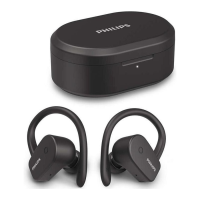
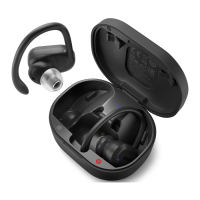
Identifies and describes each component of the Philips TAA7306 earpieces and charging case.
Instructions on how to charge the earpieces and the charging case using the USB cable.
Step-by-step guide to connect the earpieces to a Bluetooth device for the initial use.
Details on how to activate the UV sterilization feature for the earpieces within the charging case.
Instructions for connecting the earpieces to a different Bluetooth device after initial pairing.
Explains how the earpieces automatically reconnect to the last paired Bluetooth device.
Instructions on how to turn the earpieces on and off by taking them out of or placing them in the case.
Details how to control music playback and manage calls using the touch panels on the earpieces.
Explains how the earpieces battery level is displayed on the connected Bluetooth device.
Provides a reference for the meaning of different LED light indications on the earpieces and charging case.
Step-by-step guide to perform a factory reset on the earpieces to clear settings.
Instructions on how to use the heart rate monitor feature and access data via the Philips Headphones App.
Details on how to activate and control the awareness mode for ambient sound passthrough.
Statement declaring the product's compliance with essential requirements and relevant EU directives.
Guidance on the environmentally responsible disposal of the product and its rechargeable battery.
Information on EMF compliance, packaging materials, and their recyclability.
Regulatory compliance statements for FCC (USA) and Canada regarding radio frequency emissions.
Troubleshooting steps for earpieces failing to power on, likely due to low battery.
Guidance on enabling Bluetooth, device selection, and troubleshooting pairing failures.
Procedure to reset the earpieces pairing settings by pressing multi-function buttons.
Solutions for when earpieces are not discoverable by the Bluetooth device, e.g., check previous pairings.
Instructions to configure audio output on the mobile phone to play music through the earpieces.
Tips to improve audio quality, such as reducing distance and removing obstacles between devices.
Checks for mobile phone compatibility with Bluetooth profiles (A2DP) and version for optimal streaming.
Ensures the Bluetooth device supports AVRCP for music playback control like play, pause, and skip.
Addresses low volume issues by suggesting independent volume adjustment on the Bluetooth device.
Troubleshooting steps for connecting to a new device, including disabling previous connections and resetting pairing.
Diagnoses single-ear sound issues, checking battery levels, disconnections, and device pairing.
 General
| Control type | Touch |
|---|---|
| Headset type | Binaural |
| Product type | Headset |
| Product color | Black |
| Wearing style | Ear-hook, In-ear |
| Country of origin | China |
| Recommended usage | Sports |
| Protection features | Dust resistant, Waterproof |
| International Protection (IP) code | IP57 |
| Microphone type | Built-in |
| Battery type | Built-in battery |
| Fast charging | Yes |
| Charging source | USB |
| Fast charging time | 15 min |
| Battery recharge time | 2 h |
| Continuous audio playback time (with charging case) | 24 h |
| Cables included | USB Type-C |
| Accessories included in set | 3 sizes silicone eartips |
| Wireless range | 10 m |
| Bluetooth version | 5.0 |
| Bluetooth profiles | A2DP, AVRCP, HFP, SBC |
| Connectivity technology | Wireless |
| Impedance | 16 Ω |
| Driver unit | 9.2 mm |
| Ear coupling | Intraaural |
| Headphone frequency | 20 - 20000 Hz |
| Maximum input power | 5 mW |
| Headphone sensitivity | 105 dB |
| Master (outer) case width | 225 mm |
| Master (outer) case height | 358 mm |
| Master (outer) case length | 348 mm |
| Master (outer) case weight | 7093 g |
| Harmonized System (HS) code | 85183000 |
| Shipping (inner) case width | 101 mm |
| Shipping (inner) case height | 164 mm |
| Shipping (inner) case length | 160 mm |
| Shipping (inner) case weight | 847 g |
| Quantity per master (outer) case | 24 pc(s) |
| Quantity per shipping (inner) case | 3 pc(s) |
| Package type | Carton |
| Package depth | 50 mm |
| Package width | 95 mm |
| Package height | 170 mm |
| Package weight | 261 g |
| Battery life | 360 min |
 Weight and Dimensions
| Depth | 35 mm |
|---|---|
| Width | 73 mm |
| Height | 53 mm |
| Weight | 80 g |

 To Next Page