EasyManua.ls Logo

Philips TAA5608 - User Manual

Philips TAA5608
16 pages
Print Icon
To Next Page IconTo Next Page
Loading...
TAA5608
5000 Series
Sports
Headphones
User manual
Register your product and get support at:
www.philips.com/support
Question and Answer IconNeed help?

Do you have a question about the Philips TAA5608 and is the answer not in the manual?

Summary

Safety and Operation Guidelines

Hearing Safety

Guidelines for safe listening volumes and avoiding hearing damage.

General Device Precautions

Precautions to avoid damage or malfunction of the headphones.

Environmental Operating Conditions

Recommended temperature and humidity ranges for operating and storing the headphones.

Your Bluetooth Headphones

Package Contents

Lists the items included in the product packaging.

Compatible Devices

Specifies compatible devices for connection.

Headphone Overview

Getting Started with Your Headphones

App Download and Setup

Instructions for downloading and installing the Philips Headphones App.

Battery Charging and Care

How to charge the headphones and battery care tips.

Bluetooth Pairing Procedure

Step-by-step guide to connect headphones to a mobile device via Bluetooth.

Using Your Headphones

Connecting to Bluetooth Devices

Detailed steps to establish a Bluetooth connection.

Multi-point Device Management

Explains pairing and switching between two Bluetooth devices.

Managing Calls and Music Playback

How to control music playback and handle calls using the headphones.

Controls and Indicators

Music and Call Controls

Buttons and operations for music playback and call management.

Headphone Indicator Lights

Describes the meaning of different LED light patterns during operation.

Technical Specifications

Notices and Compliance Information

Declaration of Conformity

Statement of compliance with EU and UK radio equipment regulations.

Product and Battery Disposal

Guidelines for environmentally responsible disposal of the product and battery.

Integrated Battery Removal

Instructions on how to safely remove the built-in battery.

Electromagnetic Field (EMF) Compliance

Product compliance with regulations for electromagnetic field exposure.

Regulatory Compliance Details

Environmental Information

Details about packaging materials and recyclability.

FCC and Canada Compliance

Details on FCC and Canadian radio equipment compliance rules.

Radiation Exposure Statements

Compliance with FCC and Canada radiation exposure limits.

Trademarks and Brand Information

Bluetooth Trademark

Information about Bluetooth trademarks.

Siri Trademark

Information about Siri trademark.

Frequently Asked Questions and Troubleshooting

Power and Connection Troubleshooting

Solutions for headphones not turning on, pairing, or device discovery problems.

Audio Quality and Control Troubleshooting

Fixes for poor audio quality, music control, and volume issues.

Maintenance and Support

Headphone Cleaning Procedure

Instructions for cleaning the headphones to maintain performance.

Battery Maintenance

Reminder to charge headphones periodically to maintain battery health.

Overview

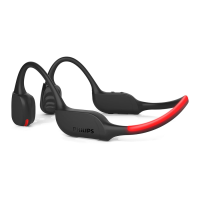
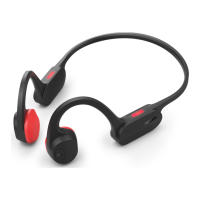
The Philips TAA5608 5000 Series Sports Headphones are wireless Bluetooth headphones designed for active use, offering a blend of audio quality, durability, and user-friendly features. They are ideal for sports enthusiasts and individuals seeking a reliable audio companion for their daily activities.

Function Description:

These headphones provide wireless audio playback and hands-free calling via Bluetooth connectivity. They are designed to be comfortable and secure during physical activity, offering a robust build suitable for sports environments. The headphones allow users to enjoy music, manage calls, and interact with voice assistants wirelessly. The Philips Headphones App enhances the user experience by allowing customization of sound and call settings.
Important Technical Specifications:

  • Model: TAA5608 (5000 Series)
  • Connectivity: Bluetooth 5.3
  • Bluetooth Profiles: HFP (Hands-Free Profile), A2DP (Advanced Audio Distribution Profile), AVRCP (Audio Video Remote Control Profile)
  • Supported Audio Codes: SBC
  • Frequency Range: 2.402-2.480 GHz
  • Transmitter Power: < 10 dBm
  • Operating Range: Up to 10 meters (33 feet)
  • Battery Type: Rechargeable lithium polymer
  • Battery Capacity: 140 mAh
  • Music Time: 6 hours
  • Talk Time: 6 hours
  • Standby Time: 80 hours
  • Charging Time: 2 hours
  • Microphones: 2 AI mics
  • Auto Power Off: Yes
  • Low Battery Warning: Available
  • IP Rating: Not explicitly stated in the provided text, but mentioned as a feature to refer to for specific product. The general information section indicates "Headphones shall not be exposed to dripping or splashing." and "Do not allow your headphones to be submerged in water."
  • Operating Temperature: 0°C (32°F) to 45°C (113°F) with up to 90% relative humidity.
  • Storage Temperature: -20°C (-4°F) to 50°C (122°F) with up to 90% relative humidity.

Usage Features:

  • Wireless Convenience: Enjoy music and calls without the hassle of cables, ideal for sports and on-the-go use.
  • Hands-Free Calling: Integrated microphones allow for clear phone conversations.
  • Music Control: Easily play/pause music, adjust volume, and skip tracks using dedicated buttons on the headphones.
  • Call Management: Answer, hang up, reject calls, and switch between callers with simple button presses.
  • Multi-Function Button (MFB): A single button for various controls, including power on/off and call management.
  • Volume Control: Dedicated Volume + and Volume - buttons for easy audio adjustment.
  • Type C Charging: Utilizes a Type C charging slot for convenient and modern charging.
  • Bluetooth Pairing: Simple pairing process with mobile phones and other Bluetooth devices. The headphones can store up to 4 paired devices and automatically reconnect to the last connected device.
  • Multi-point Connection: Allows pairing with two devices simultaneously (e.g., mobile phone and notebook), enabling seamless switching between music and calls from different sources.
  • LED Indicators: Visual cues for various statuses, including charging, pairing mode, connection status, and low battery.
  • Running Light: Features a running light with slow breathing, fast blinking, constant on, and constant off modes, likely for visibility during outdoor activities.
  • Philips Headphones App: Enhances the user experience by allowing customization of sound and call settings, accessible via QR code, 'Download' button, or by searching 'Philips Headphones' in app stores.
  • Automatic Power Off: If the headphones fail to connect to any Bluetooth device within range for 5 minutes, they will automatically switch off to conserve battery life.

Maintenance Features:

  • Regular Cleaning: It is recommended to regularly clean the headphones, especially the sound conduits and microphone holes, with a clean, damp cloth to prevent buildup of sweat or earwax. Avoid using alcohol, ammonia, benzene, or abrasive cleaning agents.
  • Drying After Use: If sweat or water droplets are present in the sound conduits or microphone holes, dry the headphones thoroughly with a soft, damp cloth. For internal moisture, remove earbud tips, turn sound conduits downward, and gently tap the headphones about five times on a dry cloth to remove collected water. Ensure headphones are completely dry before charging or using.
  • Battery Care: To maintain battery life, fully charge the rechargeable battery at least once every three months if the headset is not used for a long time.
  • Charging Guidelines: Use only the original USB-C charging cable to prevent damage. Avoid charging when the connector or socket is wet.
  • Battery Disposal: The integrated battery should be removed and recycled professionally before disposing of the headphones, especially if no local collection/recycling system for electronic products exists.
  • Environmental Information: The product is designed with recyclable and reusable materials. Users are encouraged to observe local regulations for the disposal of packaging materials, exhausted batteries, and old equipment.

Philips TAA5608 Specifications

General IconGeneral
BrandPhilips
ModelTAA5608
CategoryHeadphone
LanguageEnglish

Related product manuals