EasyManua.ls Logo

Philips TAN7506 - User Manual

Philips TAN7506
14 pages
Print Icon
To Next Page IconTo Next Page
Loading...
User manual
Register your product and get support at
www.philips.com/support
Headphones
TAN7506
7000 Series

Questions and Answers

Overview

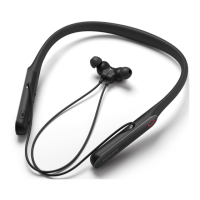
The Philips 7000 Series TAN7506 are Bluetooth wireless headphones designed for convenient hands-free calls and wireless music enjoyment. They feature active noise cancellation (ANC) and are compatible with the Philips Headphones App for enhanced functionality.

Function Description:

These headphones allow users to:

  • Enjoy convenient wireless hands-free calls.
  • Listen to and control wireless music.
  • Switch seamlessly between calls and music.
  • Utilize Active Noise Cancellation (ANC) to reduce ambient noise.
  • Access a Voice Assistant.
  • Engage a "Busy mode" to signal unavailability.
  • Connect to a mobile phone or computer via Bluetooth.

Important Technical Specifications:

  • Battery: Rechargeable lithium polymer battery (200 mAh).
  • Music Time:
    • ANC enabled with Bluetooth: 15 hours.
    • ANC disabled with Bluetooth: 20 hours.
  • Talk Time: 20 hours.
  • Standby Time: ANC disabled with Bluetooth: 150 hours.
  • Charging Time: 2 hours (full charge).
  • Bluetooth Version: 5.0.
  • Compatible Bluetooth Profiles:
    • HFP (Hands-Free Profile-HFP).
    • A2DP (Advanced Audio Distribution Profile).
    • AVRCP (Audio Video Remote Control Profile).
  • Supported Audio Codec: SBC.
  • Frequency Range: 20-20,000 Hz (Bluetooth).
  • Transmitter Power: < 10 dBm.
  • Operating Range: Up to 10 meters (33 feet).
  • Digital Echo & Noise Reduction: Yes.
  • Auto Power Off: Yes.
  • Charging Port: USB-C.
  • Water Resistance: IP54.
  • Operating Temperature: 0°C (32°F) to 40°C (104°F).
  • Storage Temperature: -10°C (14°F) to 45°C (113°F).
  • Operating Humidity: 8% - 90% RH (No condensation).
  • Storage Humidity: 5% - 90% RH (No condensation).
  • Maximum Operating Altitude: 3000m.

Usage Features:

  • Power On/Off and Pairing:
    • Press and hold the power button (⑥) for 2 seconds to turn on (blue LED on for 3s).
    • Press and hold the power button (⑥) for 2 seconds to turn off (blue LED flashes 1s and fades out).
    • For pairing, press and hold the power button (⑥) for 5 seconds until white and blue LEDs flash alternately (remains in pairing mode for 2 minutes).
  • Charging: Connect the supplied USB-C charging cable to the USB-C charging slot (⑨) on the headphones and a charger/USB port of a computer. The LED indicator (①) turns white during charging and turns off when fully charged.
  • Music Control:
    • Play or pause music: Press the power button (⑥) once.
    • Adjust volume: Press +/- (③/⑦) once.
    • Next track: Long press + (⑦) for 1s.
    • Previous track: Long press - (③) for 1s.
  • Call Control:
    • Pick up a call: Press the power button (⑥) once.
    • Hang up a call: Press the power button (⑥) twice.
    • Switch caller during a call: Press the power button (⑥) once.
  • Active Noise Cancellation (ANC):
    • ANC ON: Press the ANC button (②) once.
    • ANC OFF: Press the ANC button (②) once.
    • Ambient Sound: Press the ANC button (②) once.
  • Voice Assistant: Touch and hold the Voice Assistant touch panel (⑧).
  • Busy Mode: Press both Volume + (⑦) and Volume - (③) simultaneously for 3 seconds to turn the Red LEDs on/off. A red LED flashes when on a call.
  • Quick Awareness: Touch the Quick awareness touch panel (⑩).
  • Connectivity to Computer: Plug the USB dongle into the computer (with USBC or USBA converter). The dongle will have a solid blue LED when connected. To reconnect, either plug out and plug in the dongle or press the button on the dongle once.
  • Automatic Reconnection: Headphones automatically reconnect to the last connected mobile phone/Bluetooth device when turned on.
  • Auto Power Off: If the headphones fail to connect to any Bluetooth device within range in 5 minutes, they will switch off automatically to save battery life (when ANC is off or in idle mode).

Maintenance Features:

  • Cleaning: Use a soft cloth, if necessary dampened with a minimum amount of water or diluted mild soap, to clean the product. Avoid cleaning agents containing alcohol, ammonia, benzene, or abrasives.
  • Battery Care:
    • Charge the battery for 2 hours before first use for optimum battery capacity and lifetime.
    • The integrated battery shall not be exposed to excessive heat (sunshine, fire, etc.).
    • Do not dispose of the battery into fire or a hot oven, or mechanically crush or cut it, as this can result in an explosion.
    • Avoid leaving the battery in extremely high or low temperature environments.
    • The integrated battery is covered by European Directive 2013/56/EU and should not be disposed of with normal household waste. It should be taken to an official collection point or a Philips service center for professional removal and recycling.
  • Storage: Store within the specified temperature and humidity ranges to ensure optimal performance and battery life.
  • Ear Caps: Replaceable rubber ear caps (x3 pairs) are included for hygiene and fit.
  • Environmental Information: The product is designed with high-quality materials and components that can be recycled and reused. Packaging materials (cardboard, polystyrene foam, polyethylene) are also designed for easy separation and recycling.

Philips TAN7506 Specifications

General IconGeneral
BrandPhilips
ModelTAN7506
CategoryElectric Shaver
LanguageEnglish

Related product manuals