EN12
Google Voice Assistant
Just start with "OK Google", then ask it questions
or tell it to do things like this:
"Play some jazz"
"Turn up the volume"
"Set a 13 minute timer for pizza"
"Do I need an umbrella today?"
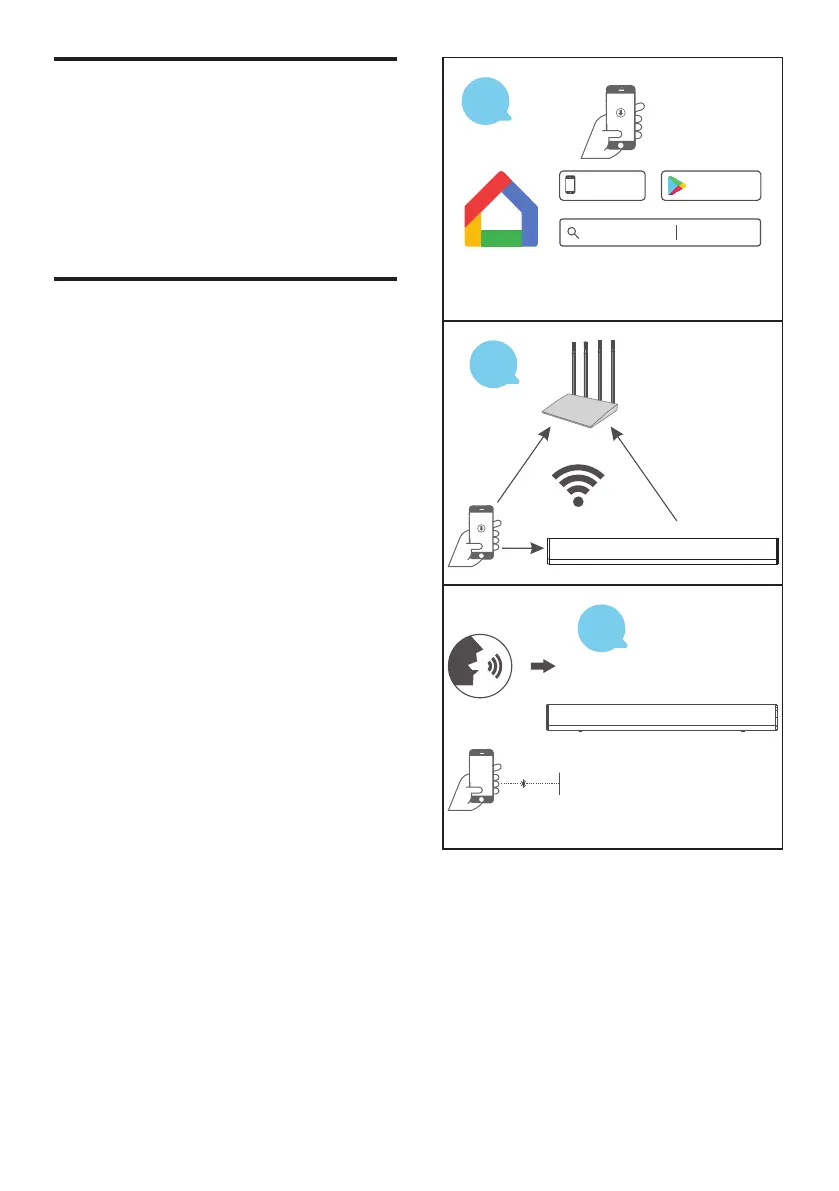
Google Chromecast Built-in
Follow the three steps below to enjoy this
feature:
1. Connect a phone or tablet to the same
Wi-Fi network as your speaker using the
Google Home App.
2. Cast podcasts, music, and more from 100+
Chromecast-enabled apps. Tap the Cast
button in a Chromecast-enabled app to play.
3. Tap the Cast button in a Chromecast-
enabled app to play music on your speaker.
Google Home
Google Play
GET IT ON
App Store
Available on the
Download and run the Google Home app on a Phone
or tablet. Set up your device in the Google Home app.
STEP
1
STEP
2
STEP
3
Pair with any Bluetooth device


 To Next Page