Need help?
Do you have a question about the Philips TAR3306/05 and is the answer not in the manual?
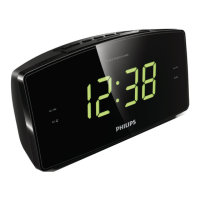
This document describes the Philips 3000 Series Clock Radio, model R3306, a versatile device designed to provide timekeeping, alarm functions, and FM radio listening in a compact form factor. The clock radio is intended for general household use and offers a range of features to enhance daily routines.
The Philips Clock Radio primarily functions as a time display and an alarm clock. It features a clear digital display that shows the current time, making it easy to read at a glance. Beyond basic timekeeping, it integrates an FM radio tuner, allowing users to listen to their favorite radio stations. The device supports both automatic and manual tuning for FM frequencies, providing flexibility in finding and storing stations. A key feature is its dual alarm capability, enabling users to set two separate alarms to ring at different times, catering to various schedules or for two different users. The alarm source can be set to either FM radio or a buzzer, offering a personalized wake-up experience. For those who prefer to drift off to sleep with music, a sleep timer function is included, which automatically switches the clock radio to standby mode after a user-defined period. The device also incorporates a snooze function, providing a brief delay before the alarm rings again, a common and appreciated feature in alarm clocks.
Getting started with the clock radio involves a few simple steps. First, batteries (2 AAA, not provided) need to be installed to back up the clock and alarm settings, ensuring that time and alarm configurations are retained even during power outages. After battery installation, the device is connected to a wall outlet using the provided power adapter. Setting the time is straightforward, performed in standby mode by pressing and holding the "SET TIME" button, then using the "HR" and "MIN" buttons to adjust the hour and minute, respectively, followed by a confirmation.
For FM radio listening, the process begins by turning on the clock radio. Users can tune to FM stations either automatically or manually. Automatic tuning involves pressing and holding the "TUN" button, which scans and stops at stations with strong reception. Manual tuning allows for precise frequency selection by repeatedly pressing "TUN". The clock radio offers the convenience of storing up to 20 FM radio stations as presets. This can be done automatically by pressing and holding "SCAN" for more than two seconds, which scans and stores all available stations, broadcasting the first one. Alternatively, stations can be stored manually by tuning to a desired station, then pressing and holding "PRESET" to enter programming mode, selecting a preset number, and confirming. Once stations are stored, selecting a preset is as simple as repeatedly pressing "PRESET" or using "PRESET" followed by "TUN" to navigate through the stored stations. The volume can be adjusted during listening by pressing the "VOL+" or "VOL-" buttons.
Setting an alarm is done in standby mode by pressing and holding either "AL1" or "AL2" for two seconds, then adjusting the hour and minute using "HR" and "MIN", and confirming. The alarm source can be chosen between FM radio or a buzzer by pressing "AL1" or "AL2" in standby mode, with a corresponding alarm icon lighting up. Alarms can be activated or deactivated by repeatedly pressing "AL1" or "AL2", indicated by the alarm indicator turning on or off. When an alarm sounds, pressing "SNOOZE" will temporarily silence it for 9 minutes. To stop an alarm completely, the corresponding "AL1" or "AL2" button should be pressed. The sleep timer function is activated by repeatedly pressing "SLEEP" to select a desired duration (e.g., 120, 90, 60, 30, 15 minutes), after which the clock radio will automatically switch to standby. To deactivate the sleep timer, "SLEEP" is pressed until "OFF" appears. The display brightness can also be adjusted to different levels (High, Medium, Low) by repeatedly pressing the "BRIGHTNESS" button, allowing users to customize visibility according to their preference.
The user manual emphasizes several important safety and maintenance guidelines to ensure the longevity and proper functioning of the Philips Clock Radio. Users are advised to read and heed all warnings and instructions, particularly regarding ventilation, heat sources, and power cord protection. It is crucial not to block any ventilation openings and to install the device away from heat sources. The power cord should be protected from being walked on or pinched. Only attachments and accessories specified by the manufacturer should be used. The apparatus should be unplugged during lightning storms or when unused for long periods. Servicing should be referred to qualified personnel if the apparatus is damaged in any way, such as a damaged power-supply cord, liquid spills, or exposure to moisture.
Regarding battery usage, caution is advised to prevent leakage. Batteries must be installed correctly with the proper polarity (+ and -) and removed if the unit is not used for a long time. Batteries should not be exposed to excessive heat, sunshine, or fire, and should be disposed of properly due to their chemical substances. The clock radio should not be exposed to dripping or splashing, and no liquid-filled objects or lighted candles should be placed on it. For optimal radio reception, the clock radio should be kept away from other electronic devices to avoid interference, and the FM antenna should be fully extended and adjusted.
In case of troubleshooting, the manual provides guidance for common issues. If there is no power, users should ensure the AC power plug is properly connected and that there is power at the AC outlet. For no sound, adjusting the volume is the first step. If the unit is unresponsive, disconnecting and reconnecting the AC power plug, then turning it on again, is recommended. Poor radio reception can often be improved by moving the clock radio away from other electronic devices and adjusting the antenna. If the alarm does not work, users should check if the clock and alarm are set correctly. If clock or alarm settings are erased, it indicates a power interruption or disconnected power plug, and users should reset the clock/alarm and replace the backup batteries. The manual explicitly warns against removing the casing of the product to maintain warranty validity and advises contacting Philips support if problems persist, ensuring to have the device's model and serial number available.
 General
| Brand | Philips |
|---|---|
| Model | TAR3306/05 |
| Category | Clock Radio |
| Display Type | LED |
| Radio Tuner | FM |
| Alarm Function | Yes |
| Alarm Type | Buzzer, Radio |
| Snooze Function | Yes |
| Sleep Timer | Yes |
| Preset Stations | 20 |
| Backup Battery | Yes |
| Battery Type | AA |
| Power Source | AC |


 To Next Page