EasyManua.ls Logo

Philips TAR3205/05 - User Manual

Philips TAR3205/05
10 pages
Print Icon
To Next Page IconTo Next Page
Loading...
Register your product and get support at
www.philips.com/support
User manual
Clock Radio
3000 Series
R3205
Question and Answer IconNeed help?

Do you have a question about the Philips TAR3205/05 and is the answer not in the manual?

Overview

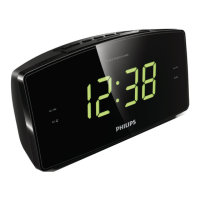
This document is the user manual for the Philips 3000 Series Clock Radio, model R3205. It provides instructions for setup, operation, and troubleshooting of the device.

Function Description

The Philips 3000 Series Clock Radio is a compact device designed to provide timekeeping, alarm, and FM radio functionalities. Its primary functions include:

  • Time Display: Shows the current time on a digital display.
  • FM Radio: Allows users to tune into and listen to FM radio stations.
  • Dual Alarms: Features two independent alarms that can be set to ring at different times.
  • Snooze Function: Provides a temporary pause for the alarm, allowing for a short additional sleep period.
  • Sleep Timer: Enables the radio to play for a set duration before automatically switching to standby mode.
  • Battery Backup: Uses AAA batteries to back up clock and alarm settings in case of power interruption.

Important Technical Specifications

Amplifier:

  • Rated Output Power: 200mW RMS

Tuner (FM):

  • Tuning Range: 87.5-108 MHz
  • Tuning Grid: 50 KHz
  • Sensitivity (Mono, 26 dB S/N Ratio): <22 dBf
  • Total Harmonic Distortion: <3%
  • Signal to Noise Ratio: >50 dBA

General Information:

  • AC Power (power adaptor):
    • Brand: Philips
    • Model: DCTO7W050060ZZ-H0
    • Input: 100-240V~, 50/60 Hz; 0.25A
    • Output: 5V = 0.6A
  • Operation Power Consumption: <3 W
  • Standby Power Consumption: <1 W
  • Dimensions (W x H x D): 131 x 54 x 131 mm
  • Weight (Main unit): 198.9 g
  • Batteries: Requires 2 AAA batteries (not provided) for backup.

Usage Features

Getting Started:

  • Battery Installation: Insert 2 AAA batteries with correct polarity for clock and alarm setting backup.
  • Power Connection: Connect the AC power adaptor to the unit and a wall socket. Ensure the power voltage matches the device's requirements.
  • Setting Time: In standby mode, press and hold SET TIME for 2 seconds, then use HR and MIN to adjust the hour and minute, and press SET TIME again to confirm.

Listening to FM Radio:

  • Turning On/Off: Press the power button to turn on the clock radio.
  • Tuning to Stations:
    • Automatic Tuning: Press and hold TUN for 2 seconds to automatically tune to stations with strong reception.
    • Manual Tuning: Press TUN repeatedly to select a specific frequency. The tuning grid increases by 0.1MHz for every two presses.
  • Storing Preset Stations:
    1. Tune to an FM radio station.
    2. Press and hold PRESET for 2 seconds until the preset number blinks.
    3. Use TUN to select a preset number (up to 10 stations can be stored).
    4. Press PRESET again to confirm.
  • Selecting Preset Stations: In FM tuner mode, press PRESET repeatedly to cycle through stored stations.
  • Adjusting Volume: Use - VOL + buttons to adjust the listening volume.

Alarm Features:

  • Setting Alarm Time:
    1. In standby mode, press and hold AL1 or AL2 for 2 seconds.
    2. Use HR and MIN to set the hour and minute.
    3. Press AL1 or AL2 again to confirm.
    • Note: Alarm can only be set in standby mode, and the clock must be set correctly.
  • Selecting Alarm Source: Press AL1 or AL2 in standby mode to choose between FM radio or buzzer as the alarm sound. The corresponding alarm icon will light up. The gentle wake-up function is designed for FM radio source only.
  • Activating/Deactivating Alarm: Press AL1 or AL2 repeatedly to toggle the alarm on or off. The alarm indicator turns on when activated and off when deactivated.
  • Snooze Function: When the alarm sounds, press SNOOZE. The alarm will pause for 9 minutes and then ring again.
  • Stopping Alarm: To stop the alarm from ringing, press the corresponding AL1 or AL2 button. The alarm will repeat the next day.

Sleep Timer:

  • Setting Sleep Timer: Press SLEEP repeatedly to select a desired period (120, 90, 60, 30, or 15 minutes). The radio will play for the selected duration and then automatically switch to standby.
  • Deactivating Sleep Timer: Press SLEEP repeatedly until [OFF] appears on the display.

Maintenance Features

General Care:

  • Casing: Never remove the casing of the clock radio.
  • Lubrication: Do not lubricate any part of the clock radio.
  • Placement: Avoid placing the clock radio on other electrical equipment, in direct sunlight, near naked flames or heat sources (radiators, heat registers, stoves, amplifiers), or where it could be exposed to dripping or splashing. Do not place liquid-filled objects or lighted candles on the unit.
  • Ventilation: Do not block any ventilation openings.
  • Power Cord: Protect the power cord from being walked on or pinched. Ensure easy access to the power cord/plug/adaptor for disconnection.
  • Cleaning: Refer all servicing to qualified service personnel.

Battery Maintenance:

  • Correct Installation: Install all batteries correctly (+ and - as marked).
  • Removal: Remove batteries when the unit is not used for a long time to prevent leakage.
  • Disposal: Batteries contain chemical substances and should be disposed of properly. Do not expose batteries to excessive heat (sunshine, fire, etc.).

Troubleshooting:

  • No Power:
    • Ensure the AC power plug is properly connected.
    • Verify there is power at the AC outlet.
  • No Sound:
    • Adjust the volume.
  • No Response from Unit:
    • Disconnect and reconnect the AC power plug, then turn the unit on again.
  • Poor Radio Reception:
    • Keep the clock radio away from other electronic devices.
    • Fully extend and adjust the position of the FM antenna.
  • Alarm Not Working:
    • Set the clock/alarm correctly.
  • Clock/Alarm Setting Erased:
    • This may occur if power has been interrupted or the power plug disconnected. Reset the clock/alarm.

Environmental Notice:

  • Disposal: The product is designed with high-quality materials and components that can be recycled and reused. Do not dispose of the product or batteries with normal household waste. Deliver them to an appropriate collection facility for recycling, following local rules. This helps prevent negative consequences for the environment and human health.
  • Battery Removal: To remove disposable batteries, refer to the battery installation section.

Philips TAR3205/05 Specifications

General IconGeneral
BrandPhilips
ModelTAR3205/05
CategoryClock Radio
LanguageEnglish

Related product manuals