EasyManua.ls Logo

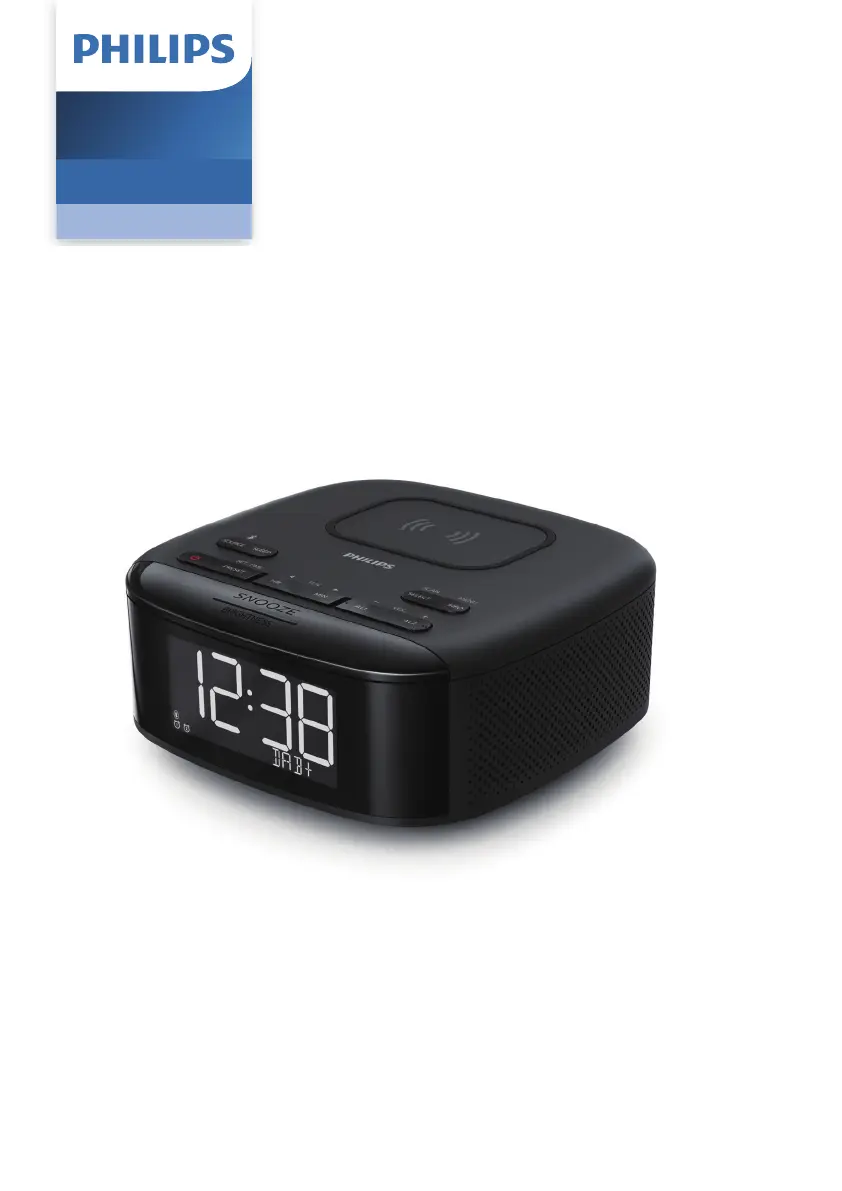
Philips TAR7705/98 - User Manual

Philips TAR7705/98
14 pages
Print Icon
To Next Page IconTo Next Page
Loading...
Register your product and get support at
www.philips.com/support
User manual
Clock Radio
7000 Series
R7705

Questions and Answers

Summary

Important

Safety

General safety precautions and warnings for operating the clock radio, including handling batteries and avoiding hazards.

Get Started

Install Batteries

Instructions on how to insert backup batteries for clock and alarm settings.

Connect Power

Guidance on connecting the clock radio to a power source using the AC adapter.

Set Time

Step-by-step instructions for setting the current time and date on the clock radio.

Listen to DAB+ Radio

Tune to DAB+ Radio Stations

Steps to tune into available DAB+ radio stations and navigate the station list.

Listen to FM Radio

Tune to FM Radio Stations

Guide on tuning into FM radio stations, including automatic and manual tuning methods.

Bluetooth

Play from Bluetooth Enabled Devices

Instructions for pairing and playing audio from Bluetooth-enabled devices.

Other Features

Troubleshooting

No Power Issues

Solutions for when the clock radio does not turn on, checking power connections.

No Sound Issues

Troubleshooting steps for when there is no audio output from the unit.

Unit Unresponsive

Steps to take if the clock radio does not respond to button presses or commands.

Poor Radio Reception

Tips to improve FM/DAB+ radio signal quality and reduce interference.

Alarm Malfunction

Solutions for when the alarm feature is not working as expected.

Summary

Important

Safety

General safety precautions and warnings for operating the clock radio, including handling batteries and avoiding hazards.

Get Started

Install Batteries

Instructions on how to insert backup batteries for clock and alarm settings.

Connect Power

Guidance on connecting the clock radio to a power source using the AC adapter.

Set Time

Step-by-step instructions for setting the current time and date on the clock radio.

Listen to DAB+ Radio

Tune to DAB+ Radio Stations

Steps to tune into available DAB+ radio stations and navigate the station list.

Listen to FM Radio

Tune to FM Radio Stations

Guide on tuning into FM radio stations, including automatic and manual tuning methods.

Bluetooth

Play from Bluetooth Enabled Devices

Instructions for pairing and playing audio from Bluetooth-enabled devices.

Other Features

Troubleshooting

No Power Issues

Solutions for when the clock radio does not turn on, checking power connections.

No Sound Issues

Troubleshooting steps for when there is no audio output from the unit.

Unit Unresponsive

Steps to take if the clock radio does not respond to button presses or commands.

Poor Radio Reception

Tips to improve FM/DAB+ radio signal quality and reduce interference.

Alarm Malfunction

Solutions for when the alarm feature is not working as expected.

Philips TAR7705/98 Specifications

General IconGeneral
BrandPhilips
ModelTAR7705/98
CategoryClock Radio
TypeDigital
Display TypeLED
Alarm FunctionYes
Preset Stations20
Battery BackupYes
Snooze functionYes
Sleep timerYes
USB ChargingYes
Radio TypeFM
Power SourceAC

Related product manuals