3 EN
2
Your clock radio
Congratulations on your purchase, and
welcome to Philips! To fully benefit from the
support that Philips oers, register your product
at www.philips.com/support.
Introduction
With this clock radio, you can
What's in the box
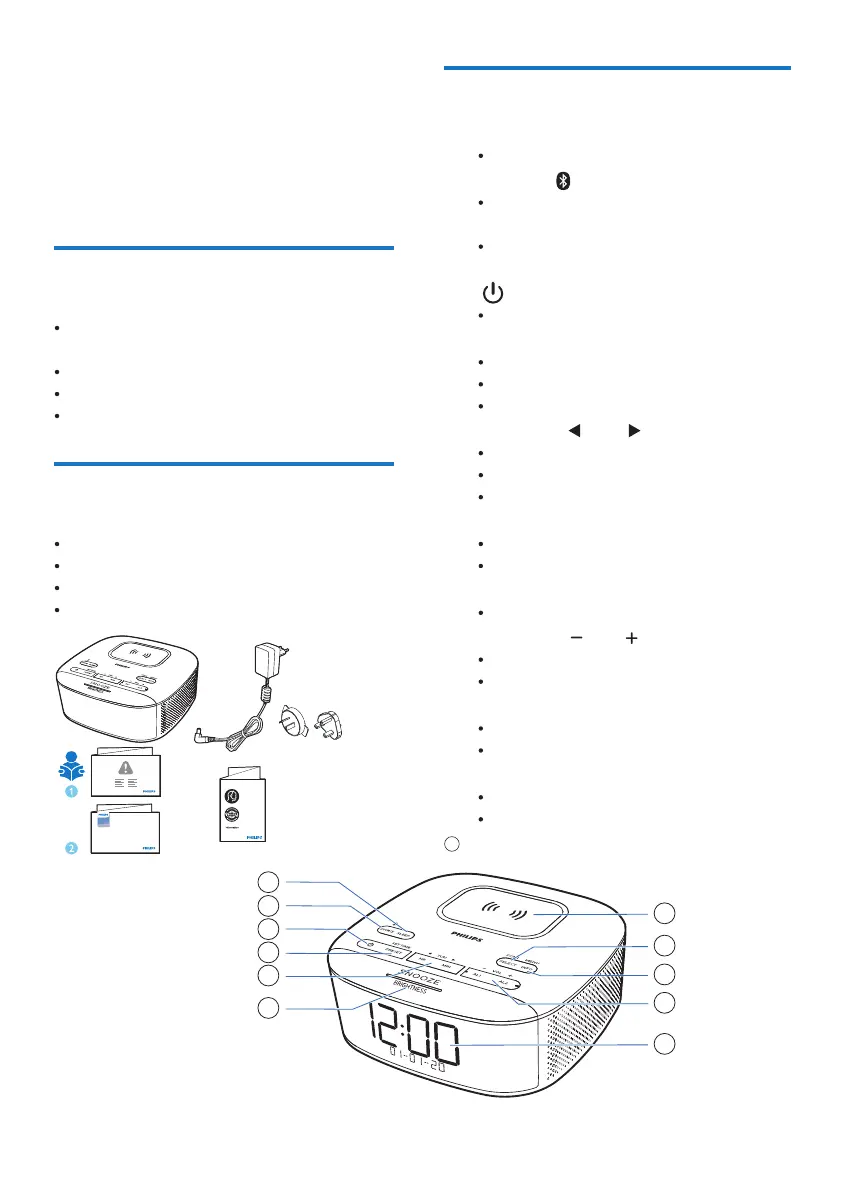
Check and identify the contents of your package:
Main unit
AC power adaptor
Quick start guide
Safety and Warranty leaflet
Quick start guide
R3205
Clock Radio
3000 Series
Overview of the clock radio
①
SLEEP
Set the sleep timer.
②
SOURCE
Press to select FM, DAB+, or Bluetooth
mode.
In Bluetooth mode, press and hold for more
than 2 seconds to enter pairing mode.
③
Turn on or switch to standby.
④
PRESET / SET TIME
Store radio stations in memory.
Select a preset FM station or DAB station.
Set time.
⑤
HR / MIN / TUN
Tune to radio stations.
Set hour and minute.
Skip to the previous/next track.
⑥
SNOOZE / BRIGHTNESS
Snooze alarm.
Adjust display brightness.
⑦
Display panel
Display current status.
⑧
AL1 / AL2 / VOL
Set alarm.
Adjust volume.
⑨
MENU / INFO
Enter the DAB+ menu.
Display DAB+/RDS station information.
⑩
SCAN / SELECT
Scan/store radio stations automatcially.
Confirm a selection.
Wireless charging pad
11
listen to both FM and Digital Audio
Broadcasting (DAB+) radio;
play audio from Bluetooth-enabled devices;
set two alarms to ring at dierent times;
charge your mobile device with the wireless
phone charger or USB.



 To Next Page