EN
2
Important for the United Kingdom
This apparatus is fitted with an approved moulded 10
Amp plug. To change a fuse in this type of plug pro-
ceed as follows:
1.
1.Remove fuse cover and fuse.
2.
2.Fix new fuse which should be a
BS1362 3A,ASTA or BSI approved type.
3.
3.Refit the fuse cover.
If the fitted plug is not suitable for your socket outlets,
it should be cut off and an appropriate plug fitted in its
place.
If the mains plug contains a fuse, this should have a
value of 3A. If a plug without a fuse is used, the fuse at
t
he distribution board should not be greater than 3A.
How to connect a plug:
The wires in the mains lead are coloured in accor-
dance with the following code:
BLUE- 'NEUTRAL' ('N')
BROWN- 'LIVE' ('L')
4.
4.The BLUE wire must be connected to the terminal
which is marked with the letter 'N' or coloured
BLACK.
5.
5.The BROWN wire must be connected to the termi-
nal which is marked with the letter 'L' or coloured
RED.
6.
6.Do not connect either wires to the earth terminai in
the plug which is marked with the letter 'E' or by
the safety earth symbol
or coloured green or
green-and-yellow.
Before replacing the plug cover, make certain that the
cord grip is clamped over the sheath of the lead-not
imply over the two wires.
Preparing the remote control for
operation
The remote control and its batteries are packed separate-
ly in the original video recorder packaging. You must
install the batteries in the remote control before use.
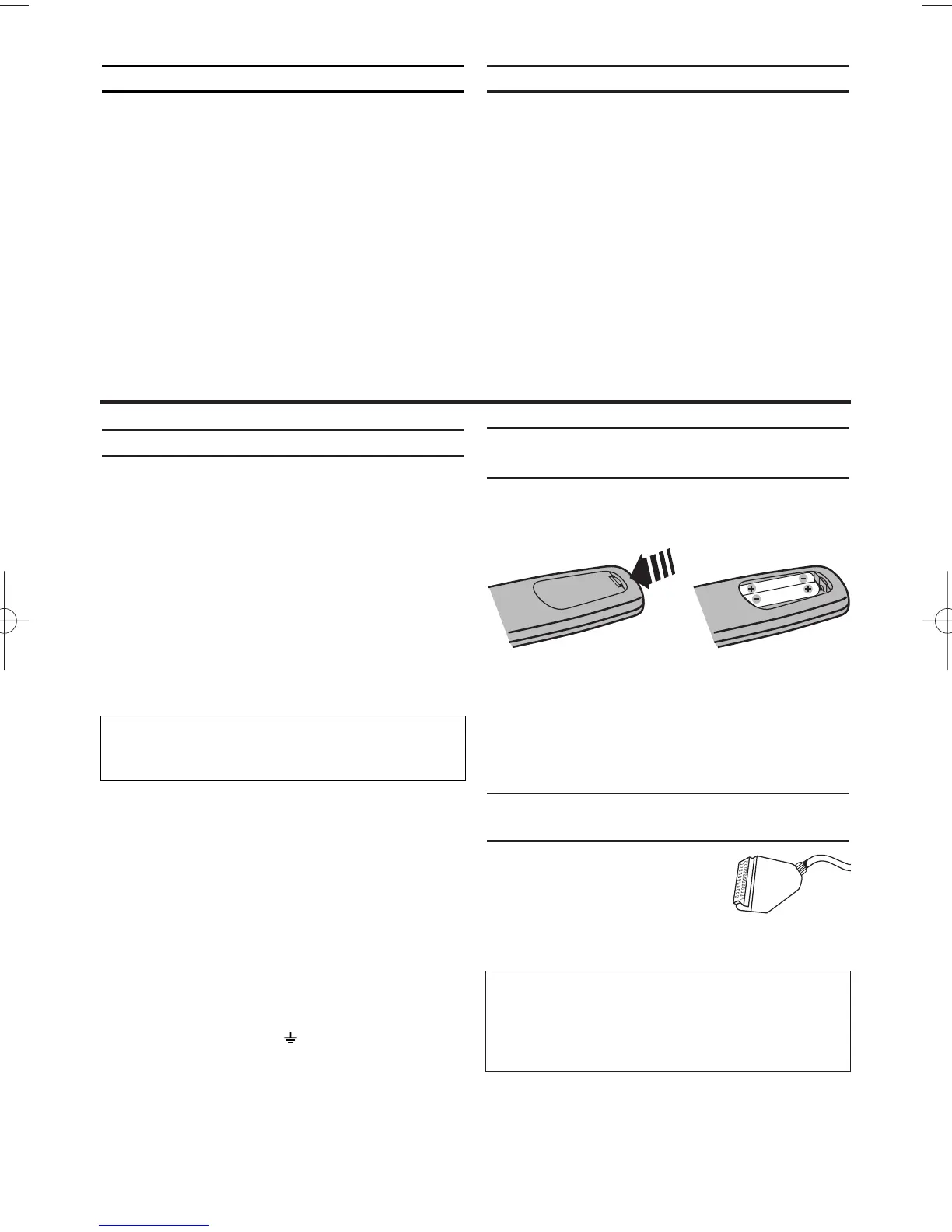
1.
1.Take the remote control and the enclosed batteries
(2 batteries).
2.
2.Open the remote control's battery compartment
and place the batteries in it as shown in the picture
and close the battery compartment.
The remote control is now ready to use. Its range is
approximately 5 metres.
Connecting your video recorder to the
TV set
The necessary cable connections
must be made before you can record
or playback TV programmes using
your video recorder.
We recommend that you use a scart
cable to connect your TV and video recorder.
Specifications
Voltage: 220-240V/50Hz
Power consumption : 20W
Power consumption (Standby): less than 3W
(PWR. in the display switched off)
Rewind time:
approx. 70 seconds (cassette E-180)
Dimensions in cm (WxDxH): 36.0x22.6x9.2
Number of video heads : 4
Number of video heads (HIFI): 2
Recording/playback time:
3 hours (SP) (cassette E-180)
6 hours (LP) (cassette E-180)
Supplied accessories
• Operating instructions
• Remote control and batteries
• Aerial Cable
1. Connecting the video recorder
What is a scart cable?
The scart or Euro AV cable serves as the universal
connector for picture, sound and control signals. With
this type of connection, there is practically no loss of
quality during the picture or sound transfer.
The severed plug must be destroyed to avoid a possi-
ble shock hazard should it be inserted into a 13A
socket alsewhere.


 To Next Page