EasyManua.ls Logo

Philips VS23605T - ESD Precautions

Philips VS23605T
29 pages
Print Icon
To Next Page IconTo Next Page
To Previous Page IconTo Previous Page
Loading...
It
is
recommended
to
have
a
maintenance
inspection
carried
out
periodically
by
a
qualified
service
employee.
The
interval
depends
on
the
usage
conditions.
-
When
the
set
is
used
in
a
living
room
the
recommended
interval
is
3
to
5
years.
-
When
the
set
is
used
in
the
kitchen
or
garage
this
interval
is
1
year.
During
the
maintenance
inspection
the
above
mentioned
"safety
instructions
for
repair”
should
be
carried
out.
The
power
supply
and
deflection
circuitry
on
the
chassis,
the
CRT
panel
and
the
neck
of
the
CRT
should
be
cleaned.
Warnings
1.When
a
camera
or
accessory
is
connected
or
disconnected,
the
monitor
should
always
be
switched
off
by
the
power
switch
(at
the
rear
side
of
the
monitor).
Only
operating
the
stand-by
knob
is
not
sufficient
!
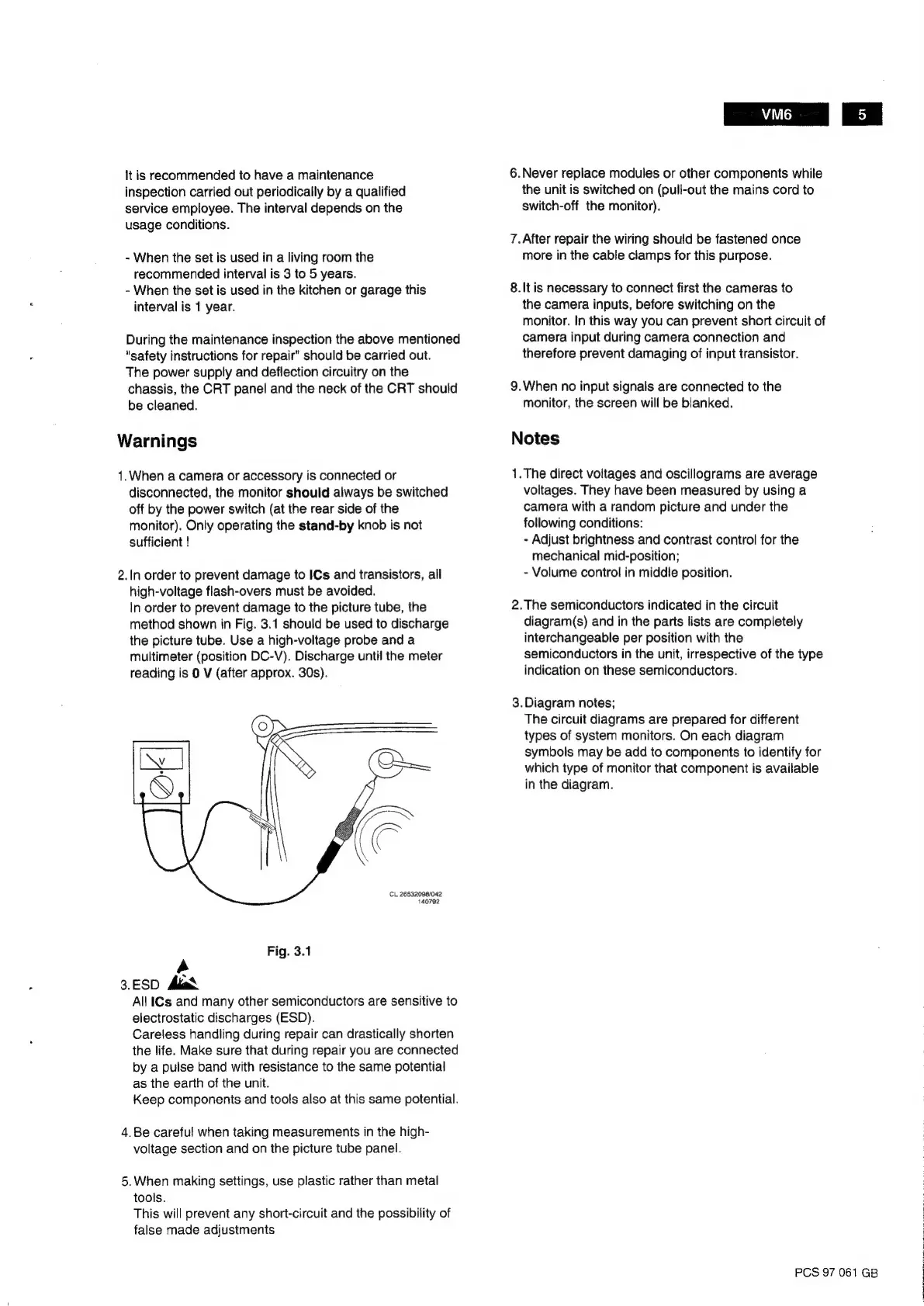
2.In
order
to
prevent
damage
to
ICs
and
transistors,
all
high-voltage
flash-overs
must
be
avoided.
In
order
to
prevent
damage
to
the
picture
tube,
the
method
shown
in
Fig.
3.1
should
be
used
to
discharge
the
picture
tube.
Use
a
high-voltage
probe
and
a
multimeter
(position
DC-V).
Discharge
until
the
meter
reading
is
0
V
(after
approx.
30s).
CL
26532098/042
140792
Fig.
3.1
4
3.ESD
Ald
All
ICs
and
many
other
semiconductors
are
sensitive
to
electrostatic
discharges
(ESD).
Careless
handling
during
repair
can
drastically
shorten
the
life.
Make
sure
that
during
repair
you
are
connected
by
a
pulse
band
with
resistance
to
the
same
potential
as
the
earth
of
the
unit.
Keep
components
and
tools
also
at
this
same
potential.
4.
Be
careful
when
taking
measurements
in
the
high-
voltage
section
and
on
the
picture
tube
panel.
5.When
making
settings,
use
plastic
rather
than
metal
tools.
This
will
prevent
any
short-circuit
and
the
possibility
of
false
made
adjustments
VIM6
6.Never
replace
modules
or
other
components
while
the
unit
is
switched
on
(pull-out
the
mains
cord
to
switch-off
the
monitor).
7.After
repair
the
wiring
should
be
fastened
once
more
in
the
cable
clamps
for
this
purpose.
8.It
is
necessary
to
connect
first
the
cameras
to
the
camera
inputs,
before
switching
on
the
monitor.
In
this
way
you
can
prevent
short
circuit
of
camera
input
during
camera
connection
and
therefore
prevent
damaging
of
input
transistor.
9.When
no
input
signals
are
connected
to
the
monitor,
the
screen
will
be
blanked.
Notes
1.The
direct
voltages
and
oscillograms
are
average
voltages.
They
have
been
measured
by
using
a
camera
with
a
random
picture
and
under
the
following
conditions:
-
Adjust
brightness
and
contrast
control
for
the
mechanical
mid-position;
-
Volume
control
in
middle
position.
2.
The
semiconductors
indicated
in
the
circuit
diagram(s)
and
in
the
parts
lists
are
completely
interchangeable
per
position
with
the
semiconductors
in
the
unit,
irrespective
of
the
type
indication
on
these
semiconductors.
3.Diagram
notes;
The
circuit
diagrams
are
prepared
for
different
types
of
system
monitors.
On
each
diagram
symbols
may
be
add
to
components
to
identify
for
which
type
of
monitor
that
component
is
available
in
the
diagram.
PCS
97
061
GB
}

Related product manuals